
Configuring a Certificate Template for Domain Controllers
Even with a certificate template for domain controllers that is supposedly simple to configure, there are a few things to keep in mind.
The certificate template should always start from the "Kerberos Authentication" certificate template.
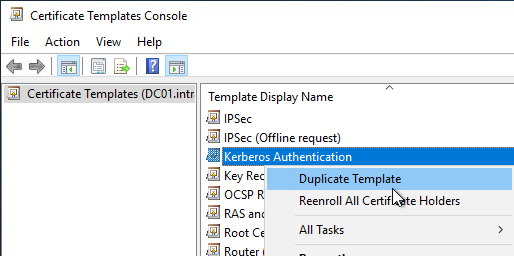
Only the Kerberos Authentication certificate template contains the flag CT_FLAG_SUBJECT_ALT_REQUIRE_DOMAIN_DNS, which ensures that the domain name is entered in the Subject Alternative Name (SAN) extension of the issued certificate. See also the article "Certificates for domain controllers do not contain the domain name in the Subject Alternative Name (SAN) ".
Certificate template configuration
Do you know TameMyCerts? TameMyCerts is an add-on for the Microsoft certification authority (Active Directory Certificate Services). It extends the function of the certification authority and enables the application of rule sets to realize the secure automation of certificate issuance. TameMyCerts is unique in the Microsoft ecosystem, has already proven itself in countless companies around the world and is available under a free license. It can be downloaded via GitHub and used free of charge. Professional maintenance is also offered.
"General" tab
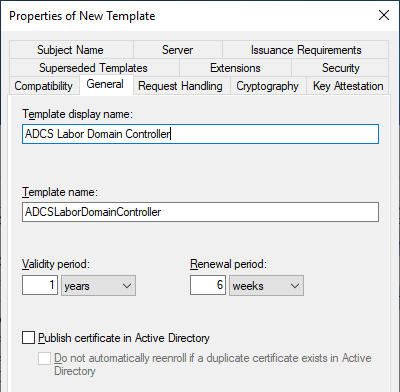
A meaningful name is assigned to the certificate template in the "General" tab. A naming convention should be used here to simplify later administration.
"Cryptography" tab
The default settings can be left here. Even though elliptic curves via key storage providers (KSP) can be used for Active Directory Domain Services, this does not apply to the Active Directory Web Services (ADWS) , which only support cryptographic service providers .
It is therefore recommended to use the RSA algorithm with a key length of at least 3072 bits and to use a cryptographic service provider.
"Superseded Templates" tab
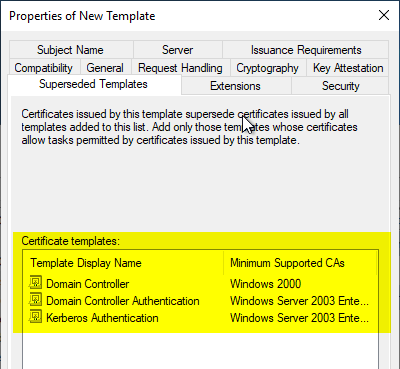
In the "Superseded Templates" tab, all default certificate templates for domain controllers are entered, as well as any previous custom certificate templates. The default certificate templates for domain controllers are:
- Domain Controller
- Domain Controller Authentication
- Kerberos Authentication
See also the article "Overview of the different generations of domain controller certificates ".
"Extensions" tab
The "Application Policies" extension is edited.
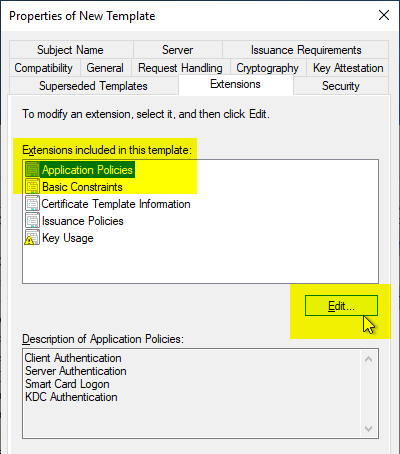
The following entries should always be removed:
- Client Authentication
- Smart Card Logon
Should forged domain controller certificates be issued (e.g. through an NTLM relay attack or through forging a corresponding account ), the certificates cannot be used for a PKINIT logon on behalf of the domain controller (which could otherwise result in the Active Directory being compromised).
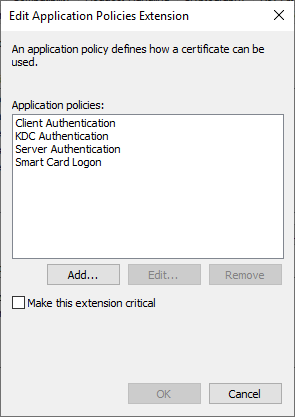
If you do not want to use PKINIT (also known as smart card logon) across the enterprise, it is also recommended to remove the Extended Key Usage for "KDC Authentication" from the certificate template so that the domain controllers cannot process such logons at all.
If forged user certificates are issued (e.g. due to overly broad permissions on a certificate template, an insecurely configured certification authority or even its compromise ), it is then not possible to log on with them (which could otherwise result in the Active Directory being compromised).
See also the article "Attack vector on the Active Directory directory service via the smart card logon mechanism ".
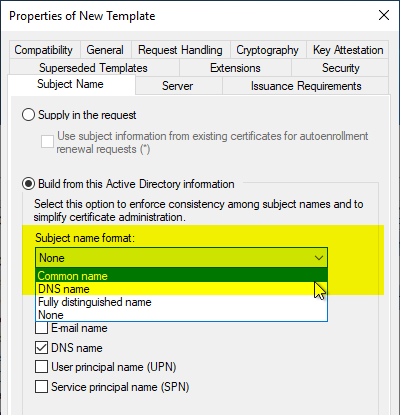
"Subject Name" tab
The option is described in more detail in the article "About the "Build this from Active Directory information" option for certificate templates ".
For compatibility reasons, it is recommended to set the "Subject Name" tab so that the subject of the issued certificates is filled with the server name of the domain controller ("Common Name" option).
By default, the subject will be empty, which is absolutely compliant with RFC 4514.
The client determines the type (e.g., DNS name or IP address) of the reference identity and performs a comparison between the reference identity and each subjectAltName value of the corresponding type until a match is produced.
The server's identity may also be verified by comparing the reference identity to the Common Name (CN) [RFC4519] value in the leaf Relative Distinguished Name (RDN) of the subjectName field of the server's certificate. [...] Although the use of the Common Name value is existing practice, it is deprecated, and Certification Authorities are encouraged to provide subjectAltName values instead.
However, applications that do not conform to this RFC (and such applications do exist in practice) will not be able to process the certificate.
If a subject is filled with the server name of the domain controller, and the application is compliant with RFC 4513, the subject is ignored anyway, so there is no disadvantage.
"Security" tab
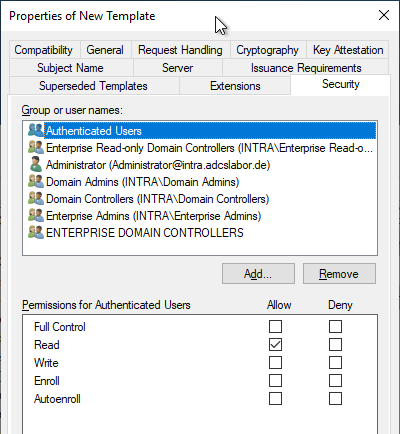
In the "Security" tab, it is important to ensure that only authorized persons can edit the certificate template.
The permissions for requesting certificates can be taken over from the underlying "Kerberos Authentication" certificate template.
Related links:
- Certificates for domain controllers do not contain the domain name in the Subject Alternative Name (SAN)
- Attack vector on the Active Directory directory service via the smart card logon mechanism
- Overview of the different generations of domain controller certificates
- Changes to Certificate Issuance and Certificate-Based Logon to Active Directory with the May 10, 2022 Patch for Windows Server (KB5014754)
- Signing certificates bypassing the certification authority
- Active Directory forest compromised by EDITF_ATTRIBUTESUBJECTALTNAME2 flag
External sources
- RFC 4513 - Lightweight Directory Access Protocol (LDAP): Authentication Methods and Security Mechanisms (Internet Engineering Task Force)
- RFC 2818 - HTTP Over TLS (Internet Engineering Task Force)