
Changes to Certificate Issuance and Certificate-Based Logon to Active Directory with the May 10, 2022 Patch for Windows Server (KB5014754)
With the May 10, 2022 patch, Microsoft is attempting to close a vulnerability in Active Directory that affects certificate-based logon (commonly known as PKINIT or also smart card logon ).
The update changes both the behavior of the certification authority as well as the behavior of Active Directory when processing certificate-based logons.
Background
How the attack works can be read in detail from the discoverer of the vulnerability .
Certificate-based logon is used not only for the obvious well-known "smart card logon", but also for Active Directory client certificate mapping of the Internet Information Service (IIS) .
Not only user accounts can log on to the domain with a certificate. This is also possible for computer accounts.
For user accounts, the userPrincipalName attribute of the associated Active Directory account is entered into the issued certificate and linked back to the associated object by Active Directory at logon.
For computer accounts, the functionality is basically the same, but here the dNSHostName attribute is entered in the certificate and evaluated by Active Directory at logon.
See also article "About the "Build this from Active Directory information" option for certificate templates ".
The attack is based on the fact that the owner of a computer object (the one who added the machine to the domain - by default, every user has this right) can independently set its dNSHostName attribute to any value. Collisions with other objects (i.e. whether the same value is already set on another computer object) are not detected with dNSHostName.
Accordingly, it is possible to request certificates for identities of other computers, including domain controllers, which can then be used to authenticate under the identity of the spoofed computer object, which in turn can result in the reading of all credentials of the domain.
Do you know TameMyCerts? TameMyCerts is an add-on for the Microsoft certification authority (Active Directory Certificate Services). It extends the function of the certification authority and enables the application of rule sets to realize the secure automation of certificate issuance. TameMyCerts is unique in the Microsoft ecosystem, has already proven itself in countless companies around the world and is available under a free license. It can be downloaded via GitHub and used free of charge. Professional maintenance is also offered.
The update
The changes are detailed in the Microsoft Knowledge Base article KB5014754 .
New certificate extension
The update introduces a new certificate extension named szOID_NTDS_CA_SECURITY_EXT with object identifier (OID) 1.3.6.1.4.1.311.25.2.
Enterprise Certificate Authorities (CA) will start adding a new non-critical extension with Object Identifier (OID) (1.3.6.1.4.1.311.25.2) by default in all the certificates issued against online templates after you install the May 10, 2022 Windows update.
— KB5014754-Certificate-based authentication changes on Windows domain controllers (Microsoft Corporation)
All certificates issued by "online" certificate templates, i.e. those where the identity part in the certificate is formed by Active Directory, include this certificate extension from the time the update is installed on the certification authority.
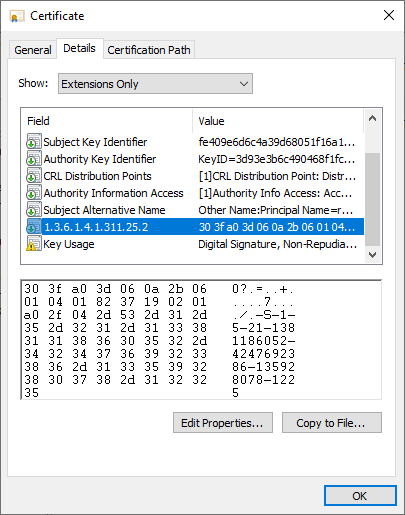
The certificate extension includes the objectSid ("Security Identifier") Active Directory attribute of the associated account. The certificate attribute is entered by the Windows Default policy module , which has received a corresponding update.
The patch thus installed a new version of the Windows Default Policy module to reflect the corresponding changes in certificate issuance.
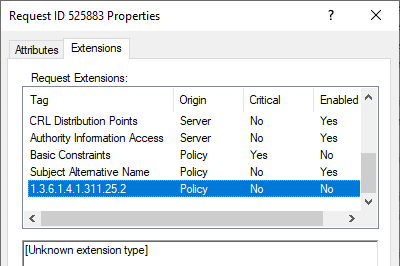
See version number before the patch...
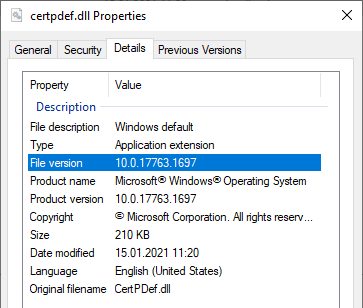
... and after installing the patch.
Changes to the Active Directory
Instead of addressing the basic issue (owners of computer accounts can modify their dNSHostName attribute themselves and there is no uniqueness constraint set on it), as of now Microsoft believes that the dNSHostName attribute is now not to be evaluated as a "strong" connection to the corresponding Active Directory account.
Either the connection between Active Directory account and certificate should now be established manually via the altSecurityIdentities attribute of the account, or a certificate must present the new certificate extension with the corresponding security identifier of the account.
Accordingly, when processing certificate-based logons according to the "old" scheme, new warning messages (Event with ID 39 of source Microsoft-Windows-Kerberos-Key-Distribution-Center ) are now logged.
The Key Distribution Center (KDC) encountered a user certificate that was valid but could not be mapped to a user in a secure way (such as via explicit mapping, key trust mapping, or a SID). Such certificates should either be replaced or mapped directly to the user via explicit mapping. See https://go.microsoft.com/fwlink/?linkid=2189925 to learn more.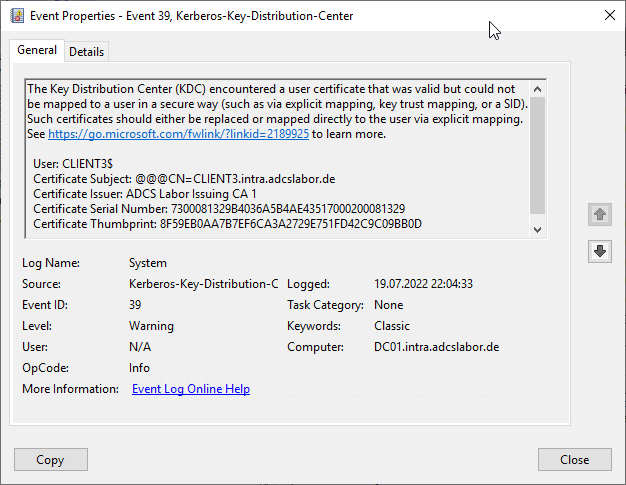
It is possible via the "StrongCertificateBindingEnforcement" registry value (type DWORD) to use the new processing mode, where a (according to Microsoft) "strong" binding is established.
The value is located below the following registry key:
HKEY_LOCAL_MACHINE\SYSTEM\CurrentControlSet\Services\KdcThe following values are possible:
| Value | Description |
|---|---|
| 0 | Logons with certificates without SID attribute are not logged and are allowed. |
| 1 | Logons with certificates without SID attribute are logged and allowed. (Default setting) |
| 2 | Logons with certificates without SID attribute are logged and not allowed. |
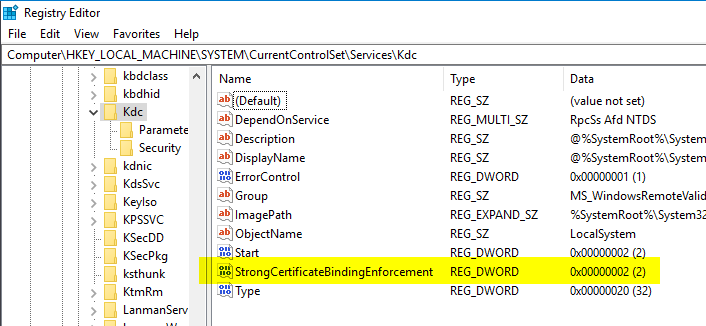
If you change the value to "2", corresponding logons are rejected and logged accordingly on the domain controller.
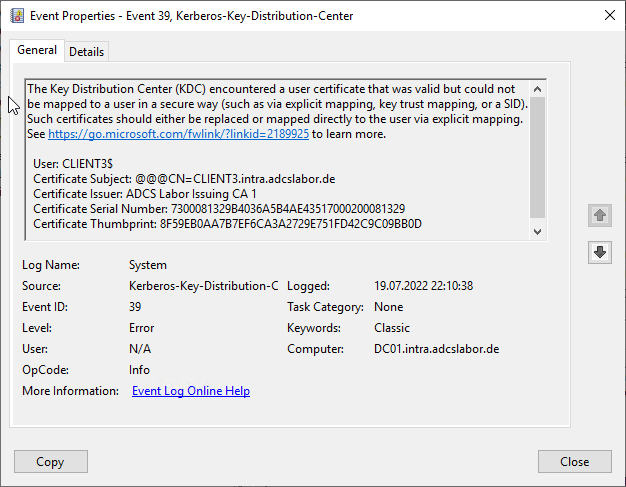
Microsoft plans to strictly enforce the "new" mechanism exactly one year after the release of the update, i.e. on May 19, 2023. The corresponding logic is already included in the patch. The registry values mentioned in the article will no longer be usable from then on.
Update: Microsoft has postponed the enforcement to November 14, 2023.
Update again: Apparently there are more serious problems, so Microsoft has postponed the enforcement again, this time to February 11, 2025. The subordinate clause "...or later" is also interesting here.
If no explicit mapping from certificate to account is desired, i.e. the new certificate extension is to be used, all certificates must be reissued by the deadline.
Common Name is apparently not enough anymore...
In a subordinate clause, Microsoft also mentions that since the patch it is now also required to populate the corresponding certificate attributes userPrincipalName or dNSName with the values of the corresponding Active Directory account , so the sole use of the commonName is no longer sufficient.
This change affects Network Policy Server (NPS) or web servers that process a logon with certificates. The underlying library has been configured with a new default value by the patch.
This is located in the "CertificateMappingMethods" value below the following registry key:
HKEY_LOCAL_MACHINE\System\CurrentControlSet\Control\SecurityProviders\SchannelThis value can be configured as follows:
| Bit | Setting | Method | Strength assessment |
|---|---|---|---|
| 1 | 0x0001 | Subject/Issuer certificate mapping | weak |
| 2 | 0x0002 | Issuer certificate mapping | weak |
| 3 | 0x0004 | UPN certificate mapping | weak |
| 4 | 0x0008 | S4U2Self certificate mapping | strong |
| 5 | 0x0010 | S4U2Self explicit certificate mapping | strong |
The old default value of 0x1F (0001 1111) had activated all of the mentioned methods. The new default value 0x18 (0001 1000) activates only the two "strong" methods.
There was confusion here, as some bloggers write that the userPrincipalName attribute must be filled in and activated accordingly in the certificate template. This led some administrators to activate this apparently also for computer certificates, which is of course not necessary. Rather, it depends on what is to be identified by the certificate. For computer certificates, a Subject Alternative Name of type "dNSName" must be present, for user certificates of type "userPrincipalName".
Dealing with the new situation
Offline certificate templates seem to have been forgotten
I have taken the change as an opportunity to extend the PSCertificateEnrollment PowerShell module so that the new certificate extension can be entered into an "offline" certificate request .
Import-Module PSCertificateEnrollment
New-CertificateRequest -Subject "CN=test" -Sid "lol"
As it turns out, for offline certificate templates (i.e., those where the enrollee can determine the identity content of the certificate), the Windows Default Policy module passes the certificate extension with any content to the issued certificate.
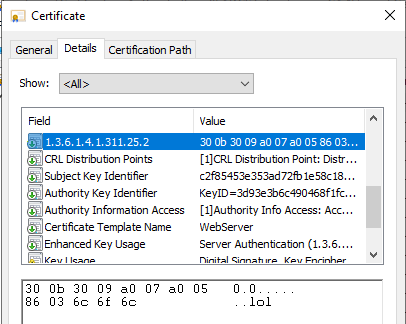
If an attacker now succeeds in gaining access to such a certificate template, the supposedly "strong" binding to an Active Directory object is invalidated (provided that the new certificate extension is used instead of explicit mapping for authentication).
Furthermore, I believe that the use of a proprietary certificate extension can even be dangerous here, as this identity type would not be recognized as an identity by common solutions and recorded in a database (if available).
The TameMyCerts Policy Module is now able to initially recognize and reject the new certificate extension in "offline" certificate requests. It is also possible to enter the new certificate extension in certificates for "offline" certificate requests , for example if they were submitted by a mobile device management (MDM) system such as Intune, Workspace ONE or MobileIron.
It is also surprising that controlling whether this certificate extension may be used for offline certificate requests is unfortunately not possible via the EnableEnrolleeRequestExtensionList registry value intended for this purpose, since it is apparently hard-coded into the policy module and accordingly does not appear in the list (but is still active).
Problems with the patch when logging on to the Network Policy Server (NPS) or Internet Information Service (IIS)
Relatively quickly after the patch was installed, it became apparent that organizations using the Network Policy Server (NPS) to enable Remote Access (RAS) or Network Access Control (NAC) scenarios, such as logons to the wired or wireless network with certificates, were dealing with an outage of those very services.
The problem occurs in a similar way with IIS web servers that process logons with client certificates.
Apparently, Microsoft overlooked the fact that various logons in the Active Directory are based on the same procedure - including the NPS. And there, the "new" operating mode was apparently already enforced. Also the patch added on May 19, 2022 for the patch does not seem to fix the problem. Apparently, only the out-of-band update from May 27, 2022 fixes the problem .
As of August 05, 2022, I can confirm that a domain controller with patch level July 2022 (StrongCertificateBindingEnforcement is configured with value 1 or not set) and installed Network Policy Server role behaves exactly as documented, i.e. accepts RADIUS logons and approves them even if the SID certificate extension is not present in the certificate. The event with ID 39 is logged as a warning.
Currently there is only the workaround to patch the certification authority first, then reissue all certificates (with the new certificate extension), and then patch the domain controllers - which will not be practical in practice, since a typical certificate renewal may well take several months to complete until it has been implemented across the board.
Uninstalling the patch cannot be the solution either, as this leaves you unprotected against several security vulnerabilities (even though the US authority CISA has warned against installing the patches in the meantime).
Allegedly, the patch also does not work with read-only domain controllers (RODCs).
What about intentional offline scenarios?
Furthermore, I wonder how Microsoft intends to deal with scenarios that intentionally use offline certificate templates. Let's take as an example end devices such as smartphones that are managed with a Mobile Device Management (MDM) system (e.g. Microsoft's own Intune/MEM or VMware's AirWatch ). These may well have certificates that are used for logon via RAS or NAC (usually issued for the identity of the user using the device).
If the Network Policy Server (NPS) is now used in the backend in the company, the question arises for me (if the NPS problem should be fixed by a patch in the meantime), what will probably happen on the date of enforcement if Microsoft activates the enforcement of the new certificate extension as planned (the "time bomb" is after all already included), and without the possibility of deactivation.
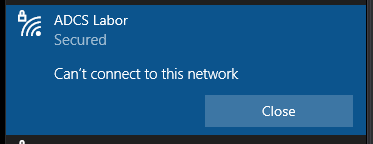
Network Policy Server denied access to a user. [...] Authentication failed due to a user credentials mismatch. Either the user name provided does not map to an existing user account or the password was incorrect.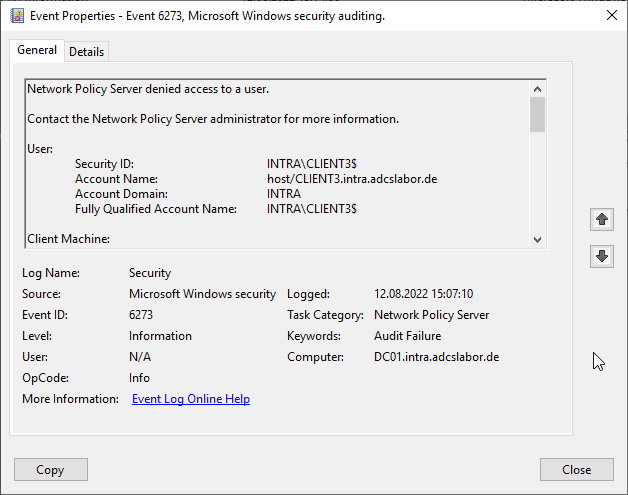
Will all MDM vendors have ensured by this date that their products will request the new certificate extension and that their customers will have renewed all certificates by then?
Meanwhile, this assumption is shared by the U.S. government, among others, without a solution:
Important Note: Microsoft plans to remove 'Compatibility Mode' and move all Windows Server devices to 'Full Enforcement' mode in May 2023. This change will break authentication if agencies have not created a strong mapping or added SIDs to certificates. CISA and the interagency working group are in active discussions with Microsoft for an improved path forward. At this time, CISA does not recommend agencies pursue migration to a strong mapping.
— GUIDANCE ON APPLYING JUNE MICROSOFT PATCH TUESDAY UPDATE FOR CVE-2022-26925 (Cybersecurity & Infrastructure Security Agency)
Ironically, Microsoft itself writes the following about it:
Environments that have non-Microsoft CA deployments will not be protected using the new SID extension after installing the May 10, 2022 Windows update. Affected customers should work with the corresponding CA vendors to address this or should consider utilizing other strong certificate mappings described above.
In other words, Microsoft is suggesting that other certification authority vendors include this certificate extension in their products without providing a complete solution in their own.
One can certainly speak of a ticking time bomb here.
With the TameMyCerts Policy Module for Microsoft Certification Authority , I have meanwhile created a possible solution for this scenario. With the TameMyCerts Policy Module it is possible to connect the identity requested by the Mobile Device Management System in the certificate request with the associated Active Directory account and to enter its SID in a corresponding certificate request in the issued certificate. Feel free to contact me if you would like to use the module and need help setting it up.
Alternative options for a "strong" binding
Microsoft points out that - if you cannot or do not want to issue certificates with the new certificate extension - you can also manually set up a "strong" binding to a certificate via the altSecurityIdentities attribute for Active Directory objects.
However, this step must be done manually or with a script. Microsoft does not offer a useful automation solution. It is also unclear how this list can be maintained permanently.
Disable the extension
Deactivating the new certificate extension can make sense if a certificate-based logon is not planned in the environment anyway.
Please take this step only with careful consideration and only if there is a valid reason. The change is marked as "non-critical" and therefore should not have any negative impact e.g. in terms of application compatibility.
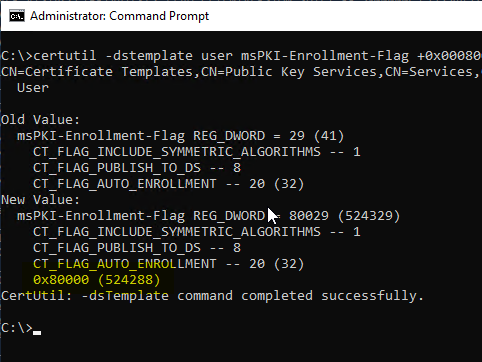
At the level of the respective certificate template, the extension can be disabled with the following command:
certutil -dstemplate user msPKI-Enrollment-Flag +0x00080000The flag is called CT_FLAG_NO_SECURITY_EXTENSION, but is currently not resolved by the operating system.
Added a new enrollment-attribute flag CT_FLAG_NO_SECURITY_EXTENSION to the msPKI-Enrollment-Flag Attribute table, that when applied, instructs the CA to not include the security extension szOID_NTDS_CA_SECURITY_EXT (OID:1.3.6.1.4.1.311.25.2), as specified in [MS-WCCE] sections 2.2.2.7.7.4 and 3.2.2.6.2.1.4.5.9, in the issued certificate. A behavior note is added to indicate that this enrollment flag is supported by the operating systems specified in [MSFT-CVE-2022-26931] , each with its related KB article download installed.
— Windows protocols: What's New and Changed (Microsoft Corporation)
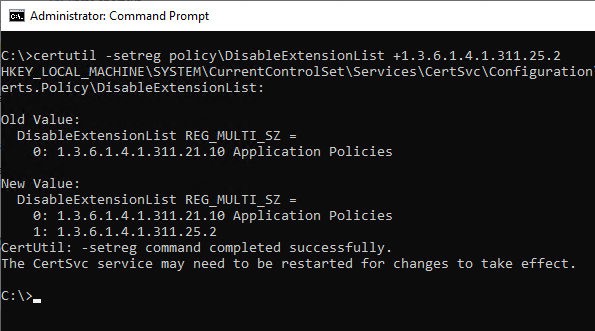
The extension can also be disabled at the certification authority level. Thus, the appropriately configured certification authority does not enter the extension in any of the published certificates. The following command can be used to make the setting:
certutil -setreg policy\DisableExtensionList +1.3.6.1.4.1.311.25.2This setting is not recommended and is now treated as a security-relevant misconfiguration under the name ESC16 .
Conclusion/evaluation
The patch seems very rushed:
- The real problem, that a computer account can set some of its own attributes arbitrarily, is apparently not addressed.
- The new certificate extension is not checked for "offline" certificate templates, so one cannot really speak of a "strong" binding to the Active Directory object. It is hard-coded in the Windows default policy module and does not appear in the actually intended registry values of the policy module for offline certificate requests, i.e. one is inconsistent to one's own design here and apparently even builds in a new bug through this. However, this effectively corresponds to the level of maintenance, that the product can currently still expect from Microsoft , namely implementing just the bare essentials with the least possible effort.
- With the introduction of the update, Microsoft has created an apparently never-ending chain of new problems (is there possibly a quality control problem here)?
- Apparently, Microsoft has also forgotten that there is also a world outside of Active Directory in PKI, but has not ensured that all affected certificates can have the new certificate extension by the deadline.
In addition, essential issues remain unaddressed. For example, domain controllers still do not check Extended Key Usages by default .
My recommendation is therefore still to completely prevent smart card logon (if it is not used anyway) and related cases, and to remove all certification authorities (where this is possible without risk) from NTAuthCertificates that should not issue certificates for the corresponding logon mechanisms. In my opinion, the Network Policy Server should no longer be used, as it creates various security and, as you can see, availability problems due to its dependency on Active Directory.
Generally speaking, it is outrageous to introduce such a far-reaching change without being able to assess the effects or at least coordinate with the most important partners in advance. Such a short lead time (for PKI lifecycles) of just one year can actually be described as negligent.
External sources
- KB5014754-Certificate-based authentication changes on Windows domain controllers (Microsoft Corporation)
- Windows protocols: What's New and Changed (Microsoft Corporation)
- May 2022 - You might see authentication failures on the server or client for services (Microsoft Corporation)
- Windows Kerberos Elevation of Privilege Vulnerability (CVE 2022 26931) (Microsoft Corporation)
- HowTo: Map a user to a certificate via all the methods available in the altSecurityIdentities attribute (Microsoft Corporation)
- GUIDANCE ON APPLYING JUNE MICROSOFT PATCH TUESDAY UPDATE FOR CVE-2022-26925 (Cybersecurity & Infrastructure Security Agency)
- Certifried: Active Directory Domain Privilege Escalation (CVE-2022-26923) (Oliver Lyak)
- May 19, 2022-KB5015013 (OS Build 20348.709) Out-of-band (Microsoft Corporation)
- CISA warns not to install May Windows updates on domain controllers (Bleepingcomputer)
- NPS stopped working after May 2022 updates (Discussion on Microsoft TechNet)
- AD Authentication Issues 2022-05 May Patches / Mapping Certificates to AD Objects (Robin Beismann)
- Strong Certificate Mapping Enforcement February 2025 (Richard Hicks)