
Certificate request fails with error message "Cannot archive private key. The certification authority could not verify one or more key recovery certificates. 0x8009400b (-2146877429 CERTSRV_E_NO_VALID_KRA)".
Assume the following scenario:

  • A user requests a certificate from an Active Directory integrated certification authority (enterprise CA).
  • The certificate template is set up for archiving private keys.
  • The certificate request fails with the following error message:
Cannot archive private key. The certification authority could not verify one or more key recovery certificates. 0x8009400b (-2146877429 CERTSRV_E_NO_VALID_KRA)

Continue reading "Certificate request fails with error message "Cannot archive private key. The certification authority could not verify one or more key recovery certificates. 0x8009400b (-2146877429 CERTSRV_E_NO_VALID_KRA)"."

Description of the necessary configuration settings for the "Common PKI" certificate profile

Below is a description of the configuration settings required to ensure that a certificate hierarchy based on Active Directory Certificate Services complies with the Common PKI (formerly known as ISIS-MTT) standard.

Continue reading "Description of the necessary configuration settings for the "Common PKI" certificate profile"

Enabling Secure Sockets Layer (SSL) for Certification Authority Web Enrollment (CAWE)

In the default configuration, Certification Authority Web Enrollment (CAWE) accepts only unencrypted connections via HTTP. It is recommended that the CAWE be configured for HTTP over TLS (HTTPS) to make capturing the network traffic more difficult. Instructions are provided below.

Continue reading "Enabling Secure Sockets Layer (SSL) for Certification Authority Web Enrollment (CAWE)"

Using Authentication Mechanism Assurance (AMA) to secure the logon of administrative accounts

Authentication Mechanism Assurance (AMA) is a feature designed to ensure that a user is a member of a security group only if they can be shown to have logged on using a strong authentication method (i.e., a smart card). If the user logs on via username and password instead, he or she will not have access to the requested resources.

Originally intended for access to file servers, however, AMA can also be used (with some restrictions) for administrative logon. Thus, for example, it would be conceivable for a user to be unprivileged when logging on with a username and password, and to have administrative rights when logging on with a certificate.

Continue reading "Using Authentication Mechanism Assurance (AMA) to secure the logon of administrative accounts"

Logon via smart card fails with error message "Signing in with a security device isn't supported for your account."

Assume the following scenario:

  • A user has a Smartcard Logon certificate and uses it to log on to the Active Directory domain.
  • The logon fails. The following error message is returned to the user on their computer:
Signing in with a security device isn't supported for your account. For more info, contact your administrator.

Continue reading "Logon via smart card fails with error message "Signing in with a security device isn't supported for your account.""

Deleting a Manually Configured Certificate Enrollment Policy (Enrollment Policy)

When working with Certificate Enrollment Web Services and manually entering certificate enrollment policies on client computers, one encounters the phenomenon that there is no way to edit or delete them in the Certificates management console.

Continue reading "Deleting a Manually Configured Certificate Enrollment Policy (Enrollment Policy)"

Basics: Manual and automatic certificate requests via Lightweight Directory Access Protocol (LDAP) and Remote Procedure Call / Distributed Common Object Model (RPC/DCOM) with the MS-WCCE protocol

The following describes the process that runs in the background when certificates are requested manually or automatically in order to achieve the highest possible level of automation.

Continue reading "Basics: Manual and automatic certificate requests via Lightweight Directory Access Protocol (LDAP) and Remote Procedure Call / Distributed Common Object Model (RPC/DCOM) with the MS-WCCE protocol"

Manually running the autoenrollment process

By default, all domain members automatically replicate the Public Key Services object of the Active Directory forest through the autoenrollment process. The triggers for this are:

  • When the user logs on (for computers, when the computer account logs on, i.e. at system startup).
  • By timer every 8 hours.
  • When updating Group Policy, assuming there has been a change.

If you do not want to wait for the autoenrollment to be triggered automatically, you can start it manually. The different ways to run the autoenrollment process are described below.

Continue reading "Manually running the autoenrollment process"

Associate a universal security group with an Object Identifier (OID) in the Active Directory directory service (Authentication Mechanism Assurance)

Authentication Mechanism Assurance (AMA) provides the ability to tie membership in a security group to logon with a smart card certificate containing a specific Object Identifier (OID).

If the user does not log on with the smart card certificate, but with user name and password, he is also not a member of the security group.

The following describes how to establish the connection between the certificate and the security group.

Continue reading "Associate a universal security group with an Object Identifier (OID) in the Active Directory directory service (Authentication Mechanism Assurance)"

Allowed Relative Distinguished Names (RDNs) in the Subject of Issued Certificates

In principle, RFC 5280 allows the use of arbitrary strings in the subject distinguished name (DN) of a certificate. Common fields are described in the X.520 standard. The length restrictions are also recommended by the ITU-T . The abbreviations commonly used today are mainly taken from RFC 4519 .

However, Microsoft Active Directory Certificate Services only allows certain RDNs by default.

The following Relative Distinguished Names (RDNs) are accepted by the Active Directory Certificate Services (AD CS) certification authority by default:

Continue reading "Allowed Relative Distinguished Names (RDNs) in the Subject of Issued Certificates"

Subsequently change the Subject Distinguished Name (DN) of a certificate request (CSR)

Sometimes it is necessary to change the Subject Distinguished Name (also called Subject or Subject DN, in German also "Antragsteller" or "Betreff") of a certificate request before issuing the certificate.

Under certain circumstances, this is certainly possible, as described below.

Continue reading "Subsequently change the Subject Distinguished Name (DN) of a certificate request (CSR)"

Configuring a Certificate Template for Authentication Mechanism Assurance (AMA)

Authentication Mechanism Assurance (AMA) provides the ability to tie membership in a security group to logon with a smart card certificate containing a specific Object Identifier (OID).

If the user does not log on with the smart card certificate, but with user name and password, he is also not a member of the security group.

The following describes how to generate a certificate template for use with Authentication Mechanism Assurance.

Continue reading "Configuring a Certificate Template for Authentication Mechanism Assurance (AMA)"

Include the wildcard issuance policy (All Issuance Policies) in a certification authority certificate

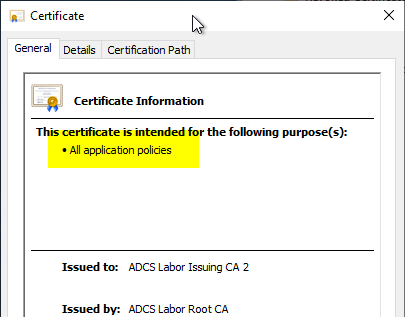
If you install an issuing CA and do not explicitly request an issuance policy, the resulting CA certificate will not contain an issuance policy.

Certificate dialog, "General" tab: "All application policies" highlighted, issued to ADCS Labor Issuing CA 2

If you want to include the wildcard issuance policy (All Issuance Policies) in the certification authority certificate, proceed as follows:

Continue reading "Include the wildcard issuance policy (All Issuance Policies) in a certification authority certificate"