
Tokens for the CDP and AIA configuration of a certification authority
The following is an overview of the tokens for the CDP and AIA configuration of a certification authority.
| Token | Name | Description |
|---|---|---|
| %1 | ServerDNSName | The fully qualified DNS name of the server on which the certification authority is installed. |
| %2 | ServerShortName | The NETBIOS name of the server on which the certification authority is installed. |
| %3 | CaName | The Common Name (CN) of the certification authority. |
| %4 | CertificateName | The certificate index for the name of the certification authority certificate. |
| %6 | ConfigurationContainer | The path to the Configuration Container of the Active Directory forest. |
| %7 | CATruncatedName | Name of the certification authority limited to 32 characters, with a checksum. |
| %8 | CRLNameSuffix | The key index for the name of the CRLs. |
| %9 | DeltaCRLAllowed | Replaced by a "+" for a delta CRL. |
| %10 | CDPObjectClass | Placeholder for the cRLDistributionPoint object class in the LDAP path of the CRL Distribution Point extension. |
| %11 | CAObjectClass | Placeholder for the certificationAuthority object class in the LDAP path of the Authority Information Access (AIA) extension. |
Sensible adjustments
Do you know TameMyCerts? TameMyCerts is an add-on for the Microsoft certification authority (Active Directory Certificate Services). It extends the function of the certification authority and enables the application of rule sets to realize the secure automation of certificate issuance. TameMyCerts is unique in the Microsoft ecosystem, has already proven itself in countless companies around the world and is available under a free license. It can be downloaded via GitHub and used free of charge. Professional maintenance is also offered.
Make LDAP CRL paths independent of the host name of the certification authority server
By default, the following LDAP path is configured for CRL publishing when a certification authority is installed.
ldap:///CN=%7%8,CN=%2,CN=CDP,CN=Public Key Services,CN=Services,%6%10The ServerShortName token (%2) ensures that the LDAP path contains the NETBIOS name of the certification authority server. This can cause problems when migrating the certification authority to another server .
A simple trick to get around this is to replace the token with CaName (%3), which describes the common name of the certification authority.
ldap:///CN=%7%8,CN=%3,CN=CDP,CN=Public Key Services,CN=Services,%6%10The setting is made in the following registry path:
HKEY_LOCAL_MACHINE\SYSTEM\CurrentControlSet\Services\CertSvc\Configuration\{Name-der-Zertifizierungsstelle>\CRLPublicationURLs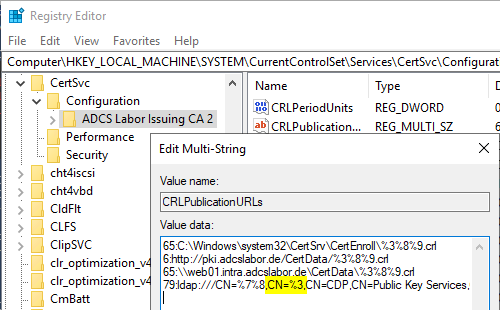
After this configuration adjustment has been made, the certification authority service must be restarted.
In addition, the LDAP path, which now differs from the default, must be created once by first creating a CRL and then publishing it to Active Directory as Enterprise Administrator.
certutil -f -dspublish {Sperrliste>.crlWhen the CRL is created, event no. 74 is logged, since the certification authority directly tries to publish to LDAP and initially fails. However, after the CRL has been manually uploaded once, the error no longer occurs.
See also article "Publishing a certificate revocation list (CRL) to an Active Directory CRL distribution point (CDP) ".
External sources
- How CA Certificates Work (Microsoft)