
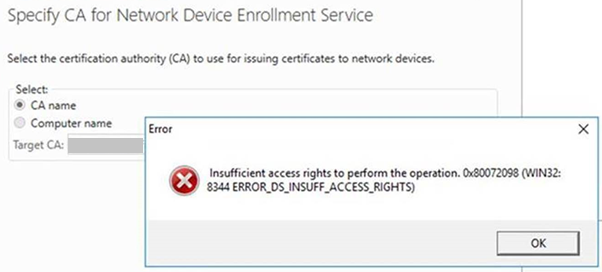
Role configuration for Network Device Enrollment Service (NDES) fails with error message "Insufficient access rights to perform this operation. 0x80072098 (WIN32: 8344 ERROR_DS_INSUFF_ACCESS_RIGHTS)"
Assume the following scenario:
- One installs a Network Device Enrollment Service (NDES) server.
- The role configuration fails with the following error message:
Insufficient access rights to perform this operation. 0x80072098 (WIN32: 8344 ERROR_DS_INSUFF_ACCESS_RIGHTSThe Network Device Enrollment Service (NDES) provides a way for devices that do not have an identifier in Active Directory (for example, network devices such as routers, switches, printers, thin clients, or smartphones and tablets) to request certificates from a certification authority. For a more detailed description, see the article "Basics: Network Device Enrollment Service (NDES) ".
Cause
Do you know TameMyCerts? TameMyCerts is an add-on for the Microsoft certification authority (Active Directory Certificate Services). It extends the function of the certification authority and enables the application of rule sets to realize the secure automation of certificate issuance. TameMyCerts is unique in the Microsoft ecosystem, has already proven itself in countless companies around the world and is available under a free license. It can be downloaded via GitHub and used free of charge. Professional maintenance is also offered.
Possibility 1: Missing permissions
The above error occurs when the user is not a member of the Enterprise Admins group. Membership in this group is strictly checked by the role configuration wizard, although it would not be mandatory.
Possibility 2: Lack of network connectivity
This error can occur if the NDES server cannot communicate with the root domain controllers of the forest via RPC named pipes.
RPC named pipes require TCP port 445, which must be opened from the NDES server to the root domain controllers of the forest (due to membership in the "Enterprise Admins" group).
See also the article "Required firewall rules for the Network Device Enrollment Service (NDES) ".
Workaround: Install NDES without role configuration wizard
There is an option to install the NDES role without the role configuration wizard. Accordingly, the requirements that can trigger the previously described error are then omitted. How to install NDES manually is described in the article "Installing the Network Device Enrollment Service (NDES) without Enterprise Administrator permissions ". Please note that the method described there is not supported by the manufacturer, so you will not get product support in case of error.