
The Simple Certificate Enrollment Protocol (SCEP) is an ancient protocol from the early 2000s. It does not use Transport Layer Security (TLS). Therefore, the protocol messages are encrypted at the transport layer.
When sending the certificate request to the NDES server, the client will sign the certificate request with the NDES server's CEP encryption certificate (which was previously communicated to it via the GetCACert message).
Upon receiving the issued certificate, the NDES server will encrypt the response using a self-signed certificate temporarily generated by the SCEP client.
In both cases, a symmetric encryption algorithm is used.
Do you know TameMyCerts? TameMyCerts is an add-on for the Microsoft certification authority (Active Directory Certificate Services). It extends the function of the certification authority and enables the Application of regulationsto realize the secure automation of certificate issuance. TameMyCerts is unique in the Microsoft ecosystem, has already proven itself in countless companies around the world and is available under a free license. It can downloaded via GitHub and can be used free of charge. Professional maintenance is also offered.
The possible capabilities are listed in RFC 8894 are defined for SCEP and are communicated to the SCEP client via the „GetCACaps“ operation.
| Capability | Description |
|---|---|
| AES | Support for the Advanced Encryption Standard (AES128-CBC). |
| DES3 | Support for the Triple Data Encryption Standard (3DES-CBC). |
| GetNextCACert | For the renewal of certification authority certificates. Not supported by NDES. |
| POSTPKIOperation | Perform the operations using HTTP POST instead of GET. |
| Renewal | Renewing a Certificate Using an Existing Certificate. |
| SHA-1 | Support for the SHA-1 hash algorithm. |
| SHA-256 | Support for the SHA-256 hash algorithm. |
| SHA-512 | Support for the SHA-512 hash algorithm. |
| SCEP Standard | Indicates that the server has all that must be implemented Supports SCEP standard operations as defined in RFC. These include, among others, „AES,“ „POSTPKIOperation,“ and „SHA-256.“. |
Default setting for NDES
NDES communicates the following capabilities to SCEP clients in its out-of-the-box state:
- POSTPKIOperation
- Renewal
- SHA-512
- SHA-256
- SHA-1
- DES3
You can query the capabilities from the NDES server using a browser or PowerShell.
Invoke-WebRequest -Uri "http://localhost/certsrv/mscep/mscep.dll/pkiclient.exe?operation=GetCACaps"
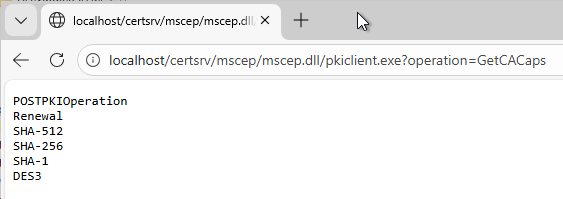
As you can see, the more modern AES algorithm is missing here. In the following, we'll show you how to get NDES to support it as well.
The SCEP standard specifies only the 128-bit AES-CBC algorithm. Theoretically, SCEP clients could also use other algorithms. However, there are no corresponding standardized capabilities.
Changing the Default Settings
It is important to understand that we are simply using capabilities to communicate which algorithms the NDES server definitely supports. Clients are not required to adhere to the propagated capabilities. NDES will accept all algorithms from RC2 to AES right out of the box. Assuming that clients understand and use the advertised capabilities, we can at least ensure that clients use AES instead of 3DES. However, we cannot enforce anything.
You can configure the propagated capabilities using the following registry key on the NDES server:
HKEY_LOCAL_MACHINE\SOFTWARE\Microsoft\Cryptography\MSCEP\CACapabilitiesAlgorithms
This registration key is not included in the NDES default installation. It can be created using the following command (with default settings):
certutil -f -setreg mscep\CACapabilitiesAlgorithms\CACapabilitiesAlgorithms "SHA-512\nSHA-256\nSHA-1\nDES3"
The „POSTPKIOperation“ and „Renewal“ operations are not configurable; therefore, they cannot and should not be set via the registry.
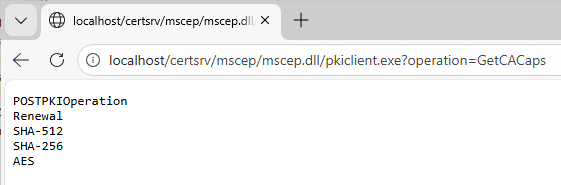
For example, to add support for the Advanced Encryption Standard (AES):
certutil -setreg mscep\CACapabilitiesAlgorithms\CACapabilitiesAlgorithms +AES
The values are stored in the registry as plain strings and are output in that format. Therefore, it is essential to ensure correct spelling (as defined in RFC 8894) Pay attention to.
For example, to remove support for Triple DES and SHA-1:
certutil -setreg mscep\CACapabilitiesAlgorithms\CACapabilitiesAlgorithms -DES3
certutil -setreg mscep\CACapabilitiesAlgorithms\CACapabilitiesAlgorithms -"SHA-1"
The removal of 3DES and SHA-1 should be carefully considered, as they can be used as a fallback for clients that do not support AES. If these capabilities are removed, clients may end up using even weaker algorithms. It is best to place them below stronger algorithms.
Once the change has been made, the NDES service must be restarted. The easiest way to do this is to restart the IIS service.
iisreset
Client side behavior
How SCEP clients behave depends on the specific implementation.
With some SCEP clients (e.g., BlackBerry Enterprise Mobility Suite), you can configure the use of specific algorithms (the capabilities offered by the NDES server are then generally ignored).
SCEP clients that use the Windows APIs (such as Microsoft Intune, certutil, or PSCertificateEnrollment) evaluate the capabilities offered by the NDES server from top to bottom and use the first hash algorithm and encryption algorithm in the list that are supported by the client’s public key. Which ones these are depends on which algorithm and which CSP/KSP was used for the certificate application.
But be careful! If a client doesn't support any of the offered algorithms, it will fall back to something that the underlying CSP/KSP understands! More on this below.
Function test
After making our changes, we should verify that the NDES service is working properly. Complete instructions can be found in the article „Performing a functional test for the network device registration service (NDES)„.
We'll focus on the actual process of requesting a certificate via SCEP. We can do this easily using the PSCertificateEnrollment PowerShell module. It queries the NDES server's capabilities and applies them accordingly when requesting the certificate.
It is important to understand that, by default, PSCertificateEnrollment uses the „Microsoft Software Key Storage Provider“ for the certificate request’s key pair, which supports both 3DES and AES.
$otp = Get-NDESOTP -ComputerName NDES01.intra.adcslabor.de
Get-NDESCertificate `
  -Subject "CN=hello" `
  -ChallengePassword $otp `
  -ComputerName "NDES01.intra.adcslabor.de"
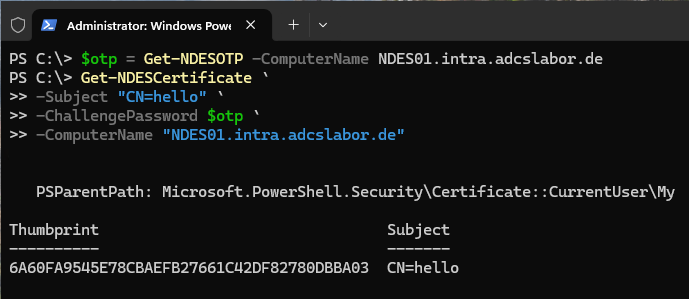
Since SCEP uses unencrypted HTTP by default, we can use Wireshark to examine the communication and extract the SCEP message.
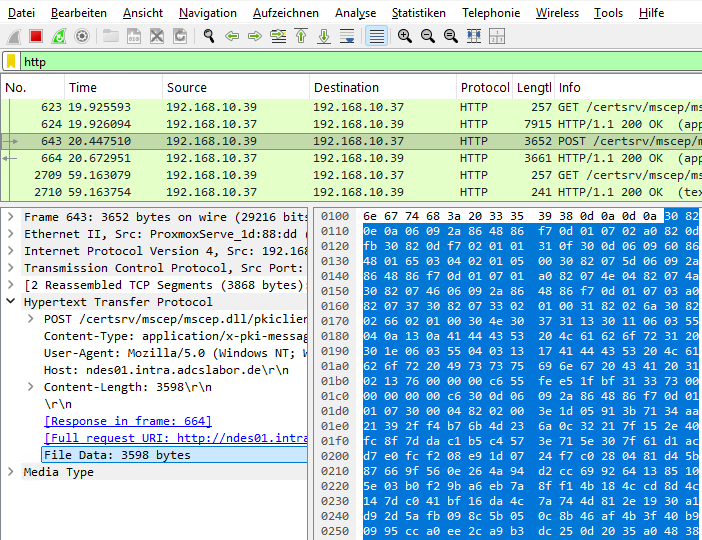
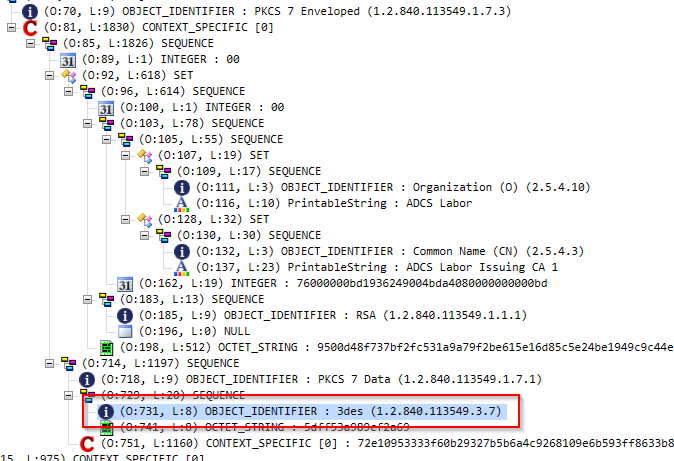
We can now use the ASN.1 Editor by Vadim Podans Open it and take a look at the PKCS7 message inside.
With the default settings for NDES, we will recognize „3des“ here as the encryption algorithm for the PKCS7-enveloped data.
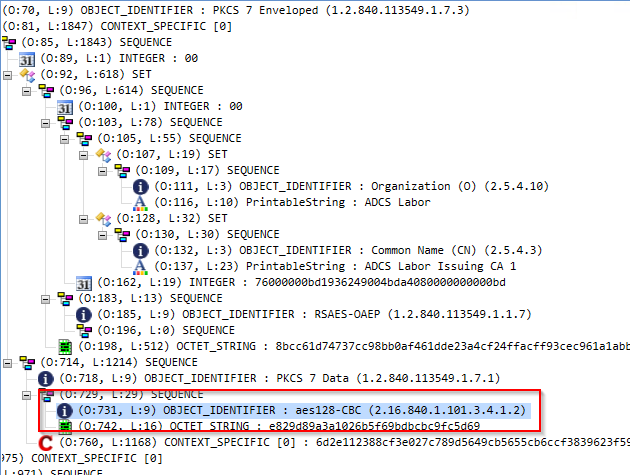
After changing the capabilities, we should see that it now says „aes128-CBC.“.
Pitfalls
Which encryption method is actually used depends on several factors.
The key store provider of the requesting client must be compatible
NDES does not enforce any specific algorithm. Clients can still get through even with completely outdated algorithms.
For testing purposes, we'll generate our key pair on the client once using the (not recommended!) Microsoft Base Cryptographic Provider v1.0, which does not support either 3DES or AES.
$otp = Get-NDESOTP -ComputerName NDES01.intra.adcslabor.de
Get-NDESCertificate `
  -Subject "CN=hello" `
  -ChallengePassword $otp `
  -ComputerName "NDES01.intra.adcslabor.de" `
  -Ksp "Microsoft Base Cryptographic Provider v1.0"
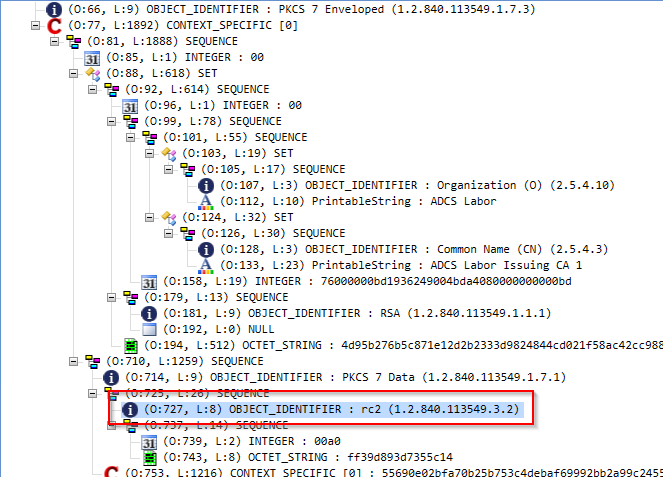
Now we can see that the message was encrypted using the RC2 algorithm. NDES accepts this message and processes it without any problems.
The NDES server's key store provider must be compatible
The key store of the NDES server (more specifically, the CEP Encryption certificate used) must also contain the algorithms used.
At first glance, that sounds counterintuitive—because NDES only supports Cryptographic Service Providers (CSPs), very few of which support 3DES, let alone AES.
However, if a Microsoft Software CSP is used, the NDES server's CryptoAPI (CAPI2) will transparently open the key of the CEP encryption certificate as an NCrypt key to perform the operation.
However, if a third-party cryptographic service provider (CSP) is used (for example, when a hardware security module is used for NDES), this is not possible. If the third-party CSP has not implemented the relevant algorithms, they cannot be used with NDES.
If an SCEP certificate request fails for this reason, NDES will Event ID 18 from the Microsoft-Windows-NetworkDeviceEnrollmentService source Log. On the client side, you will receive error code 0x80090005 (-2146893819 NTE_BAD_DATA) from the NDES server.
Conclusion
By adjusting the capabilities communicated by NDES to clients, we can, under certain circumstances, cause them to use AES instead of 3DES as the default encryption algorithm.
Even if we don't do this, NDES already accepts AES-encrypted SCEP messages in its default configuration.
In addition, it has now become standard practice to, HTTPS for NDES to configure it in such a way that the entire discussion takes on an academic nature anyway, since in this case there is an additional TLS layer, which ultimately makes the underlying encryption algorithm less relevant.
Related links:
- Network Device Enrollment Service (NDES) Basics
- Performing a functional test for the network device registration service (NDES)
- Basics: Cryptographic Service Provider (CSP) and Key Storage Provider (KSP)
- Should HTTPS be used for the Network Device Enrollment Service (NDES)?
- Authentication at the Network Device Enrollment Service (NDES) with an existing certificate (renewal mode)
 English
  Deutsch
  Français