
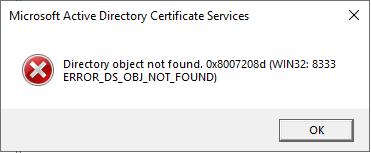
Publishing a certificate revocation list (CRL) fails with the error message "Directory object not found. 0x8007208d (WIN32: 8333 ERROR_DS_OBJ_NOT_FOUND)"
Assume the following scenario:
- An attempt is made to publish a new certificate revocation list (CRL) on a certification authority.
- The certification authority is configured to publish the certificate revocation lists to Active Directory (LDAP CDP).
- Publishing the certificate revocation list fails with the following error message:
Directory object not found. 0x8007208d (WIN32: 8333 ERROR_DS_OBJ_NOT_FOUND)Sometimes it is necessary for a certificate issued by a certification authority to be taken out of circulation even before its expiration date. To make this possible, a certification authority maintains a certificate revocation list. This is a signed file with a relatively short expiration date, which is used in combination with the certificate to check its validity.
In the Event Viewer of the certification authority, event no. 74 is logged.
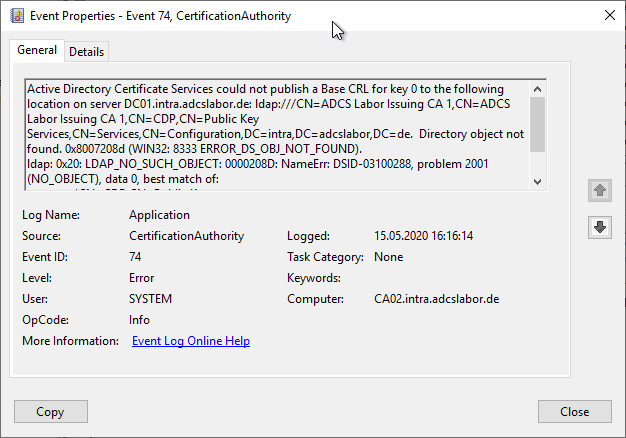
 Active Directory Certificate Services could not publish a Base CRL for key 1 to the following location on server DC01.intra.adcslabor.de: ldap:///CN=ADCS Labor Issuing CA 1(1),CN=ADCS Labor Issuing CA 1,CN=CDP,CN=Public Key Services,CN=Services,CN=Configuration,DC=intra,DC=adcslabor,DC=de.  Directory object not found. 0x8007208d (WIN32: 8333 ERROR_DS_OBJ_NOT_FOUND).
 ldap: 0x20: LDAP_NO_SUCH_OBJECT: 0000208D: NameErr: DSID-03100288, problem 2001 (NO_OBJECT), data 0, best match of:
     'CN=ADCS Labor Issuing CA 1,CN=CDP,CN=Public Key Services,CN=Services,CN=Configuration,DC=intra,DC=adcslabor,DC=de'
Solution
Do you know TameMyCerts? TameMyCerts is an add-on for the Microsoft certification authority (Active Directory Certificate Services). It extends the function of the certification authority and enables the application of rule sets to realize the secure automation of certificate issuance. TameMyCerts is unique in the Microsoft ecosystem, has already proven itself in countless companies around the world and is available under a free license. It can be downloaded via GitHub and used free of charge. Professional maintenance is also offered.
If the publication of a certificate revocation list (CRL) fails with the ERROR_DS_OBJ_NOT_FOUND error, it means that the corresponding object cannot be found in Active Directory.
This can happen if the configuration of the CA differs from the default during the installation. During the installation of the CA, an object is created below the CDP container which is identical to the (unqualified, i.e. the NETBIOS) name of the server on which the CA was installed. The server name is represented by the token SERVERSHORTNAME, in short form %2.
It is quite reasonable to change this before commissioning a certification authority in order not to write the server name into the issued certificates.
As a replacement for the SERVERSHORTNAME token, the CANAME token can be used, which specifies the common name of the certification authority. This will not change during the lifetime of the certification authority.
The CANAME token is described with the variable %3.
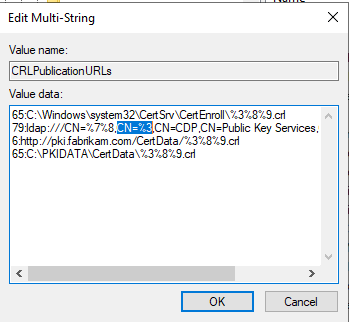
The CRL object can be created by manually uploading the CRL to Active Directory. To do this, use Certutil -dspublish with the -f (force) argument.
certutil -f -dspublish {crl-file.crl}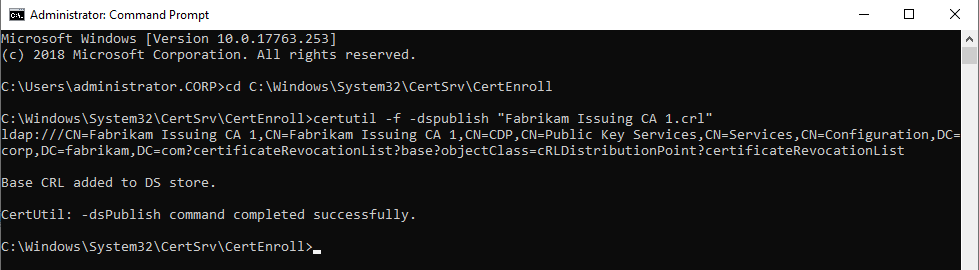
To do this, you need write permissions in the CDP container under Public Key Services in the configuration partition. This permission is usually held by enterprise administrators (Enterprise Administrator).
Likewise, the CRL file must have an extension called "Published CRL Locations", which is read by certutil during publishing to determine the correct path for the CRL.
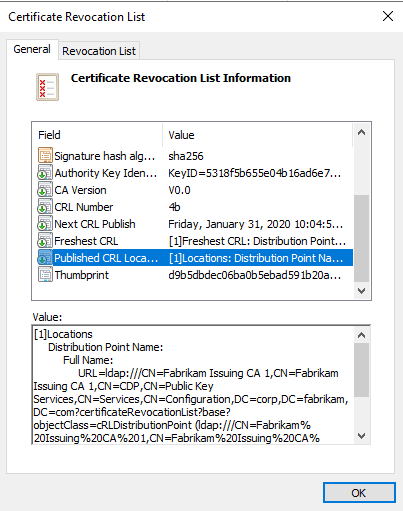
The Published CRL Locations extension is read by certutil and used to store the CRL correctly in Active Directory
The presence of this extension is controlled by the "Include in all CRLs" option in the CDP extension configuration on the certification authority.
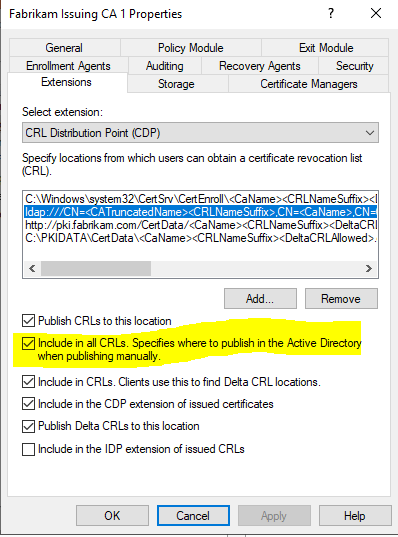
The Include in all CRLs option causes the Published CRL Locations extension to be written to a CRL.