
Revoking an issued certificate
Sometimes it is necessary for a certificate issued by a certification authority to be withdrawn from circulation even before its expiration date. To make this possible, a certification authority maintains a certificate revocation list (CRL). This is a signed file with a relatively short expiration date, which is used in combination with the certificate to check its validity.
When a certificate is revoked, its serial number is placed on the CRL. Entities that check the revocation of a certificate then consider it to be no longer valid.
Required permissions
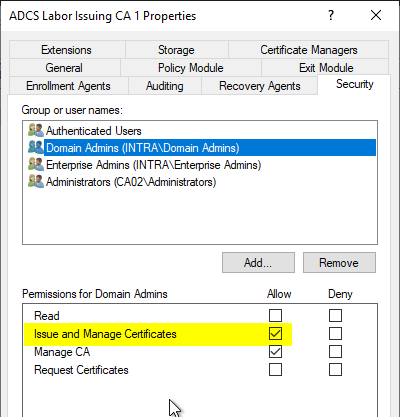
To revoke a certificate, the executing user needs the "Issue and Manage Certificates" permission on the certification authority that issued the certificate.
Required information
The following information is required to revoke a certificate:
- Serial number of the certificate
- Reason for the revocation
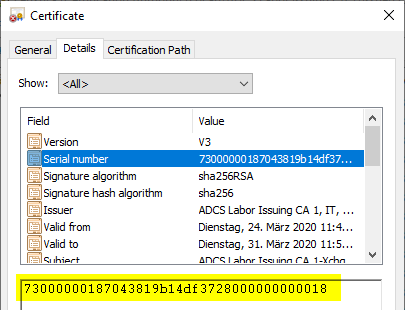
The serial number can be determined, among other things, via the "Details" tab of a certificate.
The following are possible reasons for revocation:
| Code | Designation | Description |
|---|---|---|
| 0 | Unspecified | This is the default setting and indicates that there is no specific reason for the revocation. |
| 1 | Key Compromise | The private key of a certificate was stolen or otherwise known to unauthorized third parties. |
| 2 | CA Compromise | The private key of the certification authority was stolen or otherwise known to unauthorized third parties. |
| 3 | Affiliation Changed | If the content of the certificate (e.g. the name of the user) has changed, a new certificate must be issued. |
| 4 | Superseded | The revoked certificate was replaced with a new certificate. |
| 5 | Cessation of Operation | The operation of the service belonging to the certificate was discontinued, for example, because there is a new service under a different name. |
| 6 | Certificate Hold | The certificate is revoked temporarily. This revocation type is the only one where the revocation can be subsequently undone. |
| 8 | Remove from CRL | If a certificate was revoked with reason "Certificate Hold" and delta CRLs are used, the unrevoked certificate is listed in the delta CRL with this code until the entry in the base CRL is dropped. |
| -1 | Unrevoke | If a certificate has been revoked with reason "Certificate Hold", this code can be used to unrevoke it via the command line. Likewise, in the audit event 4870 the undoing of a certificate revocation is marked with this code. |
Only revocation reason number 6 (Certificate Hold) makes it possible to remove a certificate from the CRL again later.
Details: Revoking an issued certificate via the command line
Do you know TameMyCerts? TameMyCerts is an add-on for the Microsoft certification authority (Active Directory Certificate Services). It extends the function of the certification authority and enables the application of rule sets to realize the secure automation of certificate issuance. TameMyCerts is unique in the Microsoft ecosystem, has already proven itself in countless companies around the world and is available under a free license. It can be downloaded via GitHub and used free of charge. Professional maintenance is also offered.
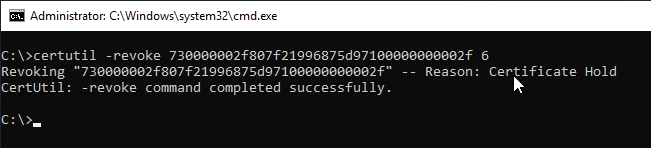
Revocation of a certificate can be done with the following command line command.
certutil -revoke {Seriennummer} {Grundcode}The command can be executed directly on the certification authority as listed above. For an Active Directory integrated certification authority, it can also be executed by another domain member if the -config switch is included with the config string (Servername\Common-Name) as an argument.
Details: Revoking an issued certificate via the graphical user interface
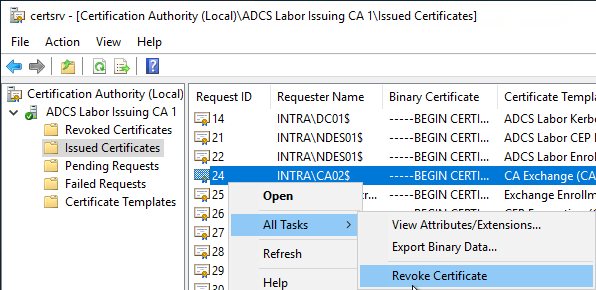
In the Certification Authority management console (certsrv.msc), the certificate to be revoked is first identified. Then right-click on the database entry and select "All Tasks" - "Revoke Certificate".
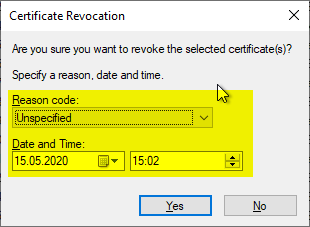
In the following dialog, the reason for the revocation is specified. Optionally, a date can be specified as of which the certificate is to be revoked. Thus, a scheduled revocation can already be realized in advance.
Publish a new certificate revocation list
The certificate is initially only marked as revoked in the certification authority database. It will be entered on the certificate revocation list the next time it is published.
The certificate revocation list is published automatically by the certification authority. As a rule, it is not necessary to publish new certificate revocation lists on an unscheduled basis. If desired, the procedure for publishing a certificate revocation list is described in the article "Create and publish a certificate revocation list ".
Please note that it cannot be guaranteed that a certificate revocation will be recognized immediately by all participants, since revocation information can be cached on the client side.
Please note that expired certificates (with the exception of code signing certificates) are removed from the CRL again .