
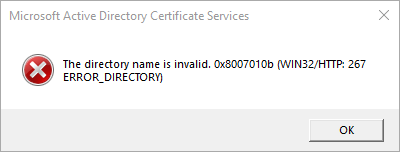
Publishing a certificate revocation list (CRL) fails with error message "The directory name is invalid. 0x8007010b (WIN32/HTTP: 267 ERROR_DIRECTORY)"
Assume the following scenario:
- A new certificate revocation list (CRL) is created on the certification authority.
- Publishing fails with the following error message:
The directory name is invalid. 0x8007010b (WIN32/HTTP: 267 ERROR_DIRECTORY)Sometimes it is necessary for a certificate issued by a certification authority to be taken out of circulation even before its expiration date. To make this possible, a certification authority maintains a certificate revocation list. This is a signed file with a relatively short expiration date, which is used in combination with the certificate to check its validity.
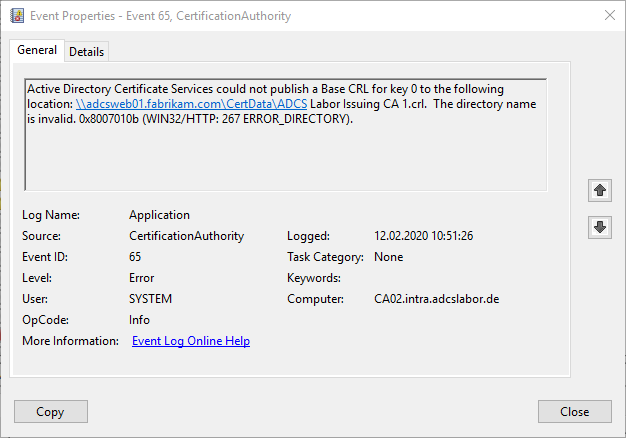
Further details can be found in the Event Viewer. Depending on the CRL type, the certification authority will log the events 65 , 66 , 74 or 75 .
Causes
Do you know TameMyCerts? TameMyCerts is an add-on for the Microsoft certification authority (Active Directory Certificate Services). It extends the function of the certification authority and enables the application of rule sets to realize the secure automation of certificate issuance. TameMyCerts is unique in the Microsoft ecosystem, has already proven itself in countless companies around the world and is available under a free license. It can be downloaded via GitHub and used free of charge. Professional maintenance is also offered.
Basically, various causes come into question:
- The configured directory is not shared.
- The configured path is not correct.
In this case, the directory was not configured correctly. To find out which directories are configured, see the Extensions tab in the Certificate Services Management Console (certsrv.msc). The option "Publish to this location" determines whether a CRL should be published to this directory.
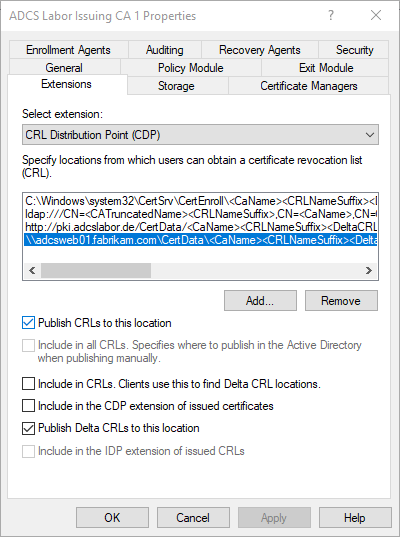
It is not possible to edit the entry directly in the certification authority management console. It can only be deleted and recreated. However, you can edit the configuration in the registry of the certification authority service. The setting is located in the "CRLPublicationURLs" value under the following path:
HKEY_LOCAL_MACHINE\SYSTEM\CurrentControlSet\Services\CertSvc\Configuration\{Name-der-Zertifizierungsstelle}\ 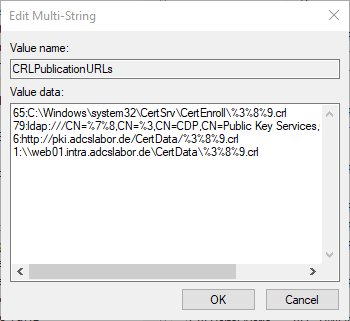
After changing the configuration, the certification authority service must be restarted for the changes to take effect.