
PKI administrators often assume that the option in the certificate template to not allow the private key for export is mandatory.
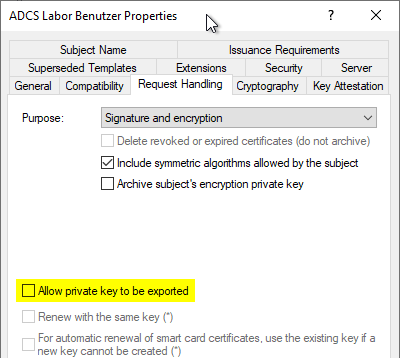
However, that is not the case.
This is merely a default setting, which the applicant can change at any time when submitting the certificate request manually.
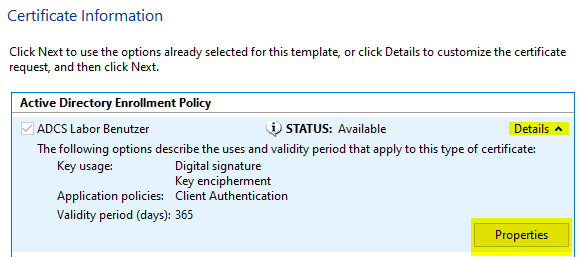
When submitting a request via the Microsoft Management Console (MMC), you can expand the „Details“ section during the certificate template selection step. There, you will find a „Properties“ button.
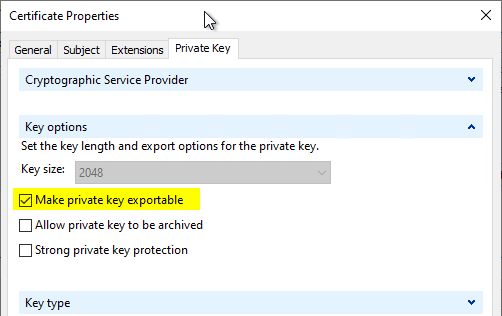
Here, on the „Private Key“ tab, we'll find the option to enable exporting.
Furthermore, even a key generated as non-exportable is not safe from export. For this exist relevant toolsto export such certificates including keys.
Hardening Options with TameMyCerts
Do you know TameMyCerts? TameMyCerts is an add-on for the Microsoft certification authority (Active Directory Certificate Services). It extends the function of the certification authority and enables the Application of regulationsto realize the secure automation of certificate issuance. TameMyCerts is unique in the Microsoft ecosystem, has already proven itself in countless companies around the world and is available under a free license. It can downloaded via GitHub and can be used free of charge. Professional maintenance is also offered.
Whether a private key can be exported or not cannot be determined from the certificate request. The entire concept of exportability is also a Microsoft-proprietary feature of the Cryptographic Service Provider or Key Storage Provider and therefore exists only within this ecosystem.
To regain a certain degree of control, we can take advantage of the fact that—when a certificate request is generated using a Windows API—the certificate request contains metadata indicating which process generated the key pair.
However, it should be noted right away that this meta-information can be falsified by the applicant with sufficient effort.
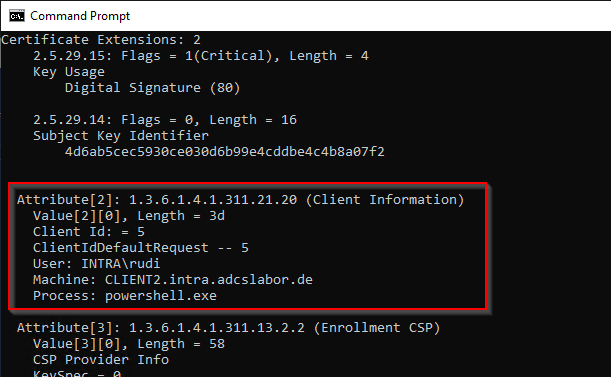
The TameMyCerts Policy Module for Microsoft Active Directory Certificate Services can determine the process used to create the certificate request from the request itself and, based on this information, decide whether or not to issue a certificate.
Most users would likely request such an exportable certificate using the Microsoft Management Console (MMC). Exportable keys could also be generated using other tools (such as certreq.exe, certutil.exe, or OpenSSL).
With TameMyCerts, we can explicitly block these processes.
OpenSSL and other non-Microsoft tools do not include process information in the certificate request. In this case, TameMyCerts would also reject the certificate request.
<CertificateRequestPolicy xmlns:xsi="http://www.w3.org/2001/XMLSchema-instance" xmlns:xsd="http://www.w3.org/2001/XMLSchema">
  <DisallowedProcesses>
    <string>mmc.exe</string>
    <string>powershell.exe</string>
    <string>certutil.exe</string>
    <string>certreq.exe</string>
    <!-- OpenSSL doesn't include process information and will therefore be denied as well -->
  </DisallowedProcesses>
  <!-- additional Directives go here -->
</CertificateRequestPolicy>
An even more elegant solution would be to allow only the Windows Autoenrollment process. This process runs under the Windows Task Scheduler (taskhostw.exe).
<CertificateRequestPolicy xmlns:xsi="http://www.w3.org/2001/XMLSchema-instance" xmlns:xsd="http://www.w3.org/2001/XMLSchema">
  <AllowedProcesses>
    <string>taskhostw.exe</string>
  </AllowedProcesses>
  <!-- additional Directives go here -->
</CertificateRequestPolicy>
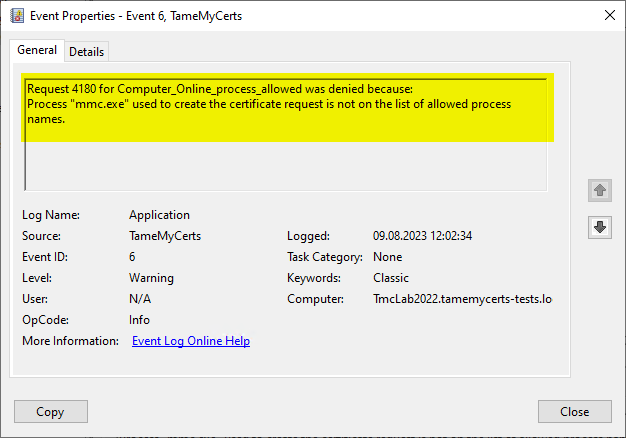
If a user attempts to request a certificate using an unauthorized process, TameMyCerts detects this and rejects the certificate request.
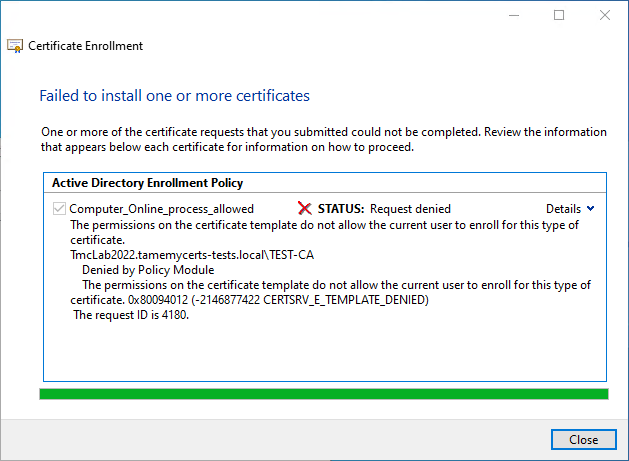
TameMyCerts will generate a corresponding Entry in the certification authority's event log write. This can even trigger an alarm.
Related links:
- Basics: Cryptographic Service Provider (CSP) and Key Storage Provider (KSP)
- Basics of manual and automatic Certificate Enrollment via Lightweight Directory Access Protocol (LDAP) and Remote Procedure Call / Distributed Common Object Model (RPC/DCOM)
 English
  Deutsch
  Français
Comments are closed.