Extend the "S/MIME Capabilities" certificate extension in issued certificates to include the Cryptography Next Generation (CNG) algorithms
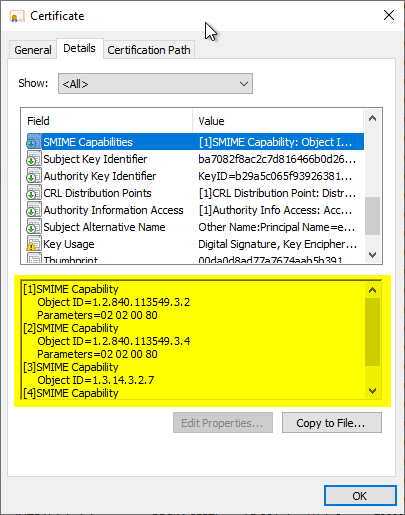
When S/MIME certificates are issued, they usually contain a certificate extension "S/MIME Capabilities". This certificate extension is specified in RFC 4262 and can be used by compatible e-mail programs to specify the symmetric algorithms supported by the recipient of an encrypted message. The sender should then choose the strongest algorithm supported by the recipient.
However, if you take a look at the symmetric algorithms included in such a certificate, you will probably find that the list contains rather outdated algorithms - the "strongest" of these algorithms is Triple DES (3DES), which is now considered obsolete.
How do the algorithms get into the certificate?
It is important to understand that the values entered in the certificate depend on the type of request:
- If the certificate request contains no "S/MIME Capabilities" extension, the default values from the "DefaultSMIME" registry key of the certification authority are used and written to the issued certificate.
- If the certificate request includes an "S/MIME Capabilities" extension, the requested values are transferred 1:1 to the issued certificate.
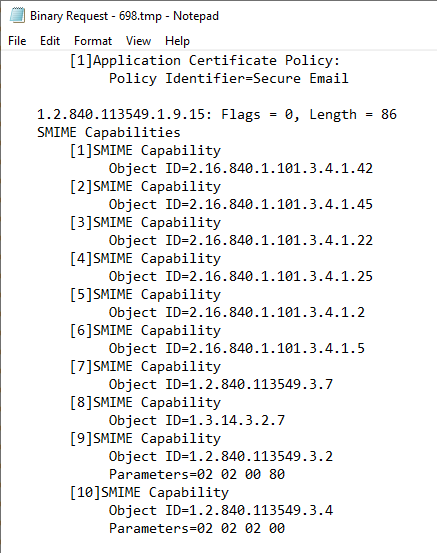
If the request is generated with the built-in Windows tools (Microsoft Management Console or autoenrollment), the following values are written to the certificate request:
Default values for a certificate template with a Cryptographic Service Provider (CSP)
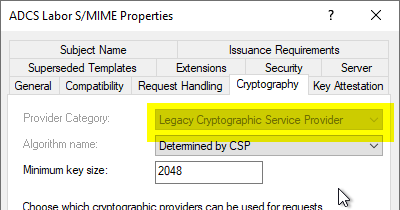
If a Cryptographic Service Provider is configured in the certificate template, the following values are always requested:
[1]SMIME Capability
Object ID=1.2.840.113549.3.2
Parameters=02 02 00 80
[2]SMIME Capability
Object ID=1.2.840.113549.3.4
Parameters=02 02 00 80
[3]SMIME Capability
Object ID=1.3.14.3.2.7
[4]SMIME Capability
Object ID=1.2.840.113549.3.7
This corresponds to the following algorithms:
- RC2 in CBC mode with 128-bit key length
- RC4 with 128-bit key length
- DES with 56-bit key length
- 3DES with 168-bit key length
Default values for a certificate template with a Key Storage Provider (KSP)
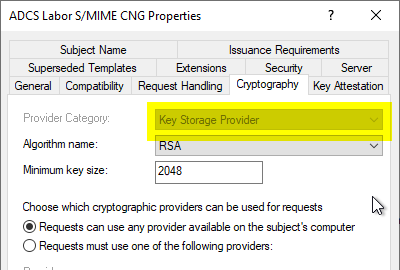
It is important to understand here that the fact that the modern algorithms only appear in the certificate if a key storage provider is used is not a technical requirement. From a purely technical point of view, the modern symmetric algorithms can also be used with a certificate based on a cryptographic service provider if the certificate request has the corresponding extensions.
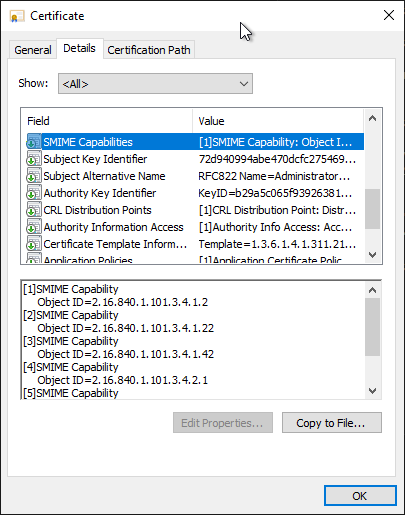
If a Key Storage Provider is configured in the certificate template, the following values are always requested:
[1]SMIME Capability
Object ID=2.16.840.1.101.3.4.1.42
[2]SMIME Capability
Object ID=2.16.840.1.101.3.4.1.45
[3]SMIME Capability
Object ID=2.16.840.1.101.3.4.1.22
[4]SMIME Capability
Object ID=2.16.840.1.101.3.4.1.25
[5]SMIME Capability
Object ID=2.16.840.1.101.3.4.1.2
[6]SMIME Capability
Object ID=2.16.840.1.101.3.4.1.5
[7]SMIME Capability
Object ID=1.2.840.113549.3.7
[8]SMIME Capability
Object ID=1.3.14.3.2.7
[9]SMIME Capability
Object ID=1.2.840.113549.3.2
Parameters=02 02 00 80
[10]SMIME Capability
Object ID=1.2.840.113549.3.4
Parameters=02 02 02 00
This corresponds to the following algorithms:
- RC2 in CBC mode with 128-bit key length
- RC4 with 512-bit key length
- DES with 56-bit key length
- 3DES with 168-bit key length
- AES in CBC mode with 128-bit key length
- AES in CBC mode with 192-bit key length
- AES in CBC mode with 256-bit key length
- AES in key wrapping mode with 128-bit key length
- AES in key wrapping mode with 192-bit key length
- AES in key wrapping mode with 256-bit key length
Keep default values in sync with certificate templates
Do you know TameMyCerts? TameMyCerts is an add-on for the Microsoft certification authority (Active Directory Certificate Services). It extends the function of the certification authority and enables the application of rule sets to realize the secure automation of certificate issuance. TameMyCerts is unique in the Microsoft ecosystem, has already proven itself in countless companies around the world and is available under a free license. It can be downloaded via GitHub and used free of charge. Professional maintenance is also offered.
Normally, the values in the registry of the certification authority are therefore not used at all. Only if a certificate request is submitted without the "S/MIME Capabilities" extension, the default values configured here are used:
HKLM:\SYSTEM\CurrentControlSet\Services\CertSvc\Configuration\{Name-der-Zertifizierungsstelle}\PolicyModules\CertificateAuthority_MicrosoftDefault.Policy\DefaultSMIME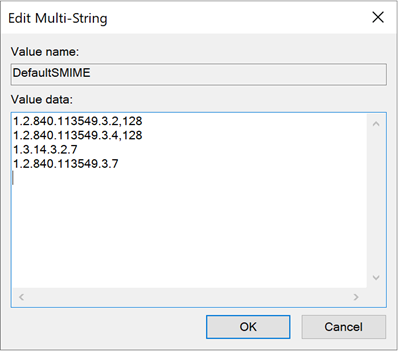
To keep the default values entered under DefaultSMIME in sync with what is requested by a certificate template configured for a key storage provider, the following values would need to be configured on the certification authority in addition to the default setting:
certutil -setreg policy\defaultsmime +2.16.840.1.101.3.4.1.42
certutil -setreg policy\defaultsmime +2.16.840.1.101.3.4.1.45
certutil -setreg policy\defaultsmime +2.16.840.1.101.3.4.1.22
certutil -setreg policy\defaultsmime +2.16.840.1.101.3.4.1.25
certutil -setreg policy\defaultsmime +2.16.840.1.101.3.4.1.2
certutil -setreg policy\defaultsmime +2.16.840.1.101.3.4.1.5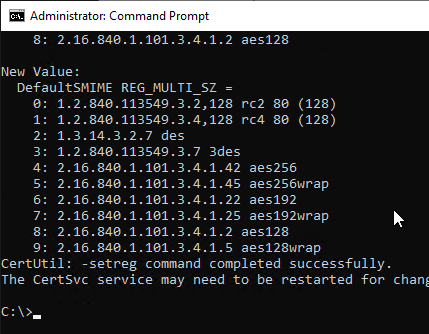
The certification authority service must then be restarted for the changes to take effect.
Fine-grained control of S/MIME capabilities
If you want certificates to contain only certain S/MIME capabilities, this is only possible via customized certificate requests, but not via the existing built-in tools, since these always enter default values.
The flaw in this line of thinking is that we as the operators of the PKI - in this case - merely enter the enrollees' wishes into the issued certificates. Which capabilities the enrollee's e-mail program actually supports is, logically, also up to the enrollee.
Manually requesting an S/MIME certificate
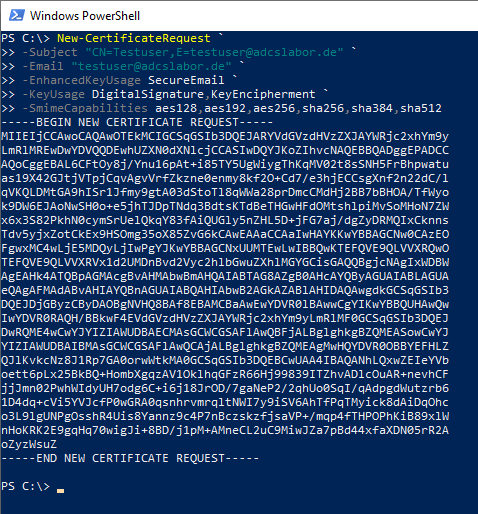
A manual creation of a certificate request for an S/MIME certificate can be done for example via the PSCertificateEnrollment PowerShell module.
Example:
New-CertificateRequest `
-Exportable `
-Subject "CN=Testuser,E=testuser@adcslabor.de" `
-Email "testuser@adcslabor.de" `
-EnhancedKeyUsage SecureEmail `
-KeyUsage DigitalSignature,KeyEncipherment `
-SmimeCapabilities aes128,aes192,aes256,sha256,sha384,sha512
Please note that central archival of the private key is not possible with such a request. The enrollee is responsible for backing up their private key themselves. The private key should therefore be marked as exportable during the request and backed up.
External sources:
- X.509 Certificate Extension for Secure/Multipurpose Internet Mail Extensions (S/MIME) Capabilities (Internet Engineering Task Force)