
Microsoft Outlook: Signed e-mail messages are rejected by the receiving mail server with error message "Invalid S/MIME encrypted message."
Assume the following scenario:
- A user sends an e-mail message signed with Secure/Multipurpose Internet Mail Extensions (S/MIME).
- The sender uses Microsoft Outlook for Macintosh.
- The receiving mail server rejects the message and sends back a Non-Delivery Report (NDR):
550 5.6.0 M2MCVT.StorageError.Exception: ConversionFailedException - , Content conversion: Invalid S/MIME encrypted message.; storage error in content conversion.Do you know TameMyCerts? TameMyCerts is an add-on for the Microsoft certification authority (Active Directory Certificate Services). It extends the function of the certification authority and enables the application of rule sets to realize the secure automation of certificate issuance. TameMyCerts is unique in the Microsoft ecosystem, has already proven itself in countless companies around the world and is available under a free license. It can be downloaded via GitHub and used free of charge. Professional maintenance is also offered.
Occurs if GNUPG is implemented on the receiving side and the "Send digitally signed messages as clear text" option is not enabled on the sender side.
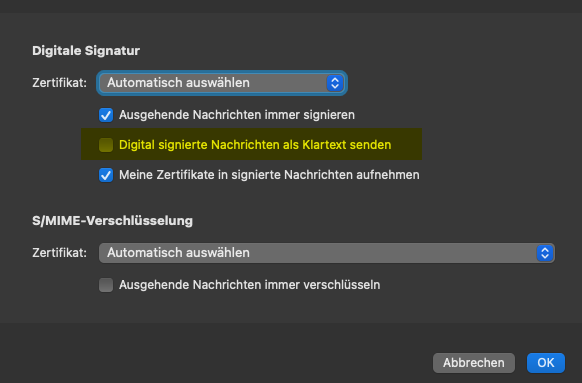
The documentation for this setting states:
Select this option if you want the contents of the message to be readable for all recipients. This includes recipients without an S/MIME mail application. A recipient without an S/MIME mail application can read a clear text message but can't verify the digital signature.
External sources
- Digital signing and encryption settings (Microsoft)
- Content conversion: Invalid S/MIME encrypted message. (GNUPG Project)