
Vous trouverez ci-dessous un aperçu des événements générés par le service de stratégie d'enregistrement des certificats (CEP) dans l'observateur d'événements Windows.
Les événements du service de stratégie d'enregistrement des certificats ne sont pas officiellement documentés. La liste suivante a été générée à l'aide de l'outil Windows Event Log Messages (WELM).
Les services web d'enregistrement des certificats (Certificate Enrollment Policy Web Service, CEP et Certificate Enrollment Web Service, CES) permettent de demander et de renouveler automatiquement les certificats d'une autorité de certification via une interface web. Il n'est donc pas nécessaire de contacter directement l'autorité de certification par Remote Procedure Call (RPC). Pour une description plus détaillée, voir l'article "Bases de la demande de certificat via Certificate Enrollment Web Services (CEP, CES)„ .
Sources d'événements
Les événements du service de politique d'enregistrement des certificats sont écrits dans le journal des applications. Les sources suivantes contiennent des événements CEP :
- Microsoft-Windows-EnrollmentPolicyWebService/Admin
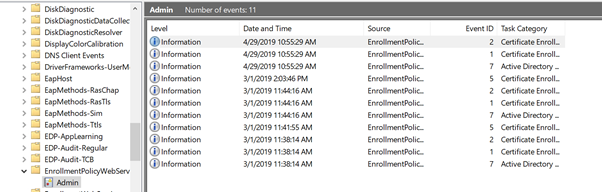
Vue prédéfinie dans l'Observateur d'événements Windows
Une vue filtrée en conséquence est préconfigurée dans la catégorie „Active Directory Certificate Services“ sur chaque système sur lequel le service de stratégie d'enregistrement des certificats est installé.
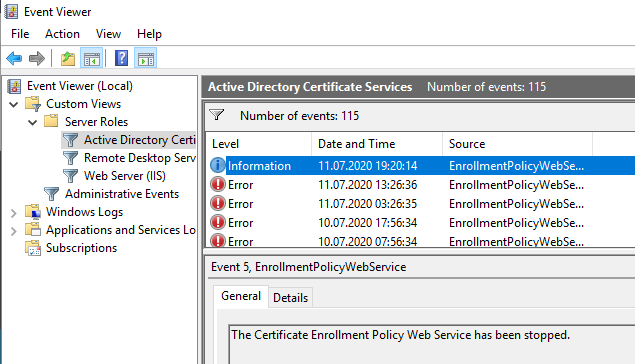
Source d'événement Microsoft-Windows-EnrollmentPolicyWebService
Connaissez-vous TameMyCerts? TameMyCerts est un add-on pour l'autorité de certification Microsoft (Active Directory Certificate Services). Il étend la fonction de l'autorité de certification et permet de Application de la réglementationIl s'agit d'un logiciel de gestion des certificats qui permet d'automatiser l'émission de certificats en toute sécurité. TameMyCerts est unique dans l'écosystème Microsoft, a déjà fait ses preuves dans d'innombrables entreprises du monde entier et est disponible sous une licence libre. Il peut téléchargé via GitHub et être utilisé gratuitement. Une maintenance professionnelle est également proposée.
| ID | Type | Texte de l'événement |
|---|---|---|
| 1 | Information | Le service Web de politique d'inscription aux certificats a démarré. |
| 2 | Information | Un point de terminaison de service avec l'URI %1 a été configuré pour ce service. Le schéma d'authentification client est %2. Utilisez la console de gestion des stratégies de groupe ou le composant logiciel enfichable Certificats pour configurer les clients avec ces informations de service Web de stratégie d'inscription de certificats. |
| 3 | Avertissement | Un point de terminaison de service avec l'URI %1 a été configuré pour ce service. La configuration du schéma d'authentification client ou de la liaison n'est pas recommandée. Pour résoudre le problème, ouvrez le fichier web.config et vérifiez les paramètres de liaison et de sécurité. Le seul type de liaison pris en charge pour ce service est wsHttpBinding. Le mode de sécurité doit être Transport ou TransportWithMessageCredential. Lorsque le mode de sécurité est Transport, le ClientCredentialType doit être Windows ou Certificate. Lorsque le mode de sécurité est TransportWithMessageCredential, le ClientCredentialType doit être UserName. |
| 4 | Erreur | Le service Web Certificate Enrollment Policy n'a pas pu s'initialiser. Vérifiez que le service Web Certificate Enrollment Policy est correctement installé. Essayez de redémarrer Internet Information Services (IIS) à l'aide de iisreset.exe. Si le problème persiste, activez le traçage dans le fichier web.config, redémarrez IIS, essayez d'obtenir des informations sur la stratégie à partir d'un client, puis contactez le service clientèle et support technique Microsoft avec les informations du fichier de traçage. %1 |
| 5 | Information | Le service Web Certificate Enrollment Policy a été arrêté. |
| 6 | Information | Le fournisseur de stratégie d'inscription de certificats Active Directory a été initialisé pour cibler le contrôleur de domaine „ %1 “. |
| 7 | Information | Le fournisseur de stratégie d'inscription de certificats Active Directory a été initialisé pour cibler le contrôleur de domaine par défaut du domaine actuel. |
| 8 | Erreur | Le fournisseur de la politique d'inscription au certificat Active Directory n'a pas réussi à s'initialiser. Essayez de redémarrer Internet Information Services (IIS) à l'aide de iisreset.exe. Si le problème persiste, activez le traçage dans le fichier web.config, redémarrez IIS, essayez d'obtenir des informations sur la politique de n'importe quel client, puis contactez le service clientèle et le support de Microsoft avec les informations du fichier de trace. %1 |
| 9 | Erreur | Le fournisseur de la politique d'inscription au certificat Active Directory n'a pas réussi à obtenir les informations de politique des services de domaine Active Directory (AD DS). Le fournisseur tentera de lire les informations à nouveau dans %1 millisecondes. Si le problème persiste, activer le traçage dans le fichier web.config, activer le logging en utilisant „certutil -setreg debug 0xffffffe3“, redémarrer IIS en utilisant iisreset.exe, essayer d'obtenir des informations de politique de n'importe quel client, puis contacter le service client et le support Microsoft avec les informations contenues dans les fichiers de traçage et le fichier certenroll.log. %2 |
| 10 | Avertissement | Aucune autorité de certification d'entreprise (CA) n'est configurée avec le service Web d'inscription de certificats dans la forêt actuelle. Vérifiez qu'au moins une CA d'entreprise est disponible dans la forêt et qu'au moins un serveur exécutant le service Web d'inscription de certificats est configuré pour fonctionner avec cette CA. |
| 11 | Avertissement | Aucun modèle de certificat dans la forêt n'est configuré pour être envoyé dans le cadre de la réponse à la politique. Confirmez que le serveur hébergeant le service web de la politique d'inscription des certificats a l'autorisation de délivrer les modèles requis dans cette forêt et qu'au moins un serveur hébergeant le service web d'inscription des certificats est configuré pour travailler avec les autorités de certification (AC) configurées pour délivrer les modèles requis. |
| 12 | Erreur | L'autorité de certification (CA) „%1“ ne peut pas être envoyée dans le cadre de la réponse à la politique. Confirmez que cette CA est en cours d'exécution et qu'au moins un service Web d'inscription aux certificats est configuré pour utiliser cette CA . %2 |
| 13 | Erreur | Le modèle de certificat „ %1 “ ne peut pas être envoyé dans le cadre de la réponse à la stratégie. Utilisez le composant logiciel enfichable Modèles de certificat pour vérifier qu'il s'agit d'un modèle de certificat valide. Vérifiez également qu'au moins une autorité de certification (CA) en cours d'exécution a activé ce modèle et qu'au moins un service Web d'inscription de certificat est configuré pour utiliser cette CA. %2 |
| 14 | Erreur | L'autorité de certification (CA) „ %1 “ associée au modèle „ %2 “ ne peut pas être envoyée dans le cadre de la réponse à la stratégie. Vérifiez que la CA est en cours d'exécution et qu'au moins un service Web d'inscription de certificat est configuré pour utiliser cette CA. %3 |
| 15 | Erreur | L'URI %2 utilisé par le service Web d'inscription de certificats pour l'autorité de certification (CA) „ %1 “ n'est pas valide. Utilisez le Gestionnaire de serveur pour configurer le service Web d'inscription de certificats afin qu'il utilise une CA valide. %3 |
| 16 | Information | Un modèle de certificat %1 a été chargé. Pour plus d'informations, veuillez vous reporter à la section EventData du volet Détails. |
| 17 | Information | Une autorité de certification %1 a été chargée. Pour plus d'informations, veuillez vous reporter à la section EventData du volet Détails. |
| 18 | Information | Pour une liste des OID qui sont chargés, veuillez vous référer au panneau „Détails“. |
| 19 | Erreur | Le service Web Certificate Enrollment Policy ne peut pas fonctionner car l'authentification Windows n'est pas compatible avec le renouvellement basé sur une clé. Pour résoudre ce problème, supprimez le service Web Certificate Enrollment Policy. Reconfigurez les options d'installation pour désactiver le renouvellement basé sur une clé, ou sélectionnez l'authentification par nom d'utilisateur et mot de passe ou l'authentification par certificat client, puis relancez l'installation. |
| 20 | Information | Un point final de service avec URI %1 a été configuré pour ce service. Le schéma d'authentification client est %2. Seules les politiques qui contiennent des modèles de certificats activés pour le renouvellement basé sur une clé seront renvoyées au client. Utilisez la Console de gestion des politiques de groupe ou le snap-in Certificats pour configurer les clients avec ces informations sur le service Web de la politique d'inscription aux certificats. |
| 21 | Information | Un point de terminaison de service avec l'URI %1 a été configuré pour ce service. Le schéma d'authentification client est %2. Seules les stratégies contenant des modèles de certificat activés pour le renouvellement basé sur une clé seront renvoyées au client. Les certificats client sans informations sur le sujet dans la base de données Active Directory peuvent être utilisés pour récupérer des modèles de certificat. Utilisez la console de gestion des stratégies de groupe ou le composant logiciel enfichable Certificats pour configurer les clients avec ces informations de service Web de stratégie d'inscription de certificat. |
Liens complémentaires :
- Aperçu des événements Windows générés par l'autorité de certification
- Aperçu des événements Windows générés par le répondeur en ligne (OCSP)
- Présentation des événements Windows générés par le service d'enregistrement des périphériques réseau (NDES)
- Présentation des événements Windows générés par le service Web d'enregistrement des certificats (CES)
 Français
  Deutsch
  English
Les commentaires sont fermés.