
Nachfolgend eine Übersicht über die vom Zertifikatregistrierungs-Webdienst (CES) erzeugten Ereignisse in der Windows-Ereignisanzeige.
Die Ereignisse des Zertifikatregistrierungs-Webdienstes sind nicht offiziell dokumentiert. Die nachfolgende Liste wurde mit Hilfe des Tools Windows Event Log Messages (WELM) erzeugt.
Les services web d'enregistrement des certificats (Certificate Enrollment Policy Web Service, CEP et Certificate Enrollment Web Service, CES) permettent de demander et de renouveler automatiquement les certificats d'une autorité de certification via une interface web. Il n'est donc pas nécessaire de contacter directement l'autorité de certification par Remote Procedure Call (RPC). Pour une description plus détaillée, voir l'article "Bases de la demande de certificat via Certificate Enrollment Web Services (CEP, CES)„ .
Sources d'événements
Die Ereignisse des Zertifikatregistrierungs-Webdienstes werden in das Anwendungs-Protokoll geschrieben. Folgende Quellen enthalten CES-Ereignisse:
- Microsoft-Windows-EnrollmentWebService/Admin
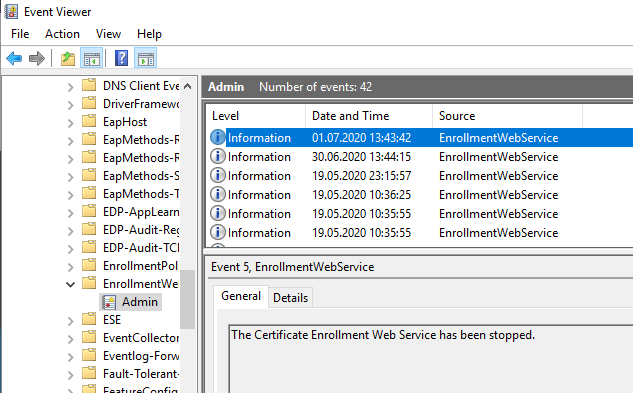
Vordefinierte Ansicht in der Windows-Ereignisanzeige
Eine entsprechend gefilterte Ansicht ist in der Kategorie „Active Directory Certificate Services“ auf jedem System, auf dem der Zertifikatregistrierungs-Webdienst installiert ist, bereits vorkonfiguriert.
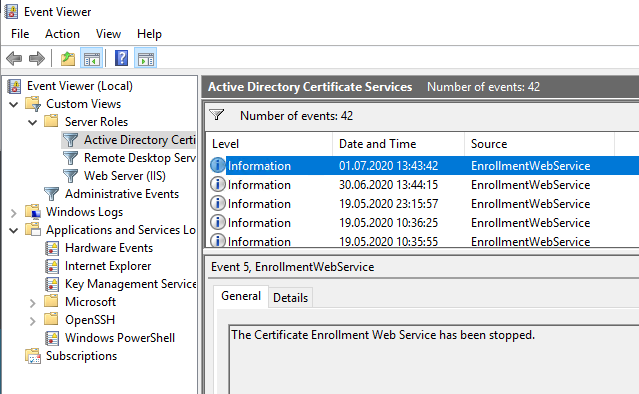
Ereignisquelle Microsoft-Windows-EnrollmentWebService
Connaissez-vous TameMyCerts? TameMyCerts est un add-on pour l'autorité de certification Microsoft (Active Directory Certificate Services). Il étend la fonction de l'autorité de certification et permet de Application de la réglementationIl s'agit d'un logiciel de gestion des certificats qui permet d'automatiser l'émission de certificats en toute sécurité. TameMyCerts est unique dans l'écosystème Microsoft, a déjà fait ses preuves dans d'innombrables entreprises du monde entier et est disponible sous une licence libre. Il peut téléchargé via GitHub et être utilisé gratuitement. Une maintenance professionnelle est également proposée.
| ID | Type | Texte de l'événement |
|---|---|---|
| 1 | Information | The Certificate Enrollment Web Service has started. |
| 2 | Erreur | The Certificate Enrollment Web Service failed to start. Confirm that the Certificate Enrollment Web Service is properly installed, and restart Internet Information Services (IIS) by using iisreset.exe. If the problem persists, enable tracing in the web.config file, restart IIS, attempt to enroll for a certificate again from any client, and then contact Microsoft Customer Service and Support with the trace file information. %1 |
| 3 | Erreur | The Certificate Enrollment Web Service failed to start. The certification authority (CA) „%1“ is not an enterprise CA. |
| 4 | Erreur | The Certificate Enrollment Web Service failed to start. A valid certification authority (CA) configuration is not specified in the web.config file. Please specify a CA configuration in the web.config file. |
| 5 | Information | The Certificate Enrollment Web Service has been stopped. |
| 6 | Avertissement | The Certificate Enrollment Web Service is in renewal-only mode. New enrollment requests cannot be processed when the Certificate Enrollment Web Service is in renewal-only mode. If you want to enable new enrollment requests, configure both the CA and the Certificate Enrollment Web Service for new enrollment requests. |
| 7 | Erreur | The Certificate Enrollment Web Service is attempting to use renewal-only mode, but certification authority (CA) „%1“ does not support this mode. To use renewal-only mode, configure the Certificate Enrollment Web Service to use a CA that is installed on a computer that is running at least Windows Server 2008 R2. Then, configure the CA by running the following command on the CA: certutil -setreg policy\editflags +EDITF_ENABLERENEWONBEHALFOF. Otherwise, disable renewal-only mode. If no action is taken, subsequent requests will be rejected. |
| 8 | Erreur | The Certificate Enrollment Web Service cannot read the version or the configuration flags from certification authority (CA) „%1.“ On the Security tab of the CA property sheet, grant Read permission to the account used by the Certificate Enrollment Web Service application pool. If no action is taken, subsequent requests will be rejected. |
| 9 | Erreur | Le service Web d'inscription aux certificats tente d'utiliser le mode de renouvellement uniquement, mais l'autorité de certification (CA) „ %1 “ ne prend pas en charge ce mode. Pour utiliser le mode de renouvellement uniquement, configurez la CA en exécutant la commande suivante sur la CA : certutil -setreg policy\editflags +EDITF_ENABLERENEWONBEHALFOF. Sinon, désactivez le mode de renouvellement uniquement. Si aucune mesure n'est prise, les demandes suivantes seront rejetées. |
| 10 | Erreur | The Certificate Enrollment Web Service cannot operate because an incompatible configuration was selected. To resolve this issue, remove the Certificate Enrollment Web Service. If you want to use key based renewal, enable both client certificate authentication and renewal-only mode. If you want to use user name and password authentication or Windows authentication, disable key based renewal, and then run Setup again. |
| 11 | Information | The Certificate Enrollment Web Service is enabled for key based renewal. Client certificates without subject information in the Active Directory database can be used to renew certificates. |
Liens complémentaires :
- Aperçu des événements Windows générés par l'autorité de certification
- Übersicht über die vom Onlineresponder (OCSP) generierten Windows-Ereignisse
- Présentation des événements Windows générés par le service d'enregistrement des périphériques réseau (NDES)
- Übersicht über die vom Zertifikatregistrierungs-Richtliniendienst (CEP) generierten Windows-Ereignisse
Sources externes
- Windows Event Log Messages (WELM) (GitHub)
 Français
  Deutsch
  English
Les commentaires sont fermés.