
Using Authentication Mechanism Assurance (AMA) to secure the logon of administrative accounts
Authentication Mechanism Assurance (AMA) is a feature designed to ensure that a user is a member of a security group only if they can be shown to have logged on using a strong authentication method (i.e., a smart card). If the user logs on via username and password instead, he or she will not have access to the requested resources.
Originally intended for access to file servers, however, AMA can also be used (with some restrictions) for administrative logon. Thus, for example, it would be conceivable for a user to be unprivileged when logging on with a username and password, and to have administrative rights when logging on with a certificate.
Restrictions
However, the approach is subject to some limitations that must be taken into account during implementation:
- Since the AMA-managed groups must be universal groups, some groups (such as "Domain Admins") cannot be secured via AMA (BUILTIN\Administrators works and is also used in this demo).
- Fast Logon and Cached Logons should be disabled on admin machines to avoid interactions.
- Changes to the PKI's certification authority certificates may be necessary (issuance policies).
Authentication Mechanism Assurance does not protect against identity theft such as pass-the-hash and pass-the-ticket. Even with a smart card logon, there are password hashes and ticket granting tickets that can be stolen using the relevant tools.
Requirements
Do you know TameMyCerts? TameMyCerts is an add-on for the Microsoft certification authority (Active Directory Certificate Services). It extends the function of the certification authority and enables the application of rule sets to realize the secure automation of certificate issuance. TameMyCerts is unique in the Microsoft ecosystem, has already proven itself in countless companies around the world and is available under a free license. It can be downloaded via GitHub and used free of charge. Professional maintenance is also offered.
In order for the AMA to be used, the infrastructure must meet some requirements:
- An Active Directory integrated issuing certification authority must be present on the network.
- The certification authority certificate of the issuing certification authority must be stored in the NTAuthCertificates object of the forest , which corresponds to the standard case, but may have been changed for hardening reasons.
- In the certification authority certificate of the issuing certification authority, either the All Issuance Policy or an issuance policy explicitly defined for Authentication Mechanism Assurance must be included.
- A certificate template for smart card logon must be configured and published on the certification authority for issuing.
- The domain controllers must have domain controller certificates, which can process smart card logon .
- One must have a physical smart card, or set up a virtual smart card .
Procedure
The Authentication Mechanism Assurance setup consists of the following steps:
- Setting up the Group Policies for the administrative computers
- Preparing the certification authorities for Authentication Mechanism Assurance
- Preparing the domain controllers for smart card logon
- Configuring the certificate template for logon with Authentication Mechanism Assurance
- Creating the group managed with the Authentication Mechanism Assurance
- Linking the security group to the issuance policy for Authentication Mechanism Assurance
- Requesting the user certificates
- Logging on with the user certificate
Setting up the Group Policies for the administrative computers
For Authentication Mechanism Assurance to be deployed without errors, a Group Policy must be applied to the administrative computers that sets the following settings:
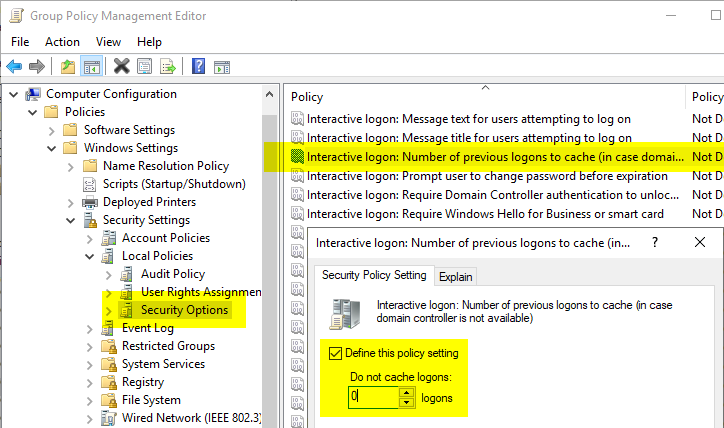
- Disabling cached logons (Cached Credentials)
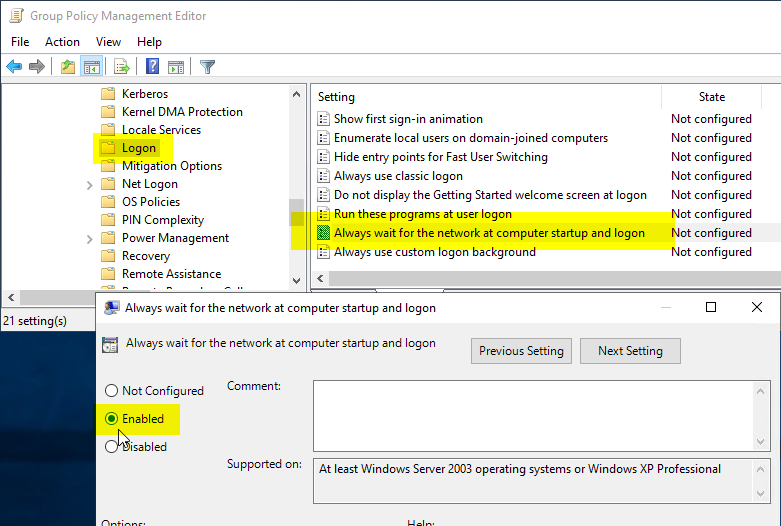
- Waiting for the network at logon (Fast Logon)
Authentication Mechanism Assurance is inherently incompatible with cached logons, since there is no way to distinguish on the client whether the user has logged on with a password or a smart card. Thus, undesired interactions could occur, for example, that the membership in the protected group would be applied even if the user logged on with a password.
In the Group Policy, navigate to "Computer Configuration" - "Policies" - "Windows Settings" - "Security Settings" - "Local Policies" - "Security Options". The setting "Interactive Logon: Number of previous logins to cache (in case domain controller is not available)" is set to "0" (i.e. no caching).
Then navigate to "Computer Configuration" - "Policies" - "Administrative Templates" - "System" - "Logon" and activate the setting "Always wait for the network at computer startup and logon".
Preparing the certification authorities for Authentication Mechanism Assurance
Authentication Mechanism Assurance uses issuance policies. For this reason, the certification authorities issuing the user certificates must include in their certification authority certificate either the wildcard issuance policy (AnyPolicy, not recommended) or explicitly the object identifier of the desired issuance policy. How this is achieved is described in the following articles:
- Include the wildcard issuance policy (All Issuance Policies) in a certification authority certificate
- Include a custom issuance policy in a certification authority certificate
Furthermore, the certification authority certificates must be stored in the NTAuthCertificates object of the Active Directory forest. How this is achieved is described in the article "Editing the NTAuthCertificates object in Active Directory ".
Preparing the domain controllers for smart card logon
Since Authentication Mechanism Assurance is based on smart card logon, the same requirements for domain controller certificates apply here. How these can be configured is described in the article "Domain Controller Certificate Templates and Smart Card Logon ".
Configuring the certificate template for logon with Authentication Mechanism Assurance
For the certificates of the users logging on, a certificate template must be created that contains the desired issuance policy. How this is configured is described in the article "Configuring a Certificate Template for Authentication Mechanism Assurance (AMA) "
Creating the group managed with the Authentication Mechanism Assurance
Authentication Mechanism Assurance works only with universal security groups. This must be kept in mind when creating the security group, or the existing group must be converted to a universal group.
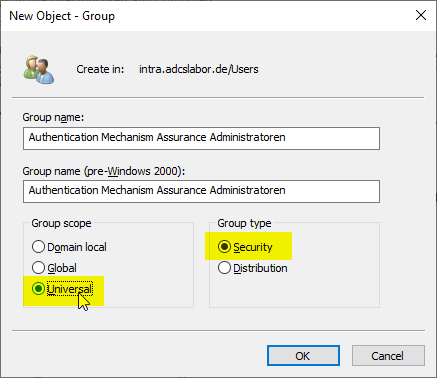
Of course, because the security group must be universal, there are some restrictions on its use. For example, it could not be a member of the Domain Admins group. However, group membership in the BUILTIN\Administrators group at the domain level would be possible, for example.
Linking the security group to the issuance policy for Authentication Mechanism Assurance
In order for the group membership to be tied to the logon with the user certificate, the security group must be linked to the issuance policy. How this is achieved is described in the article "Associate a universal security group with an Object Identifier (OID) in the Active Directory directory service (Authentication Mechanism Assurance). ".
Requesting the user certificates
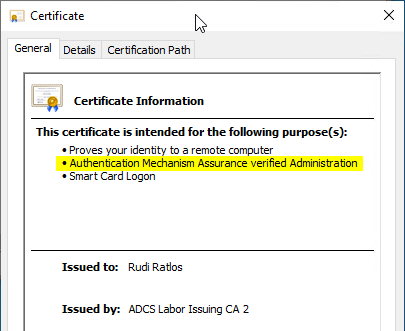
The user certificates can then be requested. The defined issuance policy is displayed in the certificate.
Logging on with the user certificate
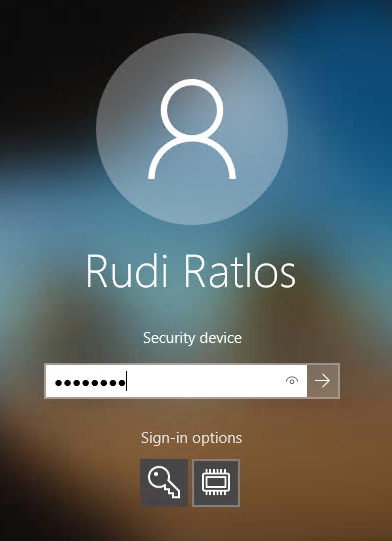
Now the users can log on with the certificate.
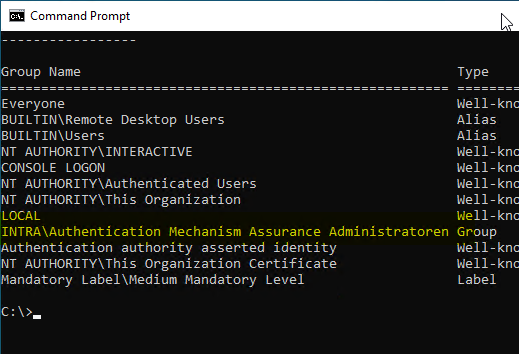
The user is now a member of the security group managed by Authentication Mechanism Assurance.
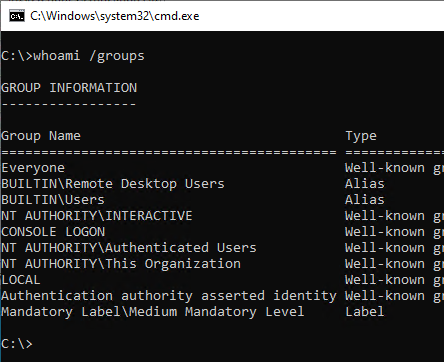
For comparison, the group memberships after a logon with username and password. The user is not a member of the security group:
Related links:
- Configuring a Certificate Template for Authentication Mechanism Assurance (AMA)
- Associate a universal security group with an Object Identifier (OID) in the Active Directory directory service (Authentication Mechanism Assurance).