Using Authentication Mechanism Assurance (AMA) to secure the logon of administrative accounts

Authentication Mechanism Assurance (AMA) is a feature designed to ensure that a user is a member of a security group only if they can be shown to have logged on using a strong authentication method (i.e., a smart card). If the user logs on via username and password instead, he or she will not have access to the requested resources.

Originally intended for access to file servers, however, AMA can also be used (with some restrictions) for administrative logon. Thus, for example, it would be conceivable for a user to be unprivileged when logging on with a username and password, and to have administrative rights when logging on with a certificate.

Continue reading "Using Authentication Mechanism Assurance (AMA) to secure the logon of administrative accounts"

Basics: Manual and automatic certificate requests via Lightweight Directory Access Protocol (LDAP) and Remote Procedure Call / Distributed Common Object Model (RPC/DCOM) with the MS-WCCE protocol

The following describes the process that runs in the background when certificates are requested manually or automatically in order to achieve the highest possible level of automation.

Continue reading "Basics: Manual and automatic certificate requests via Lightweight Directory Access Protocol (LDAP) and Remote Procedure Call / Distributed Common Object Model (RPC/DCOM) with the MS-WCCE protocol"

Configuring a Certificate Template for Authentication Mechanism Assurance (AMA)

Authentication Mechanism Assurance (AMA) provides the ability to tie membership in a security group to logon with a smart card certificate containing a specific Object Identifier (OID).

If the user does not log on with the smart card certificate, but with user name and password, he is also not a member of the security group.

The following describes how to generate a certificate template for use with Authentication Mechanism Assurance.

Continue reading "Configuring a Certificate Template for Authentication Mechanism Assurance (AMA)"

(Re-)Installing the Microsoft Standard Certificate Templates

There may be cases where it is necessary to install the standard Microsoft certificate templates before installing the first Active Directory integrated certification authority (Enterprise Certification Authority), or to reinstall the templates, for example because they have been corrupted or otherwise modified.

Continue reading "(Re-)Installing the Microsoft Standard Certificate Templates"

The Network Device Enrollment Service (NDES) administration web page (certsrv/mscep_admin) reports "You do not have sufficient permission to enroll with SCEP. Please contact your system administrator."

Assume the following scenario:

  • An NDES server is configured on the network.
  • When calling the administration web page (certsrv/mscep_admin) the following message appears:
You do not have sufficient permission to enroll with SCEP. Please contact your system administrator. 

Continue reading "The Network Device Enrollment Service (NDES) administration web page (certsrv/mscep_admin) reports "You do not have sufficient permission to enroll with SCEP. Please contact your system administrator.""

Configure Device Template for Network Device Enrollment Service (NDES)

By default, the Network Device Enrollment Service (NDES) requests certificates from the "IPsec (Offline Request)" template. This certificate template is from Windows 2000 times and cannot be edited. Therefore, it is recommended to change the default settings and use your own certificate templates that serve your personal requirements.

Continue reading "Configure Device Template for Network Device Enrollment Service (NDES)"

Using custom Registration Authority (RA) certificate templates for the Network Device Enrollment Service (NDES)

The Network Device Enrollment Service (NDES) uses two certificate templates for its internal function to make it act as a Registration Authority (RA). These are published during role configuration of the NDES service on the configured certification authority and certificates are requested:

  • CEP Encryption
  • Exchange Enrollment Agent (Offline Request)

These certificate templates are standard templates from the Windows 2000 world (version 1 templates), i.e. they cannot be edited. In addition, the Exchange Enrollment Agent (Offline Request) template is marked as a user template, i.e. during NDES role configuration the certificate is requested in the context of the installing user and then imported into the machine store. At the latest when the certificates are to be renewed after two years, things get complicated here.

It is therefore a good idea to use your own certificate templates for NDES. These can be adapted in terms of their key length, for example. The use of hardware security modules (HSM) is also possible in this way. Even automatic renewal can be configured.

Continue reading "Using custom Registration Authority (RA) certificate templates for the Network Device Enrollment Service (NDES)"

Description of the EDITF_ADDOLDKEYUSAGE flag

When installing a subordinate certification authority, you may encounter the following behavior:

  • One requests a Key Usage extension that is marked as critical, for example, or does not include DigitalSignature.
  • However, the certificate issued by the parent certification authority includes DigitalSignature, and the Key Usage extension is marked as non-critical.
  • The parent certification authority is a standalone certification authority, i.e. without Active Directory integration.

Continue reading "Description of the EDITF_ADDOLDKEYUSAGE flag"

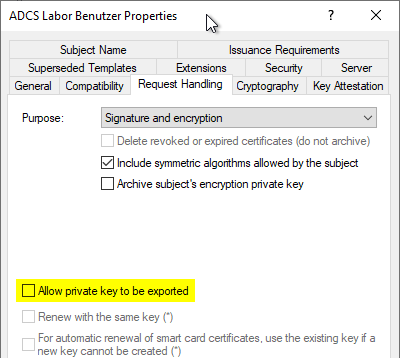
How secure is the "Allow private key to be exported" setting in the certificate templates?

PKI administrators often assume that the option in the certificate template not to allow the private key to be exported is binding.

However, that is not the case.

Continue reading "How secure is the "Allow private key to be exported" setting in the certificate templates?"

Overview of the different generations of domain controller certificates

Over the generations of Windows operating systems, various certificate templates for domain controllers have been established. In a current Active Directory directory service, one will find three different templates for this purpose.

  • Domain Controller
  • Domain Controller Authentication
  • Kerberos Authentication

Below is a description of each template and a recommendation for configuring domain controller certificate templates.

Continue reading "Overview of the different generations of domain controller certificates"

The Online Responder (OCSP) requests new signing certificates every four hours

Assume the following scenario:

  • The Online Responders are configured to request signing certificates using a certificate template from an Active Directory integrated certification authority.
  • The Online Responders request a new signing certificate at regular intervals (every four hours), even though the existing certificate is still valid for a sufficiently long time.

Continue reading "The Online Responder (OCSP) requests new signing certificates every four hours"