
Subsequently change the Subject Distinguished Name (DN) of a certificate request (CSR)
Sometimes it is necessary to change the Subject Distinguished Name (also called Subject or Subject DN, in German also "Antragsteller" or "Betreff") of a certificate request before issuing the certificate.
Under certain circumstances, this is certainly possible, as described below.
There are several ways to achieve this:
- Changing the subject DN of a certificate request pending approval
- Changing the subject DN during transmission to the certification authority
- Changing the subject DN of a certificate request before submitting it to the certification authority
However, for both methods, the certification authority must be prepared.
General conditions
- The procedure described below only works with offline certificate templates, i.e. those where the enrollee can determine the certificate content themselves.
- The procedure works regardless of whether the certificate template is configured to sign the certificate request directly or to require verification by a certificate manager.
- Setting the following flag will result in all users who have permissions to request a certificate being able to change the subject DN for all offline certificate templates published on the certification authority. This may pose a security problem under certain circumstances.
- The changes to the subject DN are made via "Request Attributes" and are therefore not part of the certificate request.
- It is only possible to set "known " RDN types. If RDN types are used which are not enabled on the certification authority by default, they must first be enabled .
Preparing the Certification Authority
Please note that setting the flag may pose a security problem.
Do you know TameMyCerts? TameMyCerts is an add-on for the Microsoft certification authority (Active Directory Certificate Services). It extends the function of the certification authority and enables the application of rule sets to realize the secure automation of certificate issuance. TameMyCerts is unique in the Microsoft ecosystem, has already proven itself in countless companies around the world and is available under a free license. It can be downloaded via GitHub and used free of charge. Professional maintenance is also offered.
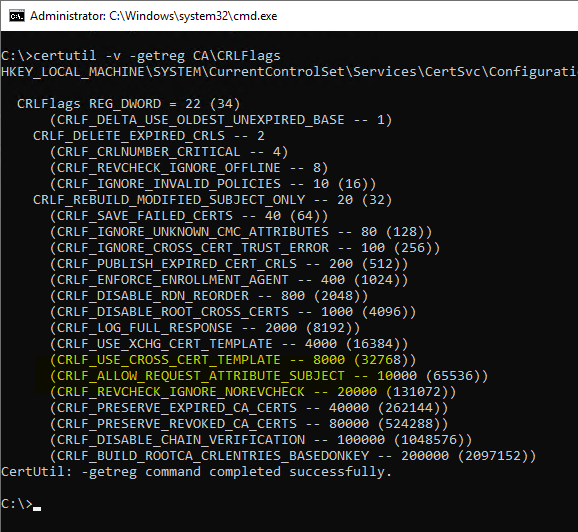
First, the CRLF_ALLOW_REQUEST_ATTRIBUTE_SUBJECT flag must be enabled on the certification authority. Whether this is already the case can be checked with the following command line command:
certutil -v –getreg CA\CRLFlagsIf the flag is indented and enclosed in brackets, it is not active.
certutil –setreg CA\CRLFlags +CRLF_ALLOW_REQUEST_ATTRIBUTE_SUBJECT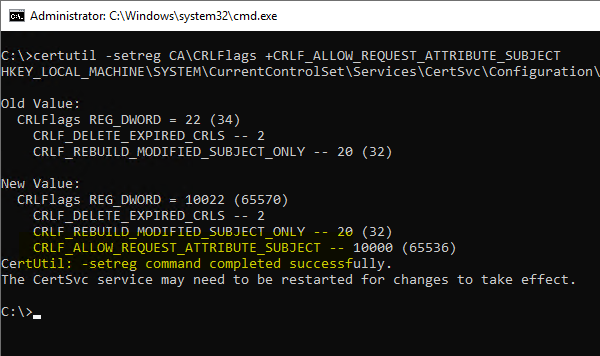
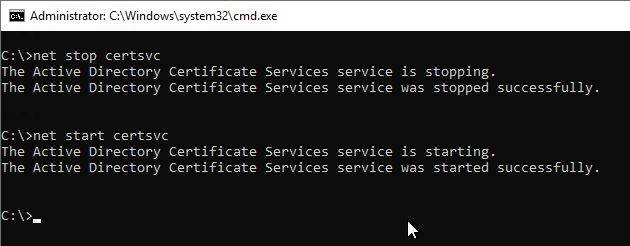
Subsequently, a restart of the certification authority service is required so that the changes are read in.
Changing the subject DN of a certificate request pending approval
Certificate manager permissions (Issue and Manage Certificates) are required for this variant.
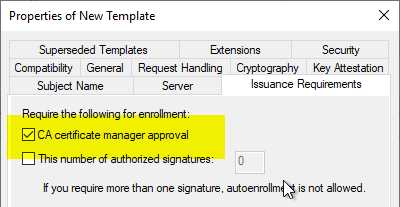
The certificate template must be configured so that incoming certificate requests are not issued directly, but that a check by a certificate manager is required ("CA certificate manager approval" option).
Incoming certificate requests then land in the "Pending Certificates" area on the certification authority.
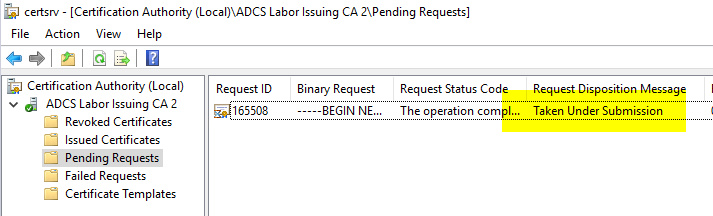
In our case, inspecting the certificate request shows that the subject is incorrect and must be replaced.
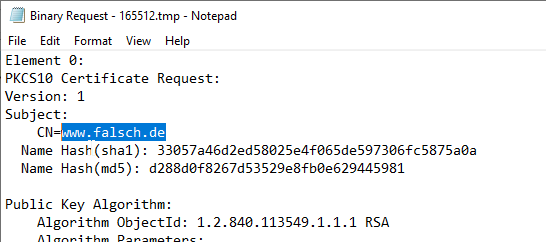
If the CRLF_ALLOW_REQUEST_ATTRIBUTE_SUBJECT flag is enabled on the certification authority, you can now add subject Relative Distinguished Names (RDNs) in the form of "name:value". Here is an example:
certutil –setattributes {Request-Id} "CN:{Wert-für-CN-Feld}\nOU:{Wert-für-OU-Feld}\nO:{Wert-für-O-Feld}"
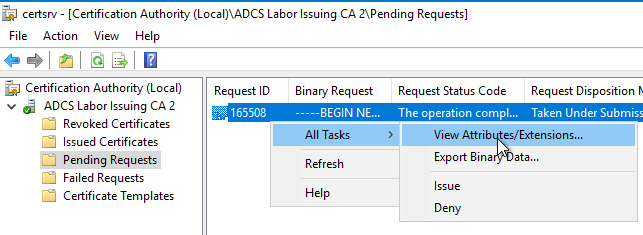
If you now inspect the request to be issued with "All Tasks" - "View Attributes/Extensions...", you should find the attributes in the first tab.
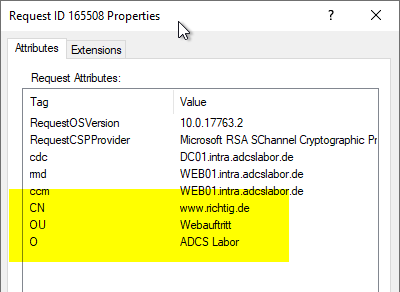
If the certificate is now issued, these values should be included in the issued certificate.
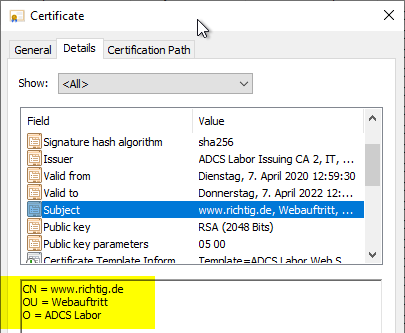
The command, if entered syntactically correctly, will always report success even if the above flag is not set on the certification authority. However, it will not work until the above flag is set, the certification authority service is restarted, and then the attributes are edited.
It is not possible to delete an existing RDN. However, you can overwrite it with an empty string (e.g. in the format "CN="), which means that the certification authority cannot enter the RDN in the issued certificate.
Changing the subject DN during transmission to the certification authority
A requester can also transmit the desired manipulations of the subject DN during the transmission of a certificate request to the certification authority via request attributes.
certreq -submit -config "{DNS-Name-der-CA}\{CA-Common-Name}" -attrib "CertificateTemplate:{Name-derZertifikatvorlage}\nCN:{Wert-für-CN-Feld}\nOU:{Wert-für-OU-Feld}\nO:{Wert-für-O-Feld}"Changing the subject DN of a certificate request before submitting it to the certification authority
For this method, the certificate request must be signed by a user who has an Enrollment Agent certificate. Furthermore, the certification authority certificate of the certification authority that issued the Enrollment Agent certificate must be stored in the NTAuthCertificates object in the Active Directory forest.
The following method is usually also performed by a certificate manager, since a corresponding certificate is required to sign the request. The difference is that the processing is done before the certificate request is sent to a certification authority. The PKCS#10 certificate request is packaged in a CMC layer in which the differing attributes are specified. This is then signed. This procedure is necessary to preserve the original certificate request. This cannot be changed, otherwise the signature would be invalid.
First, an INF file must be created, which has the following content:
[Version]
Signature= "$Windows NT$"

[RequestAttributes]
CN = "{CommonName}"
DC = "{DomainComponent}"
OU = "{OrganizationalUnitName}"
L = "{LocalityName}"
O = "{OrganizationName}"
S = "{StateOrProvinceName}"
C = "{Country}"
G = "{GivenName}"
I = "{Initials}"
E = "{EmailAddress}"
T = "{Title}"
SN = "{SurName}"
StreetAddress = "{StreetAddres}"
DeviceSerialNumber = "{DeviceSerialNumber}"
UnstructuredAddress = "{UnstructuredAddress}"
UnstructuredName = "{UnstructuredName}"
The values set in brackets ("{value}") must be adapted accordingly to your own environment. Values that are not required can be commented out with a preceding semicolon (";"), or the entire line can be deleted.
It should also be noted that the attributes from the original certificate request and the edited version are combined if they differ. Overlapping attributes must therefore be overwritten. A deletion is not possible, but you can overwrite with empty strings (e.g. C=""), which is equivalent to a deletion.
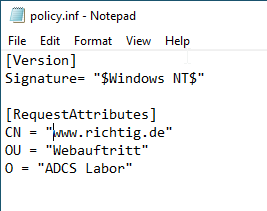
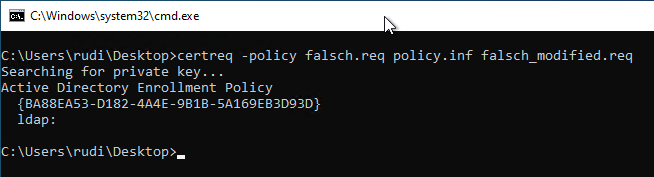
Now the policy file can be applied to the certificate request with the following command. A new request file is created, the name of which must also be specified.
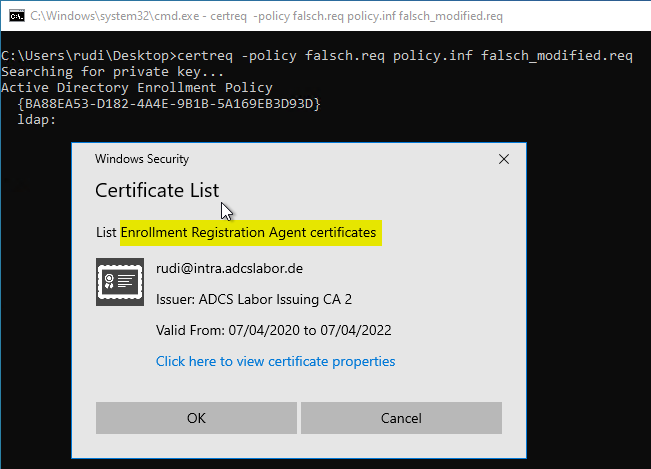
certreq -policy {Request-Datei} {Policy-Datei} {Ausgabe-Datei}During the process, you will be prompted to specify the signing certificate to be used. This must contain the Extended Key Usage "Certificate Request Agent".
You can also use a certification authority certificate, but this is not recommended.
Now the newly created request file can be sent to the certification authority :
certreq -submit {Ausgabe-Datei}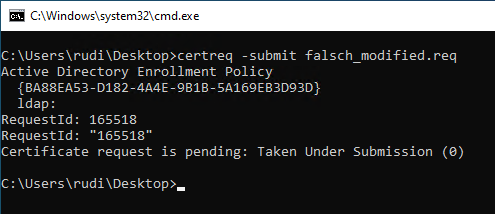
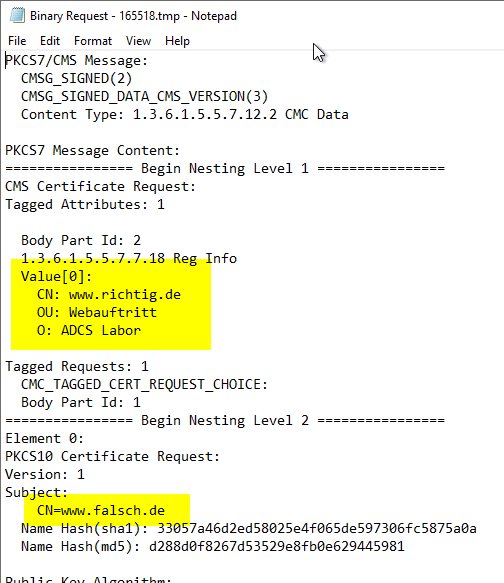
When inspecting the certificate request, you should now be able to find both the desired new attributes in the CMC layer and the previous values in the PKCS#10 layer.
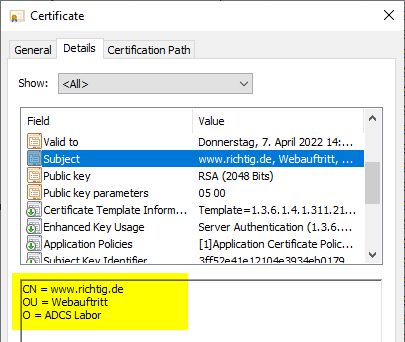
Likewise also in the issued certificate.
Related links:
- Allowed Relative Distinguished Names (RDNs) in the Subject of Issued Certificates
- Change the order of the Relative Distinguished Names (RDNs) in the subject of issued certificates.
- Manually send a certificate request (CSR) to a certification authority
- Editing the NTAuthCertificates object in Active Directory
- Inspect a certificate request (CSR)
- Adding a Subject Alternative Name (SAN) to a Certificate Request (CSR) Subsequently
- Basics: Enroll on Behalf of (EOBO)
External sources
- Name Properties (Microsoft Learn)
- MSCA: How to add Organizational Unit to a certificate (Microsoft TechNet Forums)