
Requesting a Certificate for Windows Systems Using the SCEP Protocol via the Network Device Enrollment Service (NDES) with Windows PowerShell
If you want to equip Windows systems with certificates that do not have the option of communicating directly with an Active Directory-integrated certification authority, or that are not even in the same Active Directory forest, the only option in most cases is to install certificates manually.
Since Windows 8.1 / Windows Server 2012 R2, however, there is an integrated client for the Simple Certificate Enrollment Protocol (SCEP) on board. On the server side, SCEP has been implemented in the Microsoft PKI via the Network Device Enrollment Service (NDES) since Windows Server 2003.
A particularly interesting feature of SCEP is that the protocol allows a certificate to be renewed by specifying an existing one. So what could be more obvious than to use this interface? What is still missing is a corresponding automation via Windows PowerShell.
The Network Device Enrollment Service (NDES) provides a way for devices that do not have an identifier in Active Directory (for example, network devices such as routers, switches, printers, thin clients, or smartphones and tablets) to request certificates from a certification authority. For a more detailed description, see the article "Basics: Network Device Enrollment Service (NDES) ".
In order to automate the request for the required one-time passwords (OTP) and the subsequent certificate request with Windows PowerShell, I wrote the PowerShell module "PSCertificateEnrollment" and provided it on GitHub and in the PowerShell Gallery .
The PowerShell module works only on Windows 8.1 or Windows Server 2012 R2 or later. PowerShell Core and Linux are not supported.
First, the module must be installed and loaded on the system.
Import-Module PSCertificateEnrollmentRequesting a one-time password for the subsequent certificate request
Do you know TameMyCerts? TameMyCerts is an add-on for the Microsoft certification authority (Active Directory Certificate Services). It extends the function of the certification authority and enables the application of rule sets to realize the secure automation of certificate issuance. TameMyCerts is unique in the Microsoft ecosystem, has already proven itself in countless companies around the world and is available under a free license. It can be downloaded via GitHub and used free of charge. Professional maintenance is also offered.
The Get-NDESOTP command would typically be run on a management workstation or management server.
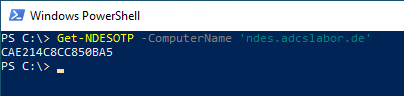
If the command is called with the computer name, authentication is performed at the NDES administration web page and the returned one-time password is output.
Get-NDESOTP -ComputerName "ndes.adcslabor.de"The connection is established in this way using SSL. However, this strictly requires that the parameter -ComputerName is specified identically to the identity stored in the SSL certificate of the NDES server.
This way, it would also be easy to request multiple one-time passwords at once.
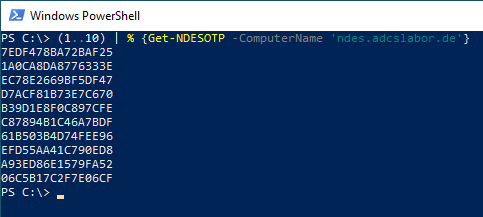
When requesting multiple passwords, please configure the number of passwords in circulation at the same time accordingly.
Optional: Logon by specifying user name and password
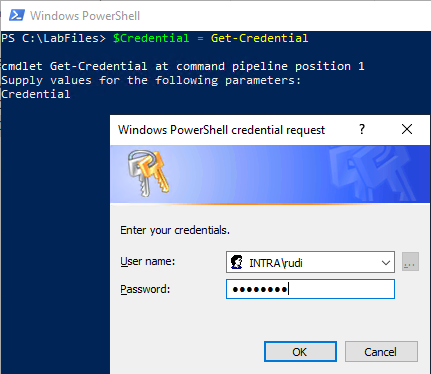
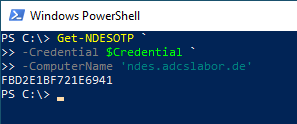
By default, the identity of the logged-on user is used for the logon to the NDES server. Logon by specifying the user name and password is implemented via the -Credential switch, which expects a PSCredential object (create with Get-Credential).
Optional: Disable the use of SSL (not recommended)
The use of SSL can be switched off with the switch -NoSSL, should this be necessary.
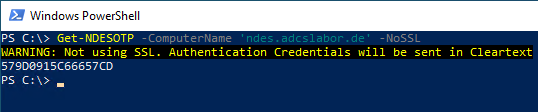
The use of SSL is strongly recommended for one-time password requests to protect the credentials used.
Requesting the certificate via the NDES server
When requesting a certificate via SCEP, the enrollee has full control over the subject information contained in the certificate. Thus, this should only be used in controlled environments, or the certificate request via SCEP should only be used for the convenient renewal of certificates (see below).
By default, the certificate is requested in the user context. However, a certificate can also be requested for the computer account via the switch -MachineContext. In this case, however, the command must be executed with administrator rights (Run as Administrator).
On the target system, the request for a certificate can now be carried out with the command "Get-NDESCertificate", specifying the previously requested one-time password.
Get-NDESCertificate `
-ComputerName "192.168.1.136" `
-Upn "Administrator@intra.adcslabor.de" `
-ChallengePassword "BDE00774A789610F"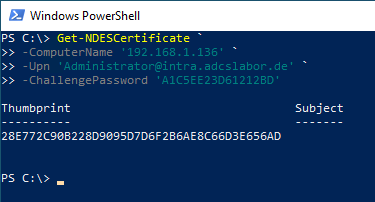
Optional: Use SSL
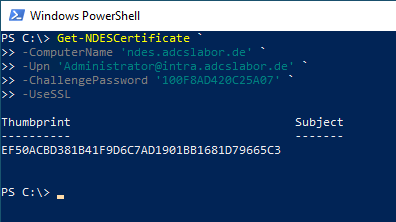
In contrast to the request for the one-time password, no Secure Sockets Layer (SSL) is used for the certificate request in the default setting, since the transmitted data is sufficiently protected by the SCEP protocol (see article "Basics: Network Device Enrollment Service (NDES) ").
Should it be necessary, the switch -UseSSL can be used to establish a connection with SSL.
Renewal of the certificate
Requesting a certificate with authentication by an already existing certificate is also possible. First, the old certificate must be stored in a variable (data type X509Certificate2 ).
$OldCert = Get-ChildItem -Path Cert:\CurrentUser\my\09D57E727FE4BEC786E46D26C08321C139173E4CIt can then be specified as a signing certificate for requesting a new certificate.
The subject information (subject and subject alternative name) is read from the old certificate and transferred to the certificate request for the new certificate. The information cannot be configured in this mode. This ensures that the subject information is identical to the previous certificate and is therefore accepted by the NDES server. For this reason, this information can also not be specified when renewal mode is used.
$OldCert | Get-NDESCertificate -ComputerName "192.168.1.136"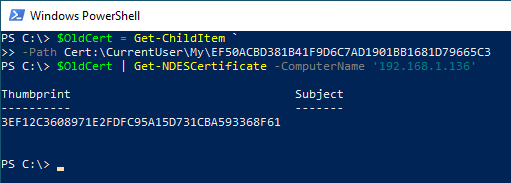
A renewal of the certificate using the previous certificate can also be made with the built-in tools .
Conclusion
Requesting one-time passwords and certificates via NDES can be used for cloud automation, for example, to automatically equip systems without domain membership with certificates.
With the option of requesting certificates by specifying an existing certificate, the renewal of manually requested web server certificates can also be significantly simplified.
Related links:
- Authentication at the Network Device Enrollment Service (NDES) with an existing certificate (renewal mode)
- Basics: Network Device Enrollment Service (NDES)
- Installing the Network Device Enrollment Service (NDES) without Enterprise Administrator permissions
External sources
- Sleepw4lker / PSNDESEnrollment (GitHub)