
Performing a functional test for a certification authority
After installing a certification authority, after migrating to a new server, or after more extensive maintenance work, an extensive functional test should be performed to ensure that all components of the certification authority are working as desired.
Performing a functional test
Do you know TameMyCerts? TameMyCerts is an add-on for the Microsoft certification authority (Active Directory Certificate Services). It extends the function of the certification authority and enables the application of rule sets to realize the secure automation of certificate issuance. TameMyCerts is unique in the Microsoft ecosystem, has already proven itself in countless companies around the world and is available under a free license. It can be downloaded via GitHub and used free of charge. Professional maintenance is also offered.
A functional test of the certification authority includes the following steps:
- Verification of the connection to the private key
- Ensure start of the certification authority service
- Checking the Event Viewer of the certification authority
- Test the connection to the enrollment interface of the certification authority
- Generate and verify the certification authority exchange certificate
- Publish a certificate template on the certification authority
- Request a certificate from the certification authority
- Revoke a certificate
- Publish a certificate revocation list
- Recheck the certificate
Details: Verification of the connection to the private key
In particular, if a hardware security module is used, the first thing to check is whether the connection to it works and the private key material can be used by the certification authority. The procedure for this is described in the article "Checking the connection to the private key of a certificate (e.g. when using a hardware security module) ".
Details: Ensure the start of the certification authority service
Next, check that the certification authority service starts correctly.
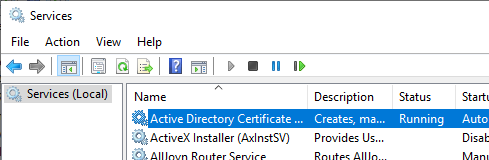
If you encounter problems with this step, the following articles may be helpful:
- The certification authority service does not start and throws the error message "The system cannot find the file specified. 0x2 (WIN32: 2 ERROR_FILE_NOT_FOUND)".
- The certification authority service does not start and throws the error message "Object was not found. 0x80090011 (-2146893807 NTE_NOT_FOUND)".
- The certification authority service does not start and throws the error message "The device that is required by this cryptographic provider is not ready for use. 0x80090030 (-2146893776 NTE_DEVICE_NOT_READY)"
- The certification authority service does not start and throws the error message "The parameter is incorrect. 0x80070057 (WIN32: 87 ERROR_INVALID_PARAMETER)".
- The certification authority service does not start and throws the error message "The certificate is revoked. 0x80092010 (-2146885616 CRYPT_E_REVOKED)".
- The certification authority service does not start and throws the error message "The data is invalid. 0x8007000d (WIN32: 13 ERROR_INVALID_DATA)."
- The certification authority service does not start and throws the error message "A certificate chain processed, but terminated in a root certificate which is not trusted by the trust provider. 0x800b0109 (-2146762487 CERT_E_UNTRUSTEDROOT)"
- The certification authority service does not start and throws the error message "A certificate chain could not be built to a trusted root authority. 0x800b010a (-2146762486 CERT_E_CHAINING)".
- The certification authority service does not start and throws the error message "The revocation function was unable to check revocation because the revocation server was offline. 0x80092013 (-2146885613 CRYPT_E_REVOCATION_OFFLINE)".
Details: Checking the Event Viewer of the certification authority
For information on the individual events, see the article "Overview of Windows events generated by the certification authority ".
First, the Windows Event Viewer on the certification authority should be scanned for any certification authority events that could indicate an error. For this purpose, there is a predefined view in Event Viewer under "Custom Views" - "Server Roles" - "Active Directory Certificate Services", which has already defined the required filters on Event Viewer.
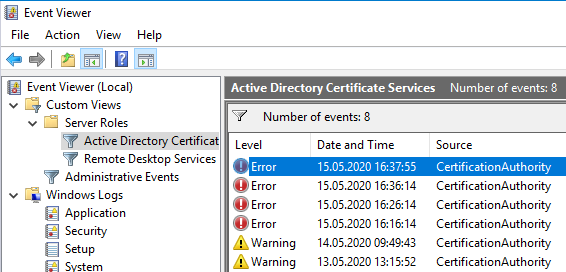
If you encounter problems with this step, the following articles may be helpful:
- Details of the event with ID 27 of the source Microsoft-Windows-CertificationAuthority
- Details of the event with ID 44 of the source Microsoft-Windows-CertificationAuthority
- Details of the event with ID 74 of the source Microsoft-Windows-CertificationAuthority
- Details of the event with ID 100 of the source Microsoft-Windows-CertificationAuthority
Details: Testing the connection to the enrollment interface of the certification authority
First, a simple test should be performed to see if clients can connect to the certification authority. This can be achieved with the following command line command:
certutil -config {ConfigString} -pingThe ConfigString denotes the connection information to the certification authority in the format "{Servername}\{Common-Name}".
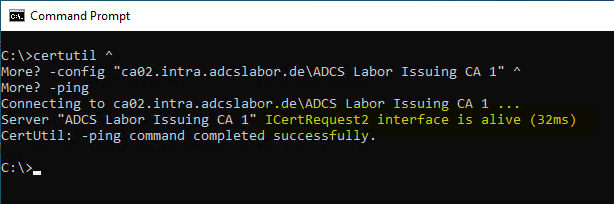
If you encounter problems with this step, the following articles may be helpful:
Details: Generate and verify the certification authority exchange certificate
To ensure that the certification authority writes the CRL distribution points (CDP), the Authority Information Access (AIA) information, and certificate policies to the issued certificates, a certificate is required, the contents of which are then verified.
The subsequent check can in principle be performed with any certificate issued by the certification authority. However, the certification authority exchange certificate is a good choice because it is automatically generated by the certification authority and can be requested by any user in Active Directory. Thus, at this point, the need for the potentially cumbersome creation of a certificate request is eliminated for the time being.
The certificate for the certification authority exchange can be generated with the following command line command:
certutil -cainfo xchg > test.cer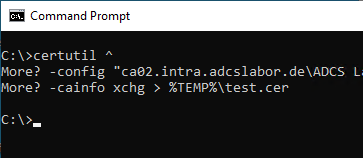
The command can be executed directly on the certification authority as listed above. For an Active Directory integrated certification authority, it can also be executed by another domain member if the -config switch is included with the config string (Servername\Common-Name) as an argument.
If you encounter problems with this step, the following articles may be helpful:
The certificate created with the command can now be inspected by double-clicking on it.
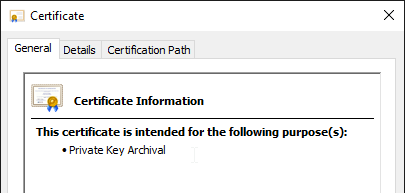
The following contents of the certificate must be verified:
- CRL distribution points
- Authority Information Access
- Certificate policies
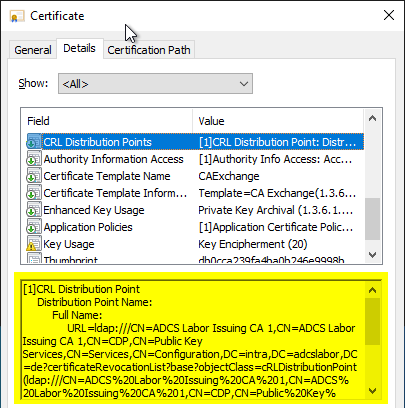
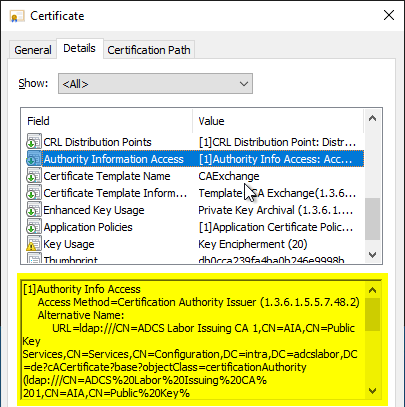
The addresses specified in the certificate for CRL distribution points (CDP) and Authority Information Access (AIA) can then be checked using the following command line command:
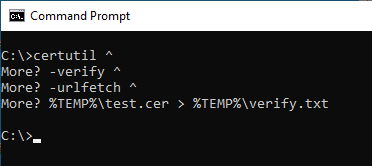
certutil -verify -urlfetch {Dateiname}.cerThe -urlfetch switch bypasses local caching, and results in command line output instead of a graphical interface. For more information, see the article "View and clear the revocation list address cache (CRL URL Cache). ".
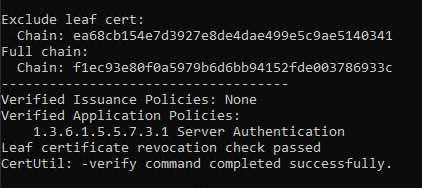
Due to the extensive output, it is recommended to redirect the command line output to a text file.
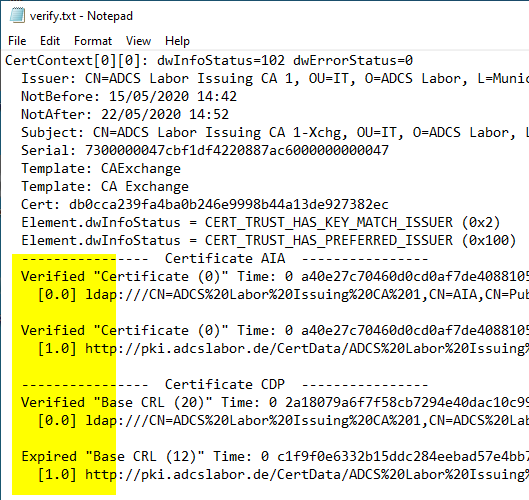
The command line output contains the respective check result for all addresses of all certificates in the chain. These should all have been checked successfully. Errors are output with a detailed error code describing the cause.
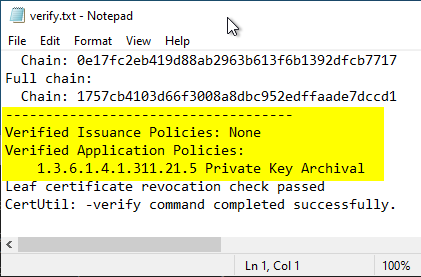
At the end of the command line output are the check results for certificate policy, revocation status and trust status (only in case of error).
Details: Publish a certificate template on the certification authority
In order to check the certification authority's permissions on its pKIEnrollmentService object, and then to be able to request a certificate, a certificate template should now be published on the certification authority.
If you encounter problems with this step, the following articles may be helpful:
- Publishing a certificate template on a CA fails with error message "The template information on the CA cannot be modified at this time. This is most likely because the CA service is not running or there are replication delays. Access is denied. 0x80070005 (WIN32: 5 ERROR_ACCESS_DENIED)".
- After the migration of the certification authority to a new server, own certificate templates can no longer be published
Details: Request a certificate from the certification authority
To verify that the certificate enrollment policies are configured correctly and that the certification authority can sign certificate requests, a certificate should now be requested from the previously published certificate template.
If the certification authority is in maintenance mode as described in the article "Putting an Active Directory integrated certification authority (Enterprise Certification Authority) into maintenance mode ", the requesting user or computer object must temporarily be explicitly granted the "Request Certificates" right in the certification authority's security settings until maintenance mode is exited again.
If you encounter problems with this step, the following articles may be helpful:
- Certificate request fails with error message "0x800b0101 (-2146762495 CERT_E_EXPIRED)".
- Certificate request fails with error message "The encryption certificate for the certification authority (CA) could not be retrieved. Error: The RPC server is unavailable. 0x800706ba (WIN32: 1722 RPC_S_SERVER_UNAVAILABLE)".
- Certificate request fails with error message "0x8009400b (-2146877429 CERTSRV_E_NO_VALID_KRA)".
- Requesting a certificate fails with the error message "You cannot request a certificate at this time because no certificate types are available."
- Requesting a certificate fails with the error message "A certification chain processed correctly, but one of the CA certificates is not trusted by the policy provider. 0x800b0112 (-2146762478 CERT_E_UNTRUSTEDCA)".
- Requesting a certificate fails with the error message "The requested operation cannot be completed. The computer must be trusted for delegation and the current user account must be configured to allow delegation. 0x80090345 (-2146892987 SEC_E_DELEGATION_REQUIRED).". When importing PFX files, the private key is missing.
- Requesting a certificate for domain controllers fails with error message "The RPC server is unavailable. 0x800706ba (WIN32: 1722 RPC_S_SERVER_UNAVAILABLE)".
- Requesting a certificate fails with the error message "A valid certification authority (CA) configured to issue certificates based on this template cannot be located, or the CA does not support this operation, or the CA is not trusted."
Details: Revoke a certificate
In order to verify that the revocation of a certificate is correctly recognized by all participants in the network, the previously requested certificate should now be revoked. The procedure for revoking a certificate is described in the article "Revoking an issued certificate ".
Details: Issue a certificate revocation list
After the certificate has been revoked, the creation of a certificate revocation list can now be tested. The procedure for issuing a certificate revocation list is described in the article "Create and publish a certificate revocation list ".
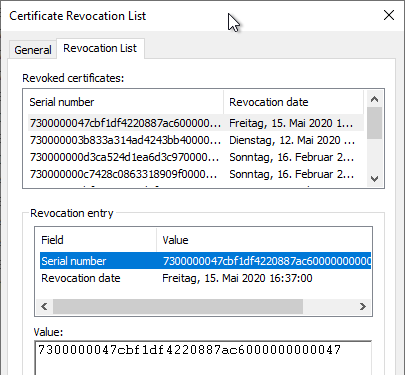
The certificate revocation list should now be created and the serial number of the revoked certificate should be found on it again.
If you encounter problems with this step, the following articles may be helpful:
- Manual publishing of a certificate revocation list (CRL) to Active Directory fails with error 0x8007202b (WIN32: 8235 ERROR_DS_REFERRAL)
- Publishing a certificate revocation list (CRL) fails with error message "The directory name is invalid. 0x8007010b (WIN32/HTTP: 267 ERROR_DIRECTORY)".
- Publishing a certificate revocation list (CRL) fails with error message "Access is denied. 0x80070005 (WIN32: 5 ERROR_ACCESS_DENIED)".
- Publishing a certificate revocation list (CRL) fails with the error message "Directory object not found. 0x8007208d (WIN32: 8333 ERROR_DS_OBJ_NOT_FOUND)".
- Publishing a certificate revocation list (CRL) fails with the error message "Insufficient access rights to perform the operation. 0x80072098 (WIN32: 8344 ERROR_DS_INSUFF_ACCESS_RIGHTS)".
Details: Recheck the certificate
The revoked certificate should now be on the revocation list and should be recognized as revoked by the subscribers. Therefore, the steps described in the section "Generate and verify the certification authority exchange certificate" should now be performed again to verify the addresses within the certificate.
To be on the safe side, the local cache for the revocation information should be cleared beforehand, as described in the article "View and clear the revocation list address cache (CRL URL Cache). ".
The revocation of the certificate should now be correctly detected and reported.
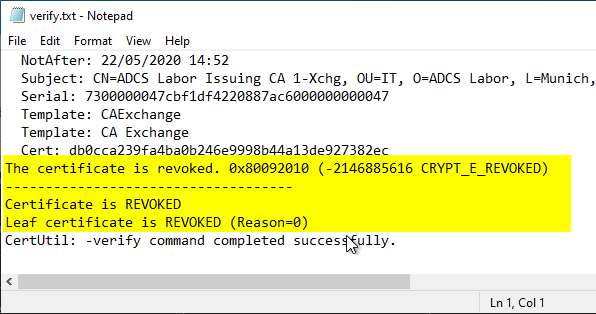
If an Online Responder is used, it has a server-side cache so that it does not reflect the revocation of the certificate until the previous certificate revocation list has expired.