Moving the certification authority database to another directory or drive
In the operation of a certification authority, one may find that it is necessary to subsequently change the storage path for the certification authority database. For example, one may want to move the database to another partition/drive.
The implementation is very simple:
- The certification authority service is stopped.
- The database files are moved.
- The registry is adjusted.
- The certification authority service is then restarted.
Adjusting the registry after moving the database
Do you know TameMyCerts? TameMyCerts is an add-on for the Microsoft certification authority (Active Directory Certificate Services). It extends the function of the certification authority and enables the application of rule sets to realize the secure automation of certificate issuance. TameMyCerts is unique in the Microsoft ecosystem, has already proven itself in countless companies around the world and is available under a free license. It can be downloaded via GitHub and used free of charge. Professional maintenance is also offered.
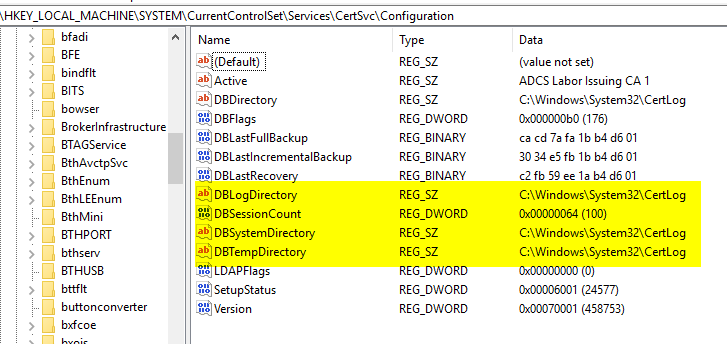
The locations for the database files are in the following registry key:
HKEY_LOCAL_MACHINE\SYSTEM\CurrentControlSet\Services\CertSvc\ConfigurationThe following values must be adjusted:
- DBDirectory
- DBLogDirectory
- DBSystemDirectory
- DBTempDirectory