
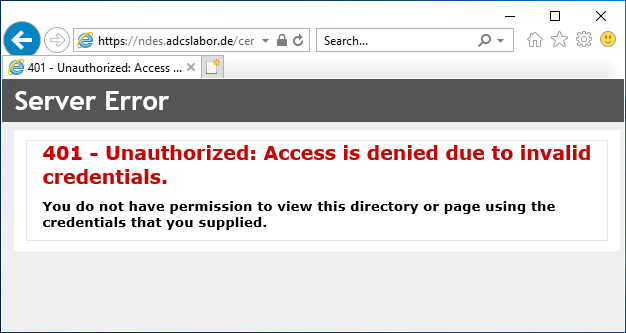
Logon to the Network Device Enrollment Service (NDES) administration web page fails with HTTP error code 401 "Unauthorized: Access is denied due to invalid credentials."
Assume the following scenario:
- An NDES server is configured on the network.
- When calling the NDES administration web page (certsrv/mscep_admin), logon is not possible.
- After several unsuccessful logon attempts, the following HTTP error message is returned:
401 - Unauthorized: Access is denied due to invalid credentials.
You do not have permission to view this directory or page using the credentials that you supplied.
The Network Device Enrollment Service (NDES) provides a way for devices that do not have an identity in Active Directory (for example, network devices such as routers, switches, printers, thin clients, or smartphones and tablets) to request certificates from a certification authority. For a more detailed description, see the article "Basics: Network Device Enrollment Service (NDES) ".
Possible causes
Do you know TameMyCerts? TameMyCerts is an add-on for the Microsoft certification authority (Active Directory Certificate Services). It extends the function of the certification authority and enables the application of rule sets to realize the secure automation of certificate issuance. TameMyCerts is unique in the Microsoft ecosystem, has already proven itself in countless companies around the world and is available under a free license. It can be downloaded via GitHub and used free of charge. Professional maintenance is also offered.
- The user logging on has entered an incorrect password.
- A logon restriction is configured for the user account logging on.
Details: A logon restriction is configured for the user account logging on
The behavior can occur if a logon restriction is set in the account of the user logging on, for example, the userWorkstations Active Directory attribute.
Microsoft recommends to stop using the attribute.
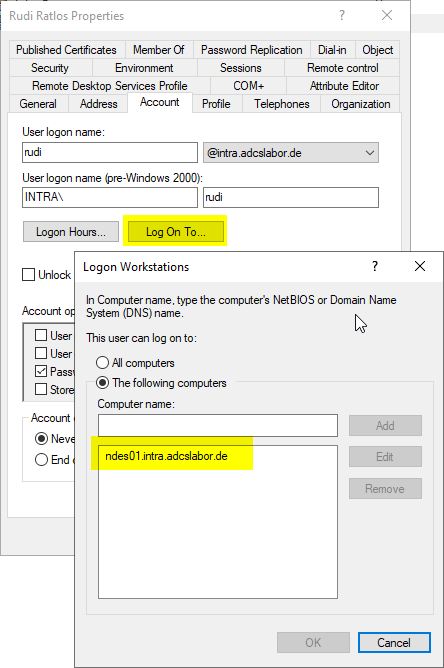
The attribute can be queried via Windows PowerShell with the following command:
Get-ADUser -Identity {Kontoname} -Properties userWorkstations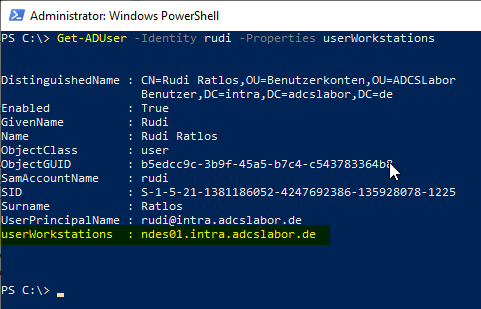
External sources
- User-Workstations attribute (Microsoft)