
Logon error with Windows Hello for Business: "Contact your system administrator and tell them that the KDC certificate could not be validated."
Assume the following scenario:
- The company is using Windows Hello for Business.
- Users receive the following error message when logging on to the client:
Sign-in failed. Contact your system administrator and tell them that the KDC certificate could not be validated. Additional information may be available in the system event log.The German translation of the error message is:
Fehler beim Anmelden. Wenden Sie sich an den Systemadministrator, und teilen Sie ihm mit, dass das KDC-Zertifikat nicht überprüft werden konnte. Das Systemereignisprotokoll enthält möglicherweise zusätzliche InformationenOn the domain controllers, the Event with ID 32 of source Microsoft-Windows-Kerberos-Key-Distribution-Center may be logged.
Possible causes
Do you know TameMyCerts? TameMyCerts is an add-on for the Microsoft certification authority (Active Directory Certificate Services). It extends the function of the certification authority and enables the application of rule sets to realize the secure automation of certificate issuance. TameMyCerts is unique in the Microsoft ecosystem, has already proven itself in countless companies around the world and is available under a free license. It can be downloaded via GitHub and used free of charge. Professional maintenance is also offered.
As the error message suggests, the KDC certificate (i.e. the domain controller certificate) cannot be verified by the client. Possible causes are:
- The domain controllers do not have corresponding certificates.
- The domain controller certificate has expired.
- The domain controller certificate does not have one of the Extended Key Usages necessary for Windows Hello for Business (analogous to smart card logon) ("KDC Authentication" or "Smartcard Logon").
- The certification authority that issues the domain controller certificates is not entered in the NTAuthCertificates object in Active Directory.
- The revocation status of the domain controller certificate cannot be verified, for example because the revocation information has expired or is not accessible. Think here also of the entire certification authority hierarchy, the same problem occurs if the revocation information of a higher-level certification authority is not valid.
Further narrowing of the error
The domain controller certificates can be verified with the following command:
certutil -dcinfo verifyPlease note here, that the command requires domain administrator permissions .
For example, a problem with the revocation status check could be identified this way:
The revocation function was unable to check revocation because the revocation server was offline. 0x80092013 (-2146885613 CRYPT_E_REVOCATION_OFFLINE)Die Sperrfunktion konnte die Sperrung nicht überprüfen, da der Sperrserver offline war. 0x80092013 (-2146885613 CRYPT_E_REVOCATION_OFFLINE).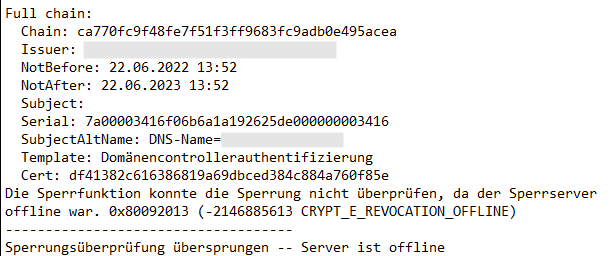
Please note that the CRYPT_E_REVOCATION_OFFLINE error code does not distinguish whether the CRL cannot be downloaded or whether it can be downloaded but has expired.
Related links:
- Editing the NTAuthCertificates object in Active Directory
- Domain Controller Certificate Templates and Smart Card Logon
- Frequently Used Extended Key Usages and Issuance Policies
- Basics: Checking the revocation status of certificates
External sources
- KDC Certificate Could Not Be Validated Error (Microsoft TechNet Forums)