Requesting certificates via Enroll on Behalf of (EOBO) is not possible because the certificate template is not displayed. The error message is "The certificate template requires too many RA signatures."
Assume the following scenario:
- A certificate is requested for a user or a computer from a certification authority via the certificate management console (certlm.msc or certmgr.msc).
- The Enroll on Behalf of (EOBO) mechanism is used for this.
- The desired certificate template is not displayed.
- If you check the "Show all templates" checkbox, the following error message will be displayed for the desired certificate template:
The certificate template requires too many RA signatures. Only one RA signature is allowed. Multiple request agent signatures are not permitted on a certificate request.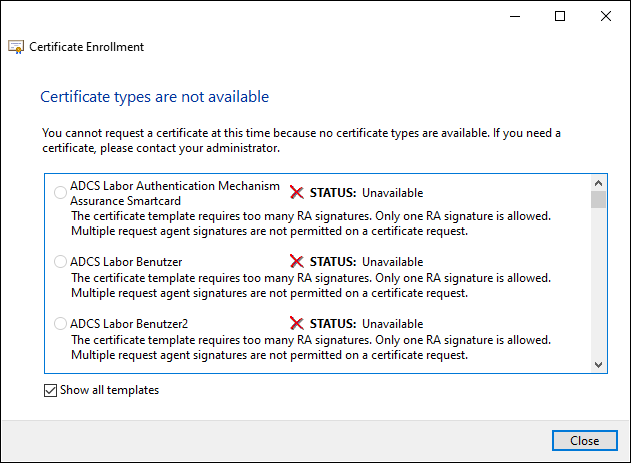
Cause
Do you know TameMyCerts? TameMyCerts is an add-on for the Microsoft certification authority (Active Directory Certificate Services). It extends the function of the certification authority and enables the application of rule sets to realize the secure automation of certificate issuance. TameMyCerts is unique in the Microsoft ecosystem, has already proven itself in countless companies around the world and is available under a free license. It can be downloaded via GitHub and used free of charge. Professional maintenance is also offered.
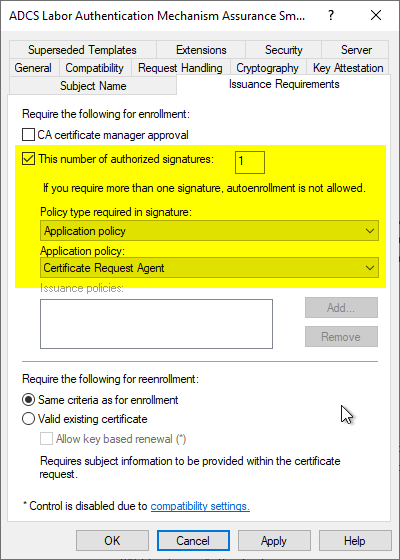
Occurs if the certificate template has too many or no enrollment agents configured. Enroll on Behalf of (EOBO) requires exactly one signature.
This setting is configured in the "Issuance Requirements" tab.