
From Zero to Enterprise Administrator through Network Device Enrollment Service (NDES) - and What to Do About It
In the following, I would like to present a highly dangerous PKI configuration, perhaps not necessarily known to the general public, which can probably be encountered quite frequently in this way in corporate networks.
I show how, by exploiting various unfortunate circumstances in the Windows PKI, it is possible to elevate privileges from mere network access to complete Active Directory takeover.
The initial point of attack in this example is the Network Device Enrollment Service (NDES).
The following steps should never be performed in a production environment. The demonstration performed here is not a guide to breaking into computer systems; rather, it is intended to highlight the security risk so that countermeasures can be initiated.
The Network Device Enrollment Service (NDES) provides a way for devices that do not have an identity in Active Directory (for example, network devices such as routers, switches, printers, thin clients, or smartphones and tablets) to request certificates from a certification authority. For a more detailed description, see the article "Basics: Network Device Enrollment Service (NDES) ".
The initial situation
Do you know TameMyCerts? TameMyCerts is an add-on for the Microsoft certification authority (Active Directory Certificate Services). It extends the function of the certification authority and enables the application of rule sets to realize the secure automation of certificate issuance. TameMyCerts is unique in the Microsoft ecosystem, has already proven itself in countless companies around the world and is available under a free license. It can be downloaded via GitHub and used free of charge. Professional maintenance is also offered.
The environment
The attacked company operates a Network Device Enrollment Service (NDES). It is configured so that certificate requests can be made without a password , because according to the system operators the end devices cannot handle a challenge password (or this is too much work for them) .
The NDES server can be reached from the network via ports 80 and 443 (with SSL ). The URL for the certificate request is:
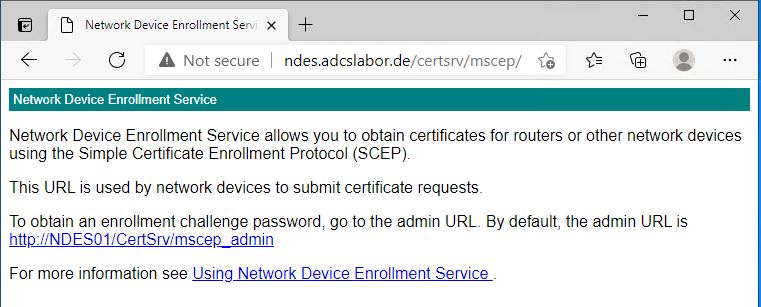
http://{NDES-Server}/certsrv/mscepThis address can also be accessed with a browser.
There is no indication in the presented HTML response whether the NDES requires a password or not. If one attempts a certificate request against an NDES server that requires a password, without a password or with the wrong password, event no. 29 is logged on the NDES server, which triggers or should trigger an alarm.
The certificates requested via NDES and issued by the certification authority contain the Extended Key Usage for "Client Authentication", because the end devices use it to log on to the network or establish a VPN tunnel and authenticate themselves with the certificate.
In line with the default settings, the certification authority was added to the NTAuthCertificates object in Active Directory when it was installed.
The domain controllers are equipped with appropriate certificates to enable LDAP connections via SSL, among other things. Since the domain controller certificates correspond to the default settings, however, the environment is thus also enabled for smart card logon .
The attacker
The attacker has gained access to the network, for example, by physically accessing a network port, connecting via Wi-Fi, or by initially infecting an internal computer.
As software, he only needs a regular computer and a regular client for the SCEP protocol. On Windows, this can be, for example, the built-in certreq.exe or the PSCertificateEnrollment PowerShell module, on Linux the sscep package.
The attack
For illustrative purposes, the PSCertificateEnrollment PowerShell module was used. To be on the safe side, a reminder that this procedure could be performed with any other client for the SCEP protocol.
Requesting a certificate
The attacker requests a certificate via the NDES server .
Since neither NDES nor the certification authority behind it checks the requested identity, he specifies the user principal name (UPN) of an administrative account (in this example, the predefined administrator account is used).
Get-NDESCertificate `
-PrivateKeyExportable `
-ComputerName "ndes.adcslabor.de" `
-Upn "Administrator@intra.adcslabor.de"
Maybe port 80 for certificate requests is restricted to the specific IP addresses that are meant to use it, so that no certificate request via HTTP is possible. However, maybe the server has an SSL certificate and can be reached via port 443?
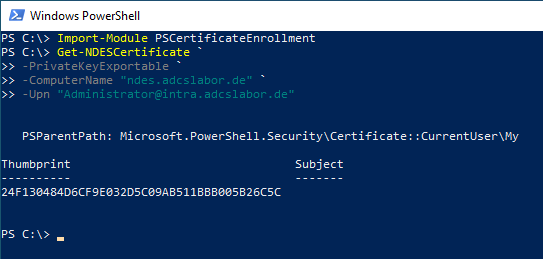
He is issued a corresponding certificate by the certification authority via the NDES server.
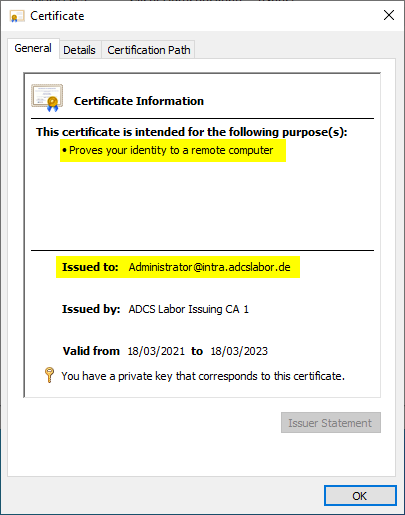
In order to better cover his tracks at this stage, the attacker could also specify a seemingly legitimate Subject Distinguished Name (DN) , which would be displayed in the certification authority database. The Subject Alternative Name, in which the identity of the Active Directory account is located, is not indexed in the certification authority database.
Logging on as Enterprise Administrator
The attacker can now log on to the network as an administrator using this certificate, e.g. by importing the certificate into a smart card .
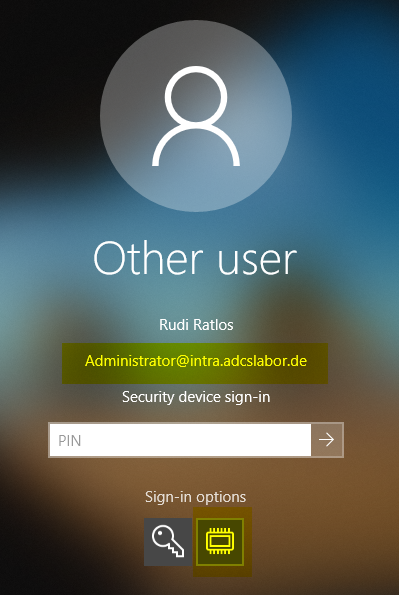
Since the domain controllers accept the "Client Authentication" Extended Key Usage for smart card logons (by default, the Extended Key Usages are not even validated at all ), logging on with the certificate is possible without any problems.
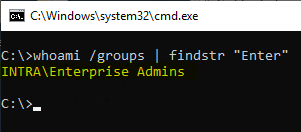
Already now, the attacker has complete control over the environment. However, the certificate used for logging on is still in the certification authority database, where it could still be discovered (although not easily).
The attacker could therefore now log on directly to the certification authority with the administrative identity. He could then create a new certificate for himself directly by using the private key of the certification authority.
Since this signature bypassed the certification authority software and the key storage provider was accessed directly, this certificate cannot be found in the certification authority database either. Likewise, no audit event for a certificate issuance is generated.
Finally, the attacker could also delete the certificate originally requested via NDES from the certification authority database .
Provided auditing is enabled, deleting a certificate from the certification authority database would trigger event no. 4896 . However, the attacker could (which would again trigger an event) also delete the audit log on the certification authority.
From this point on, at the latest, the attacker would be able to move around the corporate network almost unnoticed.
Countermeasures
The attack surface can be drastically reduced by using the TameMyCerts policy module on the certification authority. For example, it can be used to define which certificate fields may be requested, and the accounts for which certificates are issued can be restricted as well.
- In principle, operating an NDES server without a password should be avoided. Rather, it should be evaluated whether it is possible after all to use changing passwords (if in doubt, changing at least daily ). However, one should not be lulled into a false sense of security: even with password "protection", authentication via SCEP is still very superficial .
- If possible, NDES servers should never be exposed to the entire network. Rather, access should be restricted as much as possible.
- The version 1 certificate templates used by NDES by default should urgently be replaced with your own (see also ESC15 ).
- The certificate content that can be requested should be strictly defined and enforced by the TameMyCerts policy module on the certification authority.
- It makes sense to regularly evaluate the certificates issued by certification authorities to which an NDES server is connected and to search them for deviations. To be able to do this, however, the normal case (permissible certificate contents) must already be defined before the NDES server is put into operation.
- Certification authorities to which an NDES server is connected should always be removed from the NTAuthCertificates object in Active Directory .
- The "Application Policies" certificate extension should be disabled on all certification authorities.
- If smart card logon is not used, the domain controller certificates should not contain the corresponding Extended Key Usages either .
- For the events of the certification authority and of the Network Device Enrollment Service , monitoring for suspicious events should be set up, and an alert should be triggered.
Related links:
- Regular password change when configuring the Network Device Enrollment Service (NDES) with a static password
- Editing the NTAuthCertificates object in Active Directory
- Configuring a Certificate Template for Domain Controllers
External sources
- Vulnerability Note VU#971035 - Simple Certificate Enrollment Protocol (SCEP) does not strongly authenticate certificate requests (Carnegie Mellon University)
- Writing Custom Modules (Microsoft)
- Exploiting ADCS NDES For Privilege Escalation (Giulio Pierantoni)