
| Event Source: | Microsoft-Windows-CertificationAuthority |
| Event ID: | 80 (0x50) |
| Event log: | Application |
| Event type: | Warning |
| Symbolic Name: | MSG_E_CERT_PUBLICATION_HOST_NAME |
| Event text (English): | Active Directory Certificate Services could not publish a Certificate for request %1 to the following location on server %4: %2. %3.%5%6 |
| Event text (German): | The certificate request %1 could not be published in the following path on the server "%4": %2. %3.%5%6 |
Parameter
The parameters contained in the event text are filled with the following fields:
- %1: RequestId (win:UnicodeString)
- %2: DN (win:UnicodeString)
- %3: ErrorMessageText (win:UnicodeString)
- %4: HostName (win:UnicodeString)
- %5: param5 (win:UnicodeString)
- %6: AdditionalErrorMessage (win:UnicodeString)
Example events
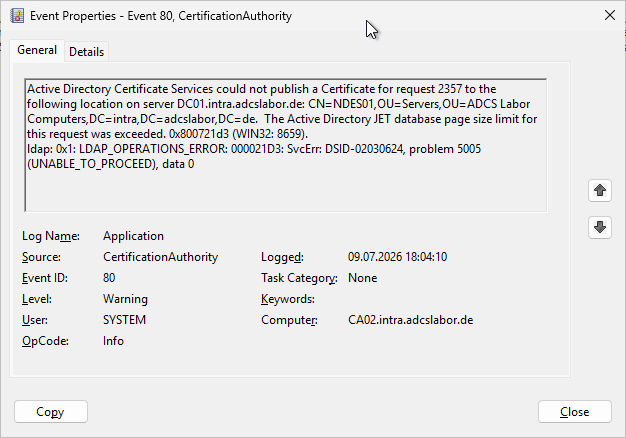
Active Directory Certificate Services could not publish a Certificate for request 2357 to the following location on server DC01.intra.adcslabor.de: CN=NDES01,OU=Servers,OU=ADCS Labor Computers,DC=intra,DC=adcslabor,DC=de.  The Active Directory JET database page size limit for this request was exceeded. 0x800721d3 (WIN32: 8659).
ldap: 0x1: LDAP_OPERATIONS_ERROR: 000021D3: SvcErr: DSID-02030624, problem 5005 (UNABLE_TO_PROCEED), data 0
Active Directory Certificate Services could not publish a Certificate for request 12745 to the following location on server DC01.intra.adcslabor.de: CN=rudi,OU=ADCS Labor Benutzer,DC=intra,DC=adcslabor,DC=de.  Insufficient access rights to perform the operation. 0x80072098 (WIN32: 8344 ERROR_DS_INSUFF_ACCESS_RIGHTS).
 ldap: 0x32: 00002098: SecErr: DSID-03150F93, problem 4003 (INSUFF_ACCESS_RIGHTS), data 0
Active Directory Certificate Services could not publish a certificate for request 12345 to the following location on server DC01.intra.adcslabor.de: CN=CLIENT4,CN=Computers,DC=intra,DC=adcslabor,DC=de.  Directory object not found. 0x8007208d (WIN32: 8333 ERROR_DS_OBJ_NOT_FOUND)
 ldap: 0x20: 0000208D: NameErr: DSID-03100213, problem 2001 (NO_OBJECT), data 0, best match of: 'CN=Computers,DC=intra,DC=adcslabor,DC=de'
Description
Do you know TameMyCerts? TameMyCerts is an add-on for the Microsoft certification authority (Active Directory Certificate Services). It extends the function of the certification authority and enables the Application of regulationsto realize the secure automation of certificate issuance. TameMyCerts is unique in the Microsoft ecosystem, has already proven itself in countless companies around the world and is available under a free license. It can downloaded via GitHub and can be used free of charge. Professional maintenance is also offered.
Insufficient access rights to perform the operation. 0x80072098 (WIN32: 8344 ERROR_DS_INSUFF_ACCESS_RIGHTS).
Occurs when the "Publish certificate in Active Directory" option is configured in a certificate template (such as a certificate template for S/MIME), but the certificate authority has no permission on the corresponding object to write the certificate (to the UserCertificate attribute of the user account).
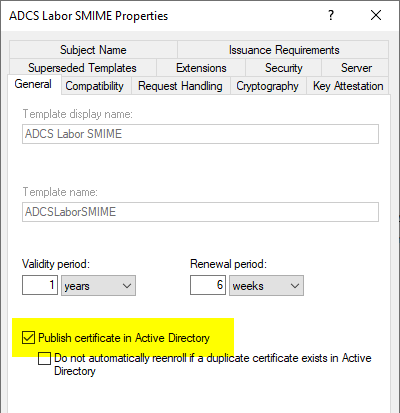
In the default configuration, the certification authority obtains this permission through membership in the "Cert Publishers„.
Directory Object not found. 0x8007208d (WIN32: 8333 ERROR_DS_OBJ_NOT_FOUND).
No description has been written for this yet.
The Active Directory JET database page size limit for this request was exceeded. 0x800721d3 (WIN32: 8659).
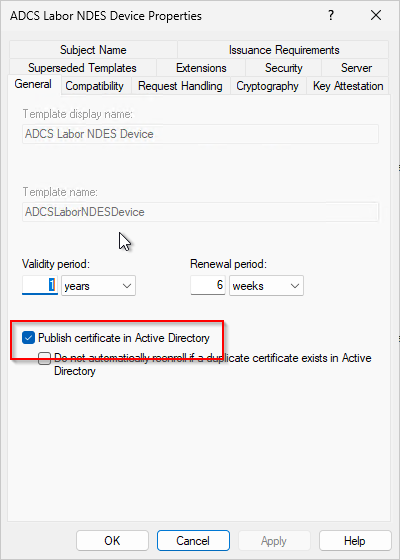
This issue can occur when the Network Device Enrollment Service (NDES) is used and the „Publish certificates in Active Directory“ option is enabled on the certificate template used by NDES.
It is important to understand that, with NDES, all certificate requests processed by NDES are submitted to the certification authority within the security context of the NDES service account. Accordingly, this account is always the requester for the certification authority.
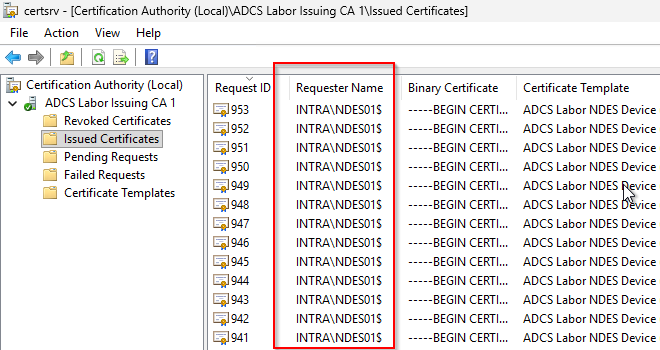
If the „Publish certificates in Active Directory“ option is enabled in the certificate template used by NDES, the certification authority will write every certificate requested by this account to the userCertificate attribute of the NDES service account.
This works regardless of whether NDES is configured to use the integrated IIS application pool (in which case the computer account is used), a domain account, or a group-managed service account (gMSA). All of these account types belong to the „user“ object class.
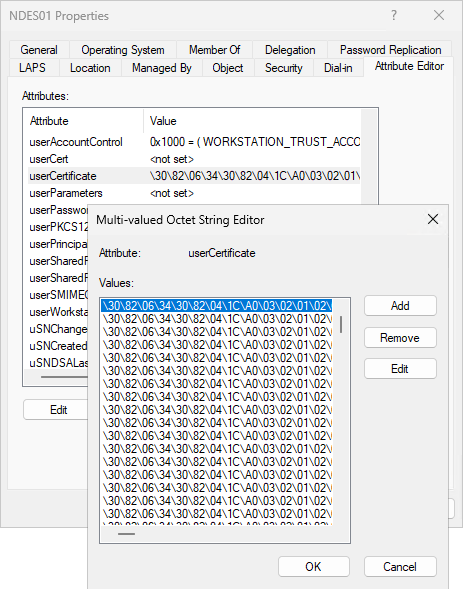
The only problem is: Unlinked, multi-valued attributes can store a maximum of about 1,200 objects. You can use this command to check how many entries the `userCertificate` attribute of the NDES service account has:
(Get-ADObject -Identity "CN=NDES01,OU=Servers,OU=ADCS Labor Computers,DC=intra,DC=adcslabor,DC=de" -Properties userCertificate).userCertificate.count
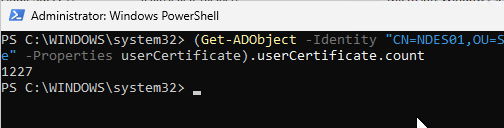
So if the „Publish certificates in Active Directory“ option is enabled, the „userCertificate“ attribute will eventually fill up, leading to the error in question.
The solution is to clear the userCertificate attribute for the NDES service account and deselect the „Publish certificates in Active Directory“ option in the certificate template for the NDES devices.
Get-ADObject -Identity "CN=NDES01,OU=Servers,OU=ADCS Labor Computers,DC=intra,DC=adcslabor,DC=de" | Set-ADObject -Clear userCertificate
Safety assessment
The security assessment is based on the three dimensions of confidentiality, integrity and availability.
No description has been written for this yet.
Microsoft rating
Microsoft evaluates this event in the Securing Public Key Infrastructure (PKI) Whitepaper with a severity score of "Low".
Related links:
- Overview of Windows events generated by the certification authority
- Overview of audit events generated by the Certification Authority
- Publishing a certificate revocation list (CRL) fails with the error message "Insufficient access rights to perform the operation. 0x80072098 (WIN32: 8344 ERROR_DS_INSUFF_ACCESS_RIGHTS)".
- Publishing a certificate revocation list (CRL) fails with error message "Access is denied. 0x80070005 (WIN32: 5 ERROR_ACCESS_DENIED)".
 English
  Deutsch
  Français