Customize the Certificate Enrollment Web Service (CES) after migrating a certification authority to a new server
If a Certificate Enrollment Web Service (CES) is operated in the network, after the "Migration of an Active Directory integrated certification authority (Enterprise Certification Authority) to another server ", the configuration of the CES must be adapted to the new situation.
A configuration string (Config String) is stored in the configuration of the CES, which contains the server name of the connected certification authority. If this changes, the configuration must be adjusted accordingly.
First, the Internet Information Services (IIS) Manager must be invoked on the CES server.
Do you know TameMyCerts? TameMyCerts is an add-on for the Microsoft certification authority (Active Directory Certificate Services). It extends the function of the certification authority and enables the application of rule sets to realize the secure automation of certificate issuance. TameMyCerts is unique in the Microsoft ecosystem, has already proven itself in countless companies around the world and is available under a free license. It can be downloaded via GitHub and used free of charge. Professional maintenance is also offered.
Then navigate to the "Default Web Site" and there to the appropriate subfolders for the CES of the corresponding certification authority.
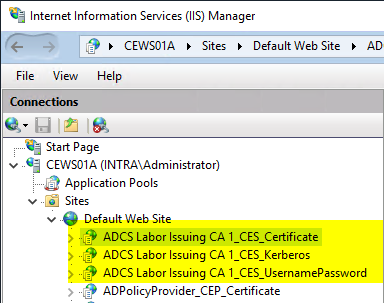
The change must be made for all CES addresses of the migrated certification authority.
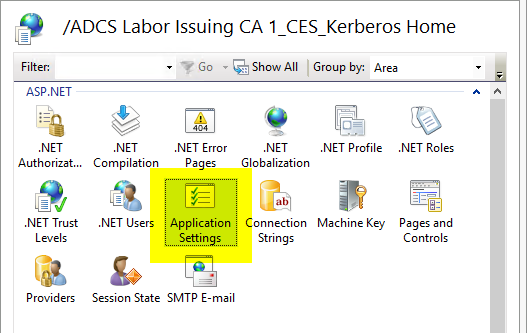
The "Application Settings" option is then called up.
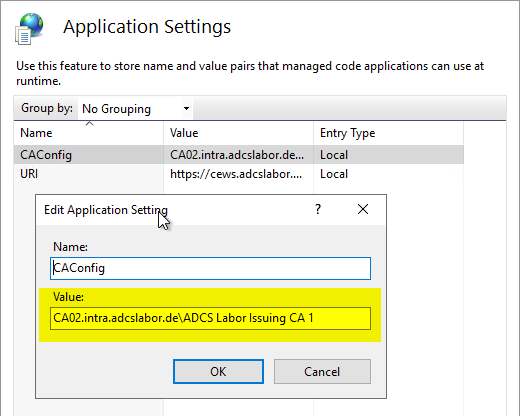
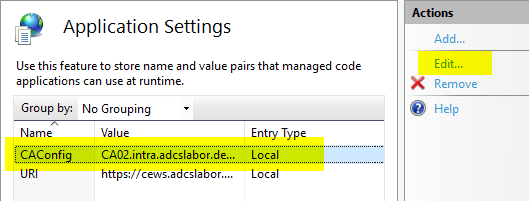
The setting you are looking for can be found in the "CAConfig" entry, which can now be edited by clicking on "Edit...".
The value must be changed accordingly to the new server name. The syntax for the config string is:
{FQDN-der-Zertifizierungsstelle>\{Common-Name-der-Zertifizierungsstelle>