Configure Certification Authority Web Enrollment (CAWE) for use with a domain account
The following describes how to set up Certification Authority Web Enrollment (CAWE) so that the service runs under a domain account.
Certification Authority Web Enrollment is a very old feature from Windows 2000 times - and was last adapted with the release of Windows Server 2003. Accordingly, the code is old and potentially insecure. Likewise, the feature supports no certificate templates with version 3 or newer - this means that certificate templates that use functions introduced with Windows Vista / Windows Server 2008 or newer cannot be used. It is recommended that you do not use Certification Authority Web Enrollment and instead request certificates via built-in tools or the PSCertificateEnrollment PowerShell module.
Operation with a domain account can only be guaranteed securely if the account has a complex password and this is changed at regular intervals. If it is possible in your own environment, preference should always be given to using a group managed service account (gMSA) (or, if it is a dedicated server, the built-in application pool identity).
The configuration of CAWE with a group managed service account is described in the article "Configure Certification Authority Web Enrollment (CAWE) for use with a group managed service account (gMSA) ".
If CAWE was installed according to the instructions in the article "Installing Certification Authority Web Enrollment (CAWE) ", the service will run with the identity of the built-in IIS application pool after installation.
Requirements for the domain account for the CAWE
Do you know TameMyCerts? TameMyCerts is an add-on for the Microsoft certification authority (Active Directory Certificate Services). It extends the function of the certification authority and enables the application of rule sets to realize the secure automation of certificate issuance. TameMyCerts is unique in the Microsoft ecosystem, has already proven itself in countless companies around the world and is available under a free license. It can be downloaded via GitHub and used free of charge. Professional maintenance is also offered.
The domain account for the CAWE...
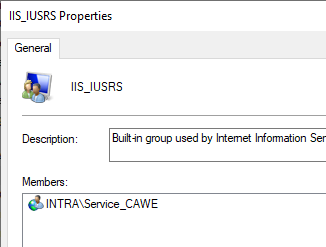
- must be a member of the local IIS_IUSRS group
- requires a service principal name (SPN), which must correspond to the fully qualified server name or the alias to be used, depending on the configuration
- requires Kerberos delegation to the certification authority.
Parameters for the following instructions
The following instructions are based on the following parameters, which must be adapted to your own environment.
- The service account has the name Service_CAWE
- The CAWE server has the name CAWE01.intra.adcslabor.de.
The connected certification authority runs on the server CA03.intra.adcslabor.de. - The alias is certenroll.adcslabor.de, which has been registered accordingly in advance in the Domain Name System (DNS).
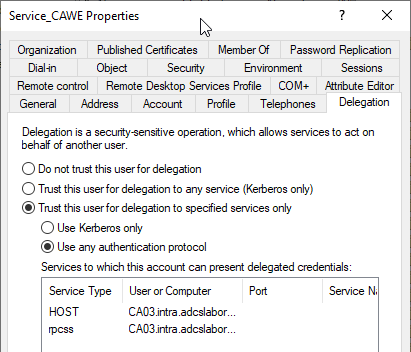
- For Service_CAWE, constrained delegation with protocol transition is configured to support other logon methods besides Kerberos.
Configuring the Service Principal Name for the CAWE Service Account
setspn -S HTTP/certenroll.adcslabor.de INTRA\Service_CAWE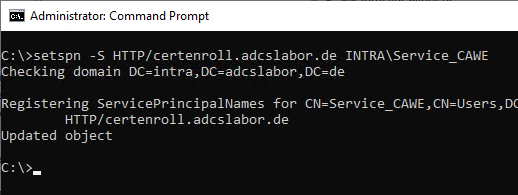
Configure delegation settings for the service account
The following settings are made:
- Constrained delegation to the certification authority CA03.intra.adcslabor.de with protocol transition (Protocol Transition, option "Use any authentication protocol") for the protocols "HOST" and "rpcss". The protocol transition is required so that other authentication methods besides Kerberos can be used, for example if you want to authenticate to the CAWE from a non-Windows system or a Windows system outside the Active Directory forest.
With this option enabled, there is great potential for abuse, especially if the service account password is not changed regularly. See article "Compromising the certification authority and Active Directory via Certification Authority Web Enrollment (CAWE)".
Add the service account to the IIS_IUSRS group on the CAWE server
The configured gMSA must now be added to the local security group IIS_IUSRS so that it can be used by CAWE. This can be done via the management console for local users (lusrmgr.msc).
IIS application pool
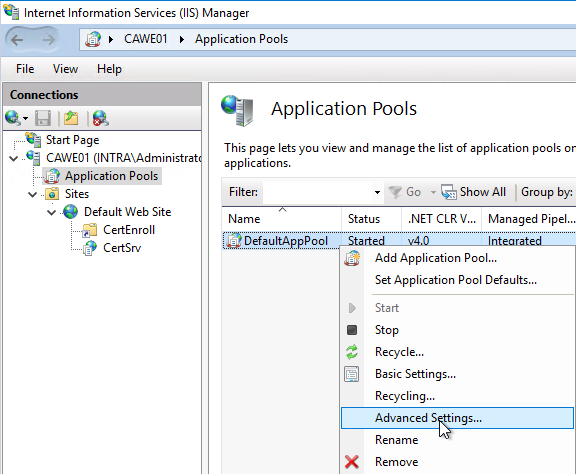
In order for the CAWE service to work with the service account, it must be configured in the DefaultAppPool application pool in the Internet Information Server (IIS) management console. To do this, right-click on the DefaultAppPool application pool and select the "Advanced Settings..." option.
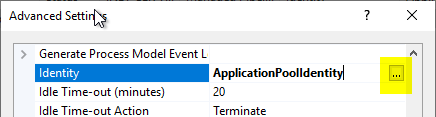
For the "Identity" option, click on the "..." button on the right side.
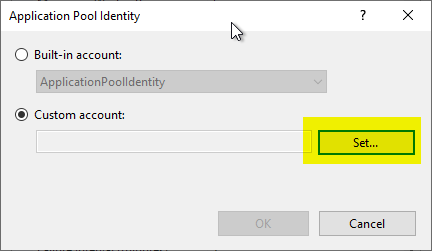
In the following dialog, select "Custom account" and click on "Set...".
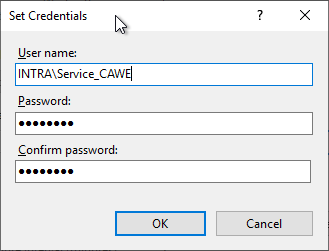
Now the domain account can be specified. The domain name must always be included. If the password is entered incorrectly, you will receive an error message when you click on "OK".
Restarting the Web Server service to apply the configuration
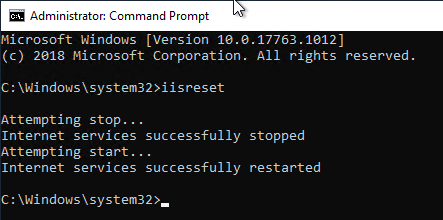
The Web Server service is then restarted with the iisreset command.