
Code signing of Appx packages via SignTool.exe fails with error code 0x8007000b (ERROR_BAD_FORMAT)
Assume the following scenario:
- An Appx package is to be signed.
- For this purpose, SignTool.exe is used.
- The code signing certificate used was recently renewed.
- The signing process with the new code signing certificate fails with the following error message:
"Error: SignerSign() failed." (-2147024885/0x8007000b) Troubleshooting
Very helpful is the -error parameter of certutil to resolve the error code:
certutil -error 0x8007000b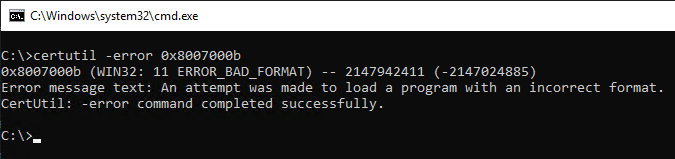
This error code is also documented at Microsoft in the article about signing Appx packages .
More commonly, the error is 0x8007000b (ERROR_BAD_FORMAT).
Further information can be found in the Event Viewer under "Applications and Services Logs" - "Microsoft" - "Windows" - "AppxPackagingOM" - "Microsoft-Windows-AppxPackaging/Operational".
In the specific case, the following event was found there:
error 0x8007000B: The app manifest publisher name (CN=ADCS Labor Code Signing Service, OU=PKI, O=ADCS Labor, C=DE) must match the subject name of the signing certificate (CN=ADCS Labor Code Signing Service, O=ADCS Labor, OU=PKI, C=DE, E=pki@adcslabor.de).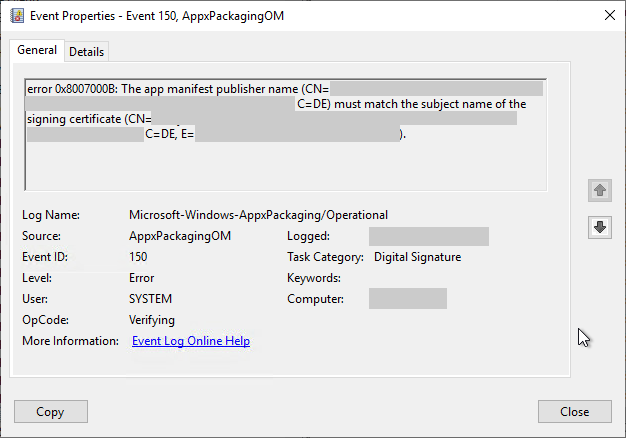
Cause
Do you know TameMyCerts? TameMyCerts is an add-on for the Microsoft certification authority (Active Directory Certificate Services). It extends the function of the certification authority and enables the application of rule sets to realize the secure automation of certificate issuance. TameMyCerts is unique in the Microsoft ecosystem, has already proven itself in countless companies around the world and is available under a free license. It can be downloaded via GitHub and used free of charge. Professional maintenance is also offered.
The cause is that the Subject Distinguished Name (DN) of the code signing certificate to be used is stored in the Appx manifest . If the Subject Distinguished Name (DN) stored there does not match the signing certificate, the error described here occurs.
For comparison, the two Subject Distinguished Names (DNs):
- CN=ADCS Labor Code Signing Service, OU=PKI, O=ADCS Labor, C=DE
- CN=ADCS Labor Code Signing Service, O=ADCS Labor, OU=PKI, C=DE, E=pki@adcslabor.de
There are two ways to solve the problem:
- The Subject Distinguished Name (DN) (manifest publisher name) can be adjusted in the Appx manifest to match that of the signing certificate.
- A new code signing certificate can be issued which has the matching Subject Distinguished Name (DN). If the order of the Relative Distinguished Names (RDNs) was changed on the certification authority , it must also be adjusted in this case, since only the entire comma-separated Subject Distinguished Name (DN) is compared and not the individual RDNs. The Appx manifest and the signing certificate must therefore not only have the exact same Relative Distinguished Names (RDNs), these must also be in the exact same order.
Related links:
- Change the order of the Relative Distinguished Names (RDNs) in the subject of issued certificates
- Allowed Relative Distinguished Names (RDNs) in the Subject of Issued Certificates
External sources
- How to sign an app package using SignTool (Microsoft Corporation)
- Generating MSIX package components (Microsoft Corporation)