
Checking the integrity of backups of the certification authority database
When creating a backup of a certification authority , the question may arise as to how to ensure the integrity of the certification authority database backup, so that it can be correctly restored in an emergency.
The certification authority database is based on a Microsoft JET Blue database engine (also known as Extensible Storage Engine, ESE ). Its working and backup files have the extension .edb and can be managed with the operating system tool esentutl .
Please read and understand the article carefully before executing the presented commands. If used incorrectly, there is a very high risk of damaging the database of the running certification authority.
Do you know TameMyCerts? TameMyCerts is an add-on for the Microsoft certification authority (Active Directory Certificate Services). It extends the function of the certification authority and enables the application of rule sets to realize the secure automation of certificate issuance. TameMyCerts is unique in the Microsoft ecosystem, has already proven itself in countless companies around the world and is available under a free license. It can be downloaded via GitHub and used free of charge. Professional maintenance is also offered.
The integrity of an ESE database file can be checked with the following command:
esentutl /g "{Datenbank-Datei}.edb"However, if you run this command against a backup of the certification authority database, you will encounter the following error message:
The database is not up-to-date. Integrity checks may find that this database is corrupt because data from the log files hat yet to be placed in the database. It is strongly recommended the database is brought up-to-date before continuing! Do you wish to abort the operation?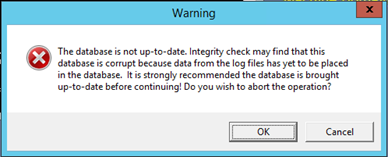
Even if you confirm the question with "OK", the check will fail with the same error.
D:\Backup\DataBase\esentutl /g "ADCS Labor Issuing CA 1.edb"

Extensible Storage Engine Utilities for Microsoft(R) Windows(R)
Version 6.3
Copyright (C) Microsoft Corporation. All Rights Reserved.

Initiating INTEGRITY mode...
        Database: ADCS Labor Issuing CA 1.edb
  Temp. Database: .\TEMPINTEG2888.EDB

Checking database integrity.

The database is not up-to-date. This operation may find that
this database is corrupt because data from the log files has
yet to be placed in the database.

To ensure the database is up-to-date please use the 'Recovery' operation.

Operation terminated with error -550 (JET_errDatabaseDirtyShutdown, Database was not shutdown cleanly. Recovery must first be run to properly complete databaseoperations for the previous shutdown.) after 19.250 seconds.
The following command can be used to take a look at the meta information of the database file:
esentutl /mh "{Datenbank-Datei}.edb" | findstr /i "log state last" | findstr /i /vc:"Gen:"This will most likely show that the database file is in the "Dirty Shutdown" state. Although it may not seem intuitive at first glance, this is the expected state when a backup of the certification authority database is made from a running server (since a file system snapshot is used). The database file thus corresponds 1:1 to the state on the running server at the time of the backup.
D:\Backup\DataBase\esentutl /mh "ADCS Labor Issuing CA 1.edb" | findstr /i "log state last" | findstr /i /vc:"Gen:"
            State: Dirty Shutdown
     Log Required: 1-2 (0x1-0x2)
    Log Committed: 0-2 (0x0-0x2)
   Log Recovering: 0 (0x0)
       Last Objid: 72
  Last Consistent: (0x1,B0,1BC)  08/28/2018 06:32:12.540
      Last Attach: (0x1,B2,268)  11/28/2018 00:45:08.528
      Last Detach: (0x0,0,0)  00/00/1900 00:00:00.000
    Last ReAttach: (0x0,0,0)  00/00/1900 00:00:00.000
    Log Signature: Create time:08/28/2018 06:21:54.359 Rand:1662563503 Computer:

  Last checksum finish Date: 00/00/1900 00:00:00.000
This also explains why the integrity check with esentutl complains that the database transaction logs have not been transferred to the database file - this is done on the certification authority only after a full backup has been successfully performed. Ergo, a backup will always contain transaction logs.
Thus, these must first be transferred to the database file. The logical step would be the following command, but...
esentutl /r {Präfix-der-Transaktionsprotokoll-Dateien}The /r ("Recovery") option takes the information to which database the transaction logs should be transferred from the transaction logs themselves. Ergo, the tool will try to restore them against the original database of the certification authority. The command should therefore never be executed on the certification authority itself.
Thus, if you run the command on the certification authority, you destroy the original certification authority database.
D:\Backup\DataBase\esentutl /r edb

Extensible Storage Engine Utilities for Microsoft(R) Windows(R)
Version 6.3
Copyright (C) Microsoft Corporation. All Rights Reserved.

Initiating RECOVERY mode...
    Logfile base name: edb
            Log files: {current directory}
         System files: {current directory}

Performing soft recovery...
                      Restore Status (% complete)

          0    10   20   30   40   50   60   70   80   90  100
          |----|----|----|----|----|----|----|----|----|----|
          .................................X


Operation terminated with error -1216 (JET_errAttachedDatabaseMismatch, An outstanding database attachment has been detected at the start or end of recovery, but database is missing or does not match attachment info) after 0.47 seconds.
The correct way is to use the /d argument to specify the destination folder in which the "correct" database file is located. Here, the folder name "." can also be used to specify that the destination folder is the same one in which the transaction logs are located.
esentutl /r {Präfix} /d {Ordner}D:\Backup\DataBase\esentutl /r edb /d.
Extensible Storage Engine Utilities for Microsoft(R) Windows(R)
Version 6.3
Copyright (C) Microsoft Corporation. All Rights Reserved.
Initiating RECOVERY mode...
Logfile base name: edb
Log files: {current directory}
System files: {current directory}
Database Directory: .
Performing soft recovery...
Restore Status (% complete)
0 10 20 30 40 50 60 70 80 90 100
|----|----|----|----|----|----|----|----|----|----|
...................................................
Operation completed successfully in 0.156 seconds.If you now inspect the metadata of the database file again, it is in "Clean Shutdown" status.
D:\Backup\DataBase\esentutl /mh "ADCS Labor Issuing CA 1.edb" | findstr /i "log state las
t" | findstr /i /vc:"Gen:"
            State: Clean Shutdown
     Log Required: 0-0 (0x0-0x0)
    Log Committed: 0-0 (0x0-0x0)
   Log Recovering: 0 (0x0)
       Last Objid: 103
  Last Consistent: (0x3,1,31)  11/28/2018 03:37:42.906
      Last Attach: (0x1,B2,268)  11/28/2018 03:37:42.796
      Last Detach: (0x3,1,31)  11/28/2018 03:37:42.906
    Last ReAttach: (0x0,0,0)  00/00/1900 00:00:00.000
    Log Signature: Create time:08/28/2018 06:21:54.359 Rand:1662563503 Computer:

  Last checksum finish Date: 00/00/1900 00:00:00.000
Now the integrity check is also executed correctly.
D:\Backup\DataBase\esentutl /g "ADCS Labor Issuing CA 1.edb"

Extensible Storage Engine Utilities for Microsoft(R) Windows(R)
Version 6.3
Copyright (C) Microsoft Corporation. All Rights Reserved.

Initiating INTEGRITY mode...
        Database: ADCS Labor Issuing CA 1.edb
  Temp. Database: .\TEMPINTEG1528.EDB

Checking database integrity.

                     Scanning Status (% complete)

          0    10   20   30   40   50   60   70   80   90  100
          |----|----|----|----|----|----|----|----|----|----|
          ...................................................


Integrity check successful.

Operation completed successfully in 0.125 seconds.
However, if you now try to restore the supposedly "repaired" file using built-in tools, the certification authority will refuse to do so:
The expected data does not exist in this directory. Please choose a different directory.

The directory name is invalid. 0x8007010b (WIN32/HTTP: 267 ERROR_DIRECTORY)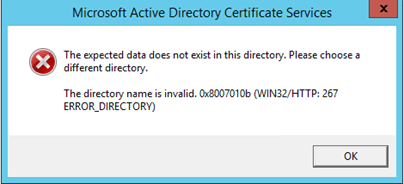
The cause, as we have previously noted, is that the expected state of a database backup is "Dirty Shutdown". Thus, the integrity-checked variant of the database file is not suitable for a (regular and vendor-supported) restore.
However, should the need arise, the following procedure may be followed (at your own risk):
- Stop the certification authority service.
- Delete the contents of the original database folder.
- Copy the "integrity-checked" files to the database folder.
- Start the certification authority service again.
Related links:
- Create a backup of a certification authority
- Restoring a certification authority from backup
- Compacting (defragmenting) the certification authority database
- Moving the certification authority database to another directory or drive
External sources
- esentutl (Microsoft Corporation)