
Change the Subject Alternative Name (SAN) of a certificate before it is issued - but do it securely!
On the internet, there are unfortunately far too many instructions (the big players are not excluded from this , not even Microsoft itself or the grandmaster Komar ), which fatally recommend that the flag EDITF_ATTRIBUTESUBJECTALTNAME2 should be set on the certification authority - supposedly to be able to issue certificates with Subject Alternative Name (SAN) extension for manually submitted certificate requests.
Unfortunately, this procedure is not only unnecessary, it also has some unpleasant side effects, which in the worst case can help an attacker to take over the entire Active Directory forest .
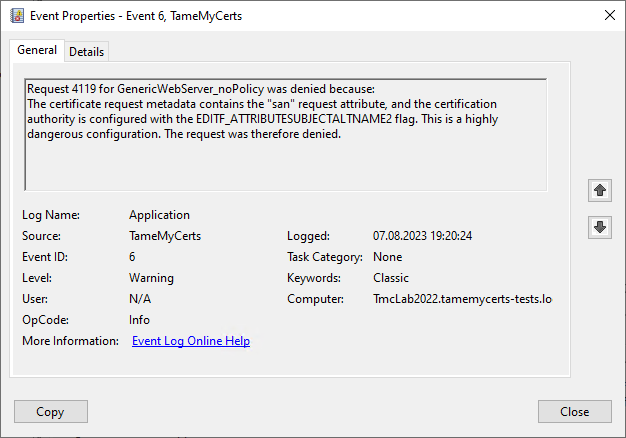
For this reason, the TameMyCerts Policy Module for Microsoft Active Directory Certificate Services will also detect, reject and log such attempts if the flag is enabled:
How can I add the SAN extension to a certificate request in a secure way (retrospectively)?
Of course, it is best if the alternative names are already part of the original certificate signing request (CSR). The procedure for creating corresponding certificate requests on Windows is described in detail in the article "Manually requesting a web server certificate ".
Unfortunately, this procedure is not possible with all systems, so there may be a need to add SAN entries to a certificate request at a later date.
Unfortunately, the certificate request itself can no longer be edited retrospectively as it is signed with the enrollee's private key. This means that the only option left is to influence the issuing process of the certification authority before it issues the certificate.
The following "secure" options are therefore available for subsequently adding alternative names to a certificate request and thus including them in the resulting certificate:
- The original certificate request is packaged in a signed CMC layer containing the alternative names.
- The corresponding certificate template is set for approval by a certificate manager and the alternative names are set after the certificate request has been submitted via the administrative interfaces of the certification authority.
- You use the TameMyCerts Policy Module for Microsoft Active Directory Certificate Services .
What all procedures have in common is that they are carried out by a certificate manager or the certification authority itself, as they involve an issuance that differs from the original certificate request.
The individual methods are described below using the example of a web server certificate whose certificate request is to receive additional alternative names in the form of DNS names.
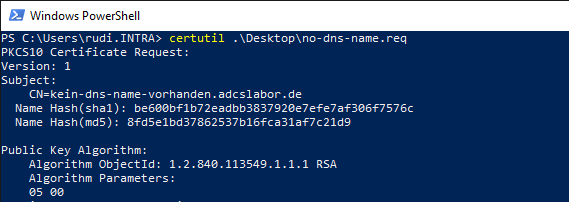
The certificate request only contains a common name, but no Subject Alternative Name (SAN) certificate extension.
Adding a SAN certificate extension subsequently via a CMC layer
This method works both with certificate templates that are configured to issue the resulting certificate directly and for those that require approval by a certificate manager.
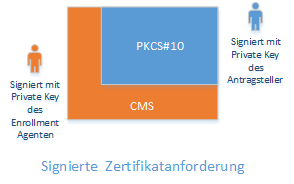
The original certificate request is packaged in a Certificate Management over CMS (CMC, RFC 5272) message. The SAN extension is part of the CMC layer.
By signing the CMC layer with the certificate of an Enrollment Agent (or that of the certification authority), authentication by a (supposedly) authorized certificate manager is ensured.
For further details see also article "Basics: Enroll on Behalf of (EOBO) ".
First, a definition file with the following content must be created.
[Version]
Signature = "$Windows NT$"

[Strings]
szOID_SUBJECT_ALT_NAME2 =  "2.5.29.17"

[Extensions]
%szOID_SUBJECT_ALT_NAME2% = "{text}"
_continue_ = "DNS=ein-dns-name.adcslabor.de&"
_continue_ = "DNS=noch-ein-dns-name.adcslabor.de&"
The definition file can now be applied to the certificate request.
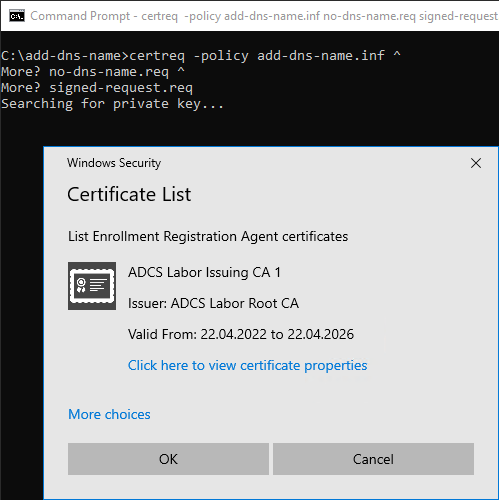
certreq -policy {Dateiname-Definitions-Datei} {Dateiname-Zertifikatanforderung} {Dateiname-Signierte-Zertifikatanforderung}The original certificate request is now packaged in a CMC layer, which contains the additional information. This must be signed by a certificate manager.
Alternatively, the certification authority certificate can also be used. However, the process should not be carried out directly on the certification authority server if possible, so this is not suitable for production use.
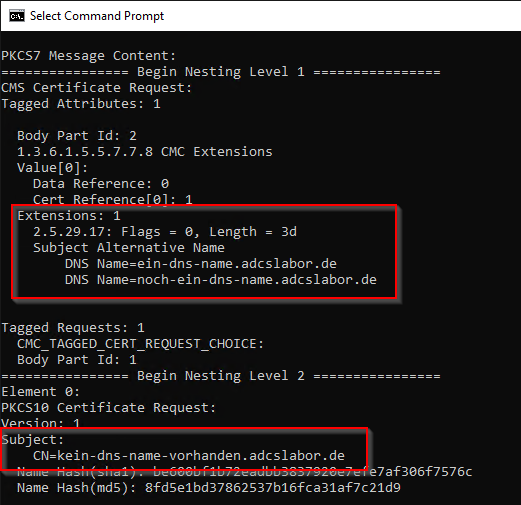
We can now inspect the resulting file.
certutil -dump {Dateiname-Signierte-Zertifikatanforderung}Here we can see that the original certificate request is part of a nesting layer. The alternative names are part of the higher-level CMC layer.
The packaged certificate request can now be sent to the certification authority.
certreq -submit {Dateiname-Signierte-Zertifikatanforderung}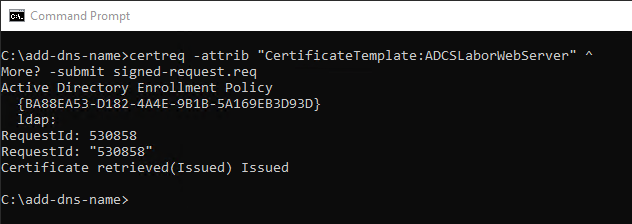
The TameMyCerts Policy Module for Microsoft Active Directory Certificate Services comes into play after the Windows Default Policy Module and is therefore able to recognize content added later in this way, too, and apply rules to it.
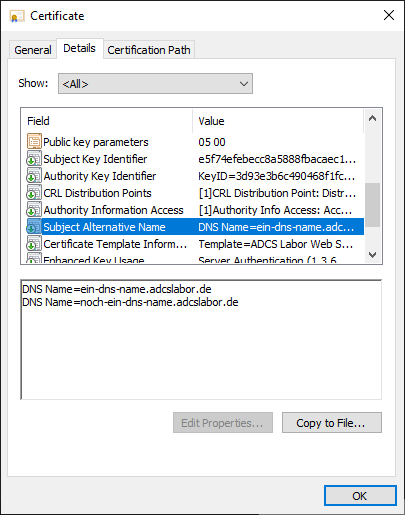
The resulting certificate will now contain the desired DNS names.
Add a SAN certificate extension subsequently via the administration interfaces of the certification authority
This method only works for certificate templates that require approval by a certificate manager, i.e. the resulting certificate is not issued directly. It can be carried out locally or remotely against the certification authority.
The executing user requires the permission "Issue and manage" certificates on the certification authority.
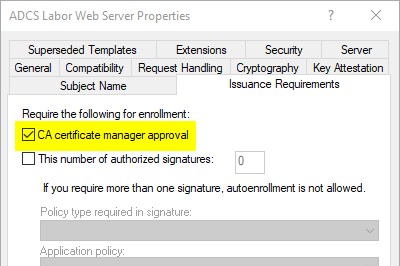
If a certificate request is now submitted, the certificate request is placed in a pending state. The requester receives a request ID, which we can use to identify the certificate request.
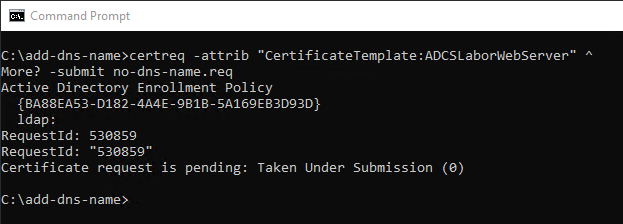
Before the certificate is issued, the data record can be changed by a certificate manager. To do this, we address the ICertAdmin interface of the certification authority. We instruct it to add a Subject Alternative Name type certificate extension to the data set, which we have to construct ourselves.
PKI expert Vadims Podans has already done excellent research on this. We use his code example as the basis for a script that simplifies our project.
[cmdletbinding()]
param(
    [Parameter(Mandatory = $true)]
    [string]
    $ConfigString,

    [Parameter(Mandatory = $true)]
    [int]
    $RequestID,

    [Parameter(Mandatory = $true)]
    [string[]]
    $DnsNames
)

$XCN_OID_SUBJECT_ALT_NAME2 =  "2.5.29.17"
$XCN_CERT_ALT_NAME_DNS_NAME = 0x3
$PROPTYPE_BINARY = 3
$XCN_CRYPT_STRING_BASE64 = 1

function ConvertTo-DERstring ([byte[]]$bytes) {

    if ($bytes.Length % 2 -eq 1) {$bytes += 0}

    $StringBuilder = New-Object System.Text.StringBuilder

    for ($n = 0; $n -lt $bytes.count; $n += 2) {
        [void]$StringBuilder.Append(
            [char]([int]$bytes[$n+1] -shl 8 -bor $bytes[$n])
        )
    }

    $StringBuilder.ToString()
}

$SanExtension = New-Object -ComObject X509Enrollment.CX509ExtensionAlternativeNames
$SanCollection = New-Object -ComObject X509Enrollment.CAlternativeNames

foreach ($DnsName in $DnsNames) {
    $SanEntry = New-Object -ComObject X509Enrollment.CAlternativeName
    $SanEntry.InitializeFromString($XCN_CERT_ALT_NAME_DNS_NAME, $DnsName)
    $SanCollection.Add($SanEntry)
}

$SanExtension.InitializeEncode($SanCollection)

$CertAdmin = New-Object -ComObject CertificateAuthority.Admin
$CertAdmin.SetCertificateExtension(
    $ConfigString,
    $RequestID,
    $XCN_OID_SUBJECT_ALT_NAME2,
    $PROPTYPE_BINARY,
    0x0,
    $(ConvertTo-DERstring (
        [Convert]::FromBase64String(
            $SanExtension.RawData($XCN_CRYPT_STRING_BASE64)
            )
        )
    )
)
The script can be called up as follows:
.\Set-SANExtension.ps1 -ConfigString "{CA-DNS-Name}\{CA-Common-Name}" -RequestID {Request-ID} -DnsNames {DNS-Name-List}Example:
.\Set-SANExtension.ps1 `
-ConfigString "CA02.intra.adcslabor.de\ADCS Labor Issuing CA 1" `
-RequestID 530859 `
-DnsNames "ein-dns-name.adcslabor.de","noch-ein-dns-name.adcslabor.de"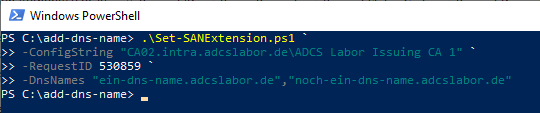
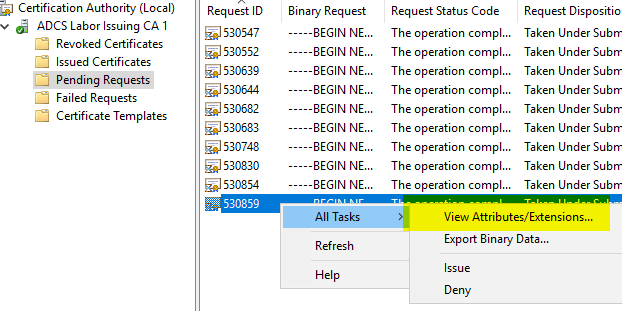
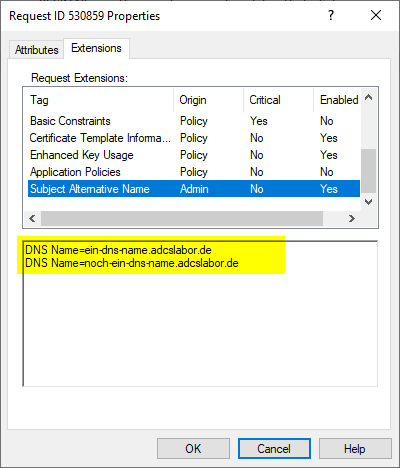
If we now check the certificate request via the certification authority management console, we find a certificate extension of the type "Subject Alternative Name", which is shown as having been added by an administrator and contains the desired entries. The issued certificate will therefore also contain the alternative names.
Use the TameMyCerts Policy Module for Microsoft Active Directory Certificate Services to influence the SAN certificate extension
Automatic transfer of the common name to the SAN extension
TameMyCerts can automatically transfer DNS names or IP addresses recognized in the Subject Distinguished Name of a certificate request to the SAN certificate extension of issued certificates. How to configure this is described in the administration manual .
Automatic transfer of service principal names to the SAN extension
TameMyCerts can automatically transfer Service Principal Names (SPNs) found in associated Active Directory objects to the SAN certificate extension of issued certificates. How to configure this is described in the administration manual .
Automatic transfer of certificate fields to the SAN extension
TameMyCerts can automatically transfer fields in the certificate request to the SAN certificate extension of issued certificates according to definable rules. How to configure this is described in the administration manual .
Automatic entry of Active Directory attributes in the SAN extension
TameMyCerts can automatically transfer attributes of associated Active Directory objects to the SAN certificate extension of issued certificates according to definable rules. How to configure this is described in the administration manual .
Related links:
- A policy module to tame them: Introducing the TameMyCerts Policy Module for the Microsoft Certification Authority
- Basics: Enroll on Behalf of (EOBO)
- Manually requesting a web server certificate