
Basics: Restricting Extended Key Usage (EKU) in Certification Authority Certificates
A useful hardening measure for certification authorities is to restrict the certification authority certificates so that they are only trusted for the extended key usages (Extended Key Usage) that are actually issued.
In the event of a compromise of the certification authority, the damage is then (at least) limited to the defined extended key usages.
The Smart Card Logon Extended Key Usage, which is of interest for many attacks (in conjunction with the certification authority's membership in NTAuthCertificates ) would then only be present in the certification authority certificate of the certification authority that actually issues such certificates.
How it works and background
Do you know TameMyCerts? TameMyCerts is an add-on for the Microsoft certification authority (Active Directory Certificate Services). It extends the function of the certification authority and enables the application of rule sets to realize the secure automation of certificate issuance. TameMyCerts is unique in the Microsoft ecosystem, has already proven itself in countless companies around the world and is available under a free license. It can be downloaded via GitHub and used free of charge. Professional maintenance is also offered.
End entity certificates have an "Extended Key Usage" extension that defines the purposes for which the certificate may be used (e.g., Transport Layer Security (TLS)).
Microsoft uses the term "Enhanced Key Usage", the correct name according to RFC 5280 is "Extended Key Usage" .
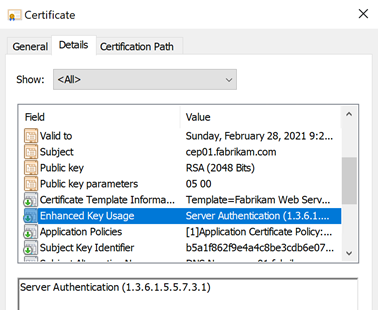
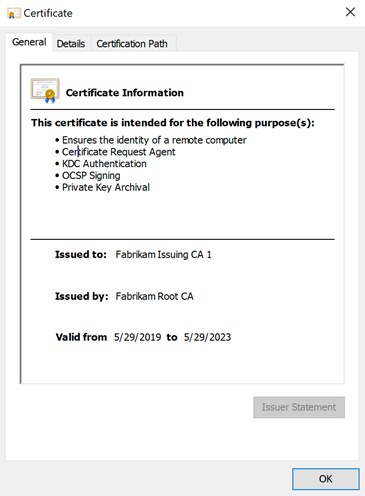
The Extended Key Usage defines for which purposes the certificate may be used. In the Microsoft Windows certificate dialog, this is displayed in the example as "Ensures the Identity of a Remote Computer" and corresponds to the Extended Key Usage for "Server Authentication", which is typical for a web server certificate.
The "General" tab in the Windows certificate dialog shows the result of the certificate's policy check, not the actual content of the certificate. This can be viewed in the "Details" tab and may well differ.
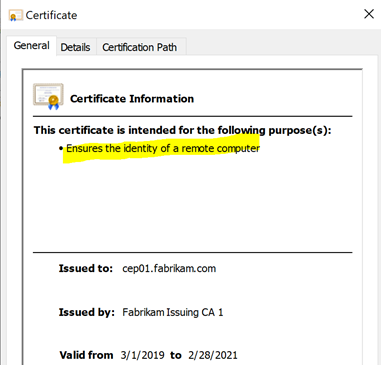
In the default configuration, a certification authority certificate is not restricted in terms of certificate types. The certificate lacks an "Extended Key Usage" extension, so the certificate can be used for all purposes. In the Microsoft Windows certificate dialog, this is displayed as "All Application Policies".
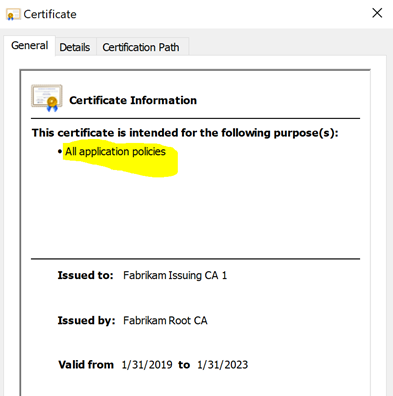
A certification authority can be restricted in its usability by adding an "Extended Key Usage" extension. It can then only issue certificates for the defined EKUs.
Types of restrictions
This basic approach of technically constraining the certification authority is known as qualified subordination or applying constraints.
| Component | Description |
|---|---|
| Path length constraint (Path Length Constraint) | This can be used to define how many hierarchy levels (i.e. subordinate certification authorities) may follow the certification authority in question. |
| Extended key usage constraints (Extended Key Usage Constraints) | This can be used to specify which extended key usages may be accepted in certificates issued by the certification authority. |
| Issuance policy constraints (Issuance Policies) | This allows you to specify for which certificate policies the certification authority may confirm their conformity in issued certificates. |
| Name constraints (Name Constraints) | This can be used to define for which namespaces the certification authority may issue certificates. |
Restricting Extended Key Usages
The method of restricting extended key usages was first used by Microsoft under the name "nested EKU enforcement".
In addition Microsoft introduced another mechanism to restrict the scope in which a CA is trusted for, they did this by treating the Extended Key Usage (see section 4.2.1.13) extension as a means to delegate only certain issuance capabilities to a Certificate Authority
— Least Privilege and Subordinate Certificate Authorities (Ryan Hurst)
It is therefore not part of RFC 5280. The RFC merely points out that the Extended Key Usage extension is only expected in end-entity certificates.
In general, this extension will appear only in end entity certificates.
— RFC 5280
However, the feature goes beyond the requirements of RFC 5280 and (if the corresponding certificate extension is marked as non-critical) is also compatible with implementations that do not support it.
A popular security incident whose consequences could at least be reduced by this implementation was the "Flame " incident. Here, a forged code signing certificate created with a hash collision meant that malware could be signed with valid certificates. After all, the damage was limited to "only" this purpose (code signing).
In practice
Meanwhile, popular applications such as Mozilla Firefox and OpenSSL have adopted the behavior of the Microsoft implementation. Browsers which are used on Windows and which use the CryptoAPI (Google Chrome, Microsoft Edge and Internet Explorer) use the corresponding Windows system library and behave accordingly.
In practice, adaptation by third parties now goes even further: in the area of Internet PKI around browser and certification authority providers, use is now sometimes even demanded or at least recommended:
We encourage CAs to technically constrain all intermediate certificates. For a certificate to be considered technically constrained, the certificate MUST include an Extended Key Usage (EKU) extension specifying all extended key usages that the subordinate CA is authorized to issue certificates for.
Generally Extended Key Usage will only appear within end entity certificates (as highlighted in RFC 5280 (4.2.1.12)), however, Subordinate CAs MAY include the extension to further protect relying parties until the use of the extension is consistent between Application Software Suppliers whose software is used by a substantial portion of Relying Parties worldwide.
If present, this extension SHOULD be marked non-critical.
For a Subordinate CA Certificate to be considered Technically Constrained, the certificate MUST include an Extended Key Usage (EKU) extension specifying all extended key usages that the Subordinate CA Certificate is authorized to issue certificates for. The anyExtendedKeyUsage KeyPurposeId MUST NOT appear within this extension.
If the Subordinate CA Certificate includes the id-kp-serverAuth extended key usage, then the Subordinate CA Certificate MUST include the Name Constraints X.509v3 extension with constraints on dNSName, iPAddress and DirectoryName as follows:
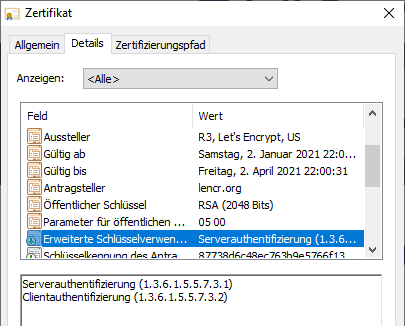
A curiosity here is that Let's Encrypt does not adhere to its own Certificate Policy (which is based on the CAB Forum): Extended Key Usage restrictions are defined, but not the required associated name constraints (Note: how could it, after all, Let's Encrypt basically wants to be able to serve all DNS namespaces).
If the Subordinate CA Certificate includes the id-kp-serverAuth extended key usage, then the Subordinate CA Certificate MUST include the Name Constraints X.509v3 extension with constraints on dNSName, iPAddress and DirectoryName [...]
— Internet Security Research Group (ISRG) Certificate Policy, Version 2.2
Assessment for usability in practice
The use is possible without danger and also makes sense, but requires thorough planning, which should also include possible use cases for the coming years.
Such a construct can drastically reduce the damage caused by the compromise of a certification authority (in conjunction with further hardening measures), but on the other hand it also increases the complexity to be handled. Complexity, in turn, is the enemy of security, so the decision wants to be well-considered.
Implementation
Before a certification authority is put into operation, it is usually already defined which certificate types it will issue. This means that the corresponding extended key usages can be worked out from these.
By default, Microsoft Active Directory Certificate Services will refuse to issue certificates with a different policy. Signatures made directly against the key storage provider , however, would still be executed. Such a certificate should then be considered invalid.
However, this check is the responsibility of the respective application that processes the certificate, so that no generally valid statement can be made here. The constraints are written to the certification authority certificate by the parent certification authority. They should therefore also be defined by it.
In practice, however, for reasons of simplification, the extended key usages will be requested by the certification authority concerned and signed by the parent certification authority. To prepare the certificate request of a certification authority for requesting extended key usages, the file capolicy.inf in the system directory (usually C:\Windows) is extended by a corresponding passage.
[EnhancedKeyUsageExtension]
OID=1.3.6.1.5.5.7.3.2 ; Client Authentication
OID=1.3.6.1.5.5.7.3.1 ; Server Authentication
OID=1.3.6.1.5.5.7.3.9 ; OCSP Signing
OID=1.3.6.1.4.1.311.21.5 ; Private Key Archival
Critical=FALSE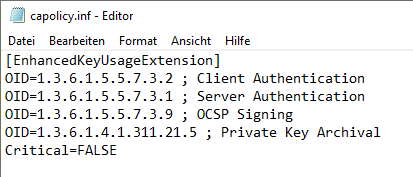
For compatibility reasons, the "Extended Key Usage" extension should be configured as non-critical. Applications that do not interpret this extension would otherwise not understand the certification authority certificate and abort certificate processing.
Below is a list of the most commonly used Extended Key Usages:
| OID | Description |
|---|---|
| 1.3.6.1.4.1.311.20.2.1 | Certificate Request Agent |
| 1.3.6.1.5.5.7.3.2 | Client Authentication |
| 1.3.6.1.5.5.7.3.3 | Code Signing |
| 1.3.6.1.4.1.311.10.3.13 | Lifetime Signing |
| 1.3.6.1.4.1.311.10.3.12 | Document Signing |
| 1.3.6.1.4.1.311.80.1 | Document Encryption |
| 1.3.6.1.4.1.311.10.3.4 | Encrypting file system |
| 1.3.6.1.4.1.311.10.3.4.1 | File Recovery |
| 1.3.6.1.5.5.7.3.5 | IP Security End System |
| 1.3.6.1.5.5.8.2.2 | IP Security IKE Intermediate |
| 1.3.6.1.5.5.7.3.6 | IP Security Tunnel Endpoint |
| 1.3.6.1.5.5.7.3.7 | IP Security User |
| 1.3.6.1.4.1.311.21.6 | Key Recovery Agent |
| 1.3.6.1.4.1.311.10.3.11 | Key Recovery |
| 1.3.6.1.5.2.3.5 | KDC Authentication |
| 1.3.6.1.4.1.311.10.3.1 | Microsoft Trust List Signing |
| 1.3.6.1.4.1.311.10.3.10 | Qualified Subordination |
| 1.3.6.1.4.1.311.10.3.9 | Root List Signer |
| 1.3.6.1.5.5.7.3.4 | Secure E-mail |
| 1.3.6.1.5.5.7.3.1 | Server Authentication |
| 1.3.6.1.4.1.311.20.2.2 | Smartcard Logon |
| 1.3.6.1.5.5.7.3.8 | Time Stamping according to RFC 3161 |
| 1.3.6.1.5.5.7.3.9 | OCSP Signing |
| 1.3.6.1.4.1.311.54.1.2 | Remote Desktop Authentication |
| 1.3.6.1.4.1.311.21.5 | Private Key Archival |
It may be advisable to include the following Extended Key Usages in the list:
- "OCSP Signing" (1.3.6.1.5.5.7.3.9) is required for OCSP signing certificates. Should the certification authority receive an OCSP entry in the Authority Information Access (AIA) extension, or could this be the case in the future, this EKU should be included, otherwise no OCSP signing certificates can be issued by this certification authority.
- "Private Key Archival" (1.3.6.1.4.1.311.21.5) is required by the certification authority exchange ("CA Exchange") certificates of the certification authority. In addition to the actual task of archiving private keys, this certificate type is also requested by the Enterprise PKI (pkiview.msc) console. If this Extended Key Usage is missing in the certification authority certificate, no certification authority exchange (CA Exchange) certificates can be issued and the certification authority will log a failed certificate request . This Extended Key Usage should therefore always be included in the list.
- "Certificate Request Agent" (1.3.6.1.4.1.311.20.2.1) is used for Enroll on Behalf of (EOBO) operations, but also for the installation of a Network Device Enrollment Service (NDES) . If the certification authority is to serve one of these cases now or possibly later, this Extended Key Usage should be included. When evaluating, it is essential to keep in mind that "modern" clients are potentially managed with Microsoft Intune , which in turn will require one or more NDES instances .
The resulting certification authority certificate will then have a corresponding "Extended Key Usage" extension.
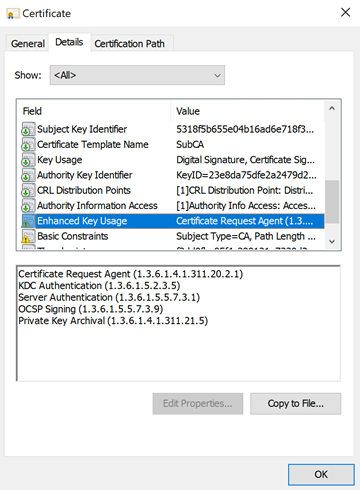
The usable certificate types are then applied accordingly in the "General" tab of the certificate dialog.
A (potentially maliciously generated) certificate that does not comply with the configured policies can be detected by the application accordingly. In the case of a Windows application, a corresponding warning is displayed.
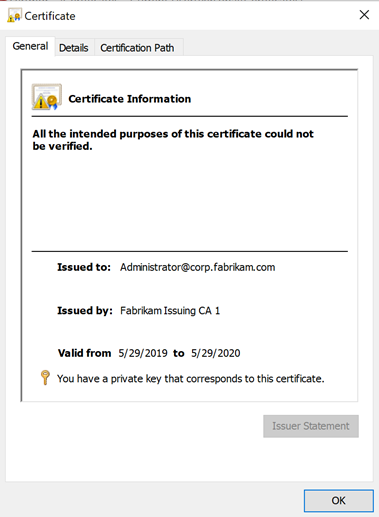
Once again, it must be pointed out that certificate checking is the responsibility of the application using it, and the results can vary greatly depending on the implementation. For example, all common browsers are very strict in this respect, whereas a domain controller does not care about the extended key usages in the certificate at all by default .
Related links:
- Domain controllers do not check extended key usages during smart card logon
- Attack vector via the smart card logon mechanism
- Basics: Name Constraints
- What requirements must be met on the infrastructure side for smart card logons to be possible?
- Frequently Used Extended Key Usages and Issuance Policies
- Restrict extended key usage (EKU) for imported root certification authority certificates
- Editing the NTAuthCertificates object in Active Directory
- Basics: Name Constraints
- Basics: Cryptographic Service Provider (CSP) and Key Storage Provider (KSP)
- Basics: key algorithms, signature algorithms and signature hash algorithms
External sources
- RFC 5280 - Internet X.509 Public Key Infrastructure Certificate and Certificate Revocation List (CRL) Profile (Internet Engineering Task Force)
- Constraining Extended Key Usages in Microsoft Windows (Vadims Podans)
- Root CA with Extended Key Usage fields (security.stackexchange.com)
- Understanding Constraints / Application Policy (Microsoft)
- Baseline Requirements for the Issuance and Management of Publicly-Trusted Certificates , versions 1.7.3 , 1.1.8 (CA/Browser Forum)
- Mozilla Root Store Policy (Mozilla)
- CA/Subordinate CA Checklist (Mozilla)
- Announcing Version 2.1 of Mozilla CA Certificate Policy (Mozilla)
- Internet Security Research Group (ISRG) Certificate Policy, Version 2.2 (Internet Security Research Group)
- Support enforcing nested EKU constraints, do so by default. (Mozilla Bugtracker)
- MSRC 2718704 and Nested EKU enforcement (Ryan Hurst, "Unmitigated Risk", former Microsoft employee and IETF representative for Microsoft)