
Basics: Requesting certificates via Certificate Enrollment Web Services (CEP, CES) with the MS-XCEP and MS-WSTEP protocols
With Windows Server 2008 R2 and Windows 7, a new function for requesting certificates was introduced: The Certificate Enrollment Web Services, which are mapped by two server roles:
- Certificate Enrollment Policy Web Service (CEP)
- Certificate Enrollment Web Service (CES)
The following is a description of the background to these roles, how they work, and the possible deployment scenarios.
Classic certificate request via LDAP and RPC/DCOM (MS-WCCE)
How the classic certificate request via RPC/DCOM or MS-WCCE works is described in this article , which should be read first to understand the common basics.
Do you know TameMyCerts? TameMyCerts is an add-on for the Microsoft certification authority (Active Directory Certificate Services). It extends the function of the certification authority and enables the application of rule sets to realize the secure automation of certificate issuance. TameMyCerts is unique in the Microsoft ecosystem, has already proven itself in countless companies around the world and is available under a free license. It can be downloaded via GitHub and used free of charge. Professional maintenance is also offered.
In summary, the classic certificate request consists of two main steps:
- Querying Active Directory via the LDAP protocol for information relevant to the certificate request (certificate templates, and which certification authorities offer them for enrollment.
- Sending the certificate request via RPC/DCOM to the responsible certification authority that was determined.
However, this method has some disadvantages:
- It works only in the internal network.
- Domain connectivity is required.
- Membership in the same Active Directory forest, or a trust relationship including replication of the relevant data, is required.
- The RPC/DCOM network ports must be exposed to all enrollees, which can be a security risk.
- Authentication at the certification authority must be done via Kerberos.
Certificate request via the Certificate Enrollment Web Services (MS-XCEP and MS-WSTEP)
Until now, certificates were requested classically via Lightweight Directory Access Protocol (LDAP) and Remote Procedure Call / Distributed Common Object Model (RPC/DCOM). This required clients (all entities requesting certificates from a certification authority) to connect to these network ports on the internal network.
The Certificate Enrollment Web Services, consisting of the Certificate Enrollment Policy Web Service (CEP) and the Certificate Enrollment Web Service (CES), now allow certificates to be requested via an HTTPS interface.
The two protocols used, MS-XCEP and MS-WSTEP , are realized as web services with the SOAP standard.
This enables new deployment scenarios such as:
- Enrollees who are to request or renew certificates via the Internet.
- Enrollees who are in a different forest to which there is no trust relationship.
- Enrollees in a demilitarized zone (DMZ).
- Enrollees on the internal network, but without having to expose the certification authority's RPC/DCOM ports to the network.
- Authentication now also with username/password and client certificate in addition to Kerberos.
- The possibility to authenticate with the previous certificate for the renewal of a certificate (Key based Renewal).
In addition, it is relatively easy to develop your own implementations of these protocols, which makes further use cases possible.
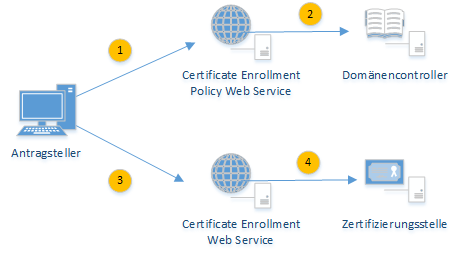
Step 1: Connection of the enrollee to the CEP via HTTPS
The enrollee connects to the Certificate Enrollment Policy Web Service via HTTPS. The information about where it is located is communicated to the enrollee via Group Policy using an enrollment policy.
The enrollee authenticates to the CEP using one of the following three methods:
- Username and password
- Kerberos
- Client certificate
Step 2: Connection of the CEP to Active Directory via LDAP
The CEP takes over the LDAP query against the Active Directory on behalf of the client. The following information is queried.
- All pKICertificateTemplate objects (certificate templates) in the Active Directory forest.
- All pKIEnrollmentService objects (enterprise certification authorities) in the Active Directory forest.
- All msPKI-Enterprise-Oid objects (Object Identifier) in the Active Directory forest.
This information is all stored in the Configuration partition of the Active Directory forest.
The pKICertificateTemplate and msPKI-Enterprise-OID objects can be used to determine whether the enrollee is permitted to request ("Enroll") and whether an automatic request is to be made ("Auto-Enroll"). The default settings for creating the certificate request are also determined from them.
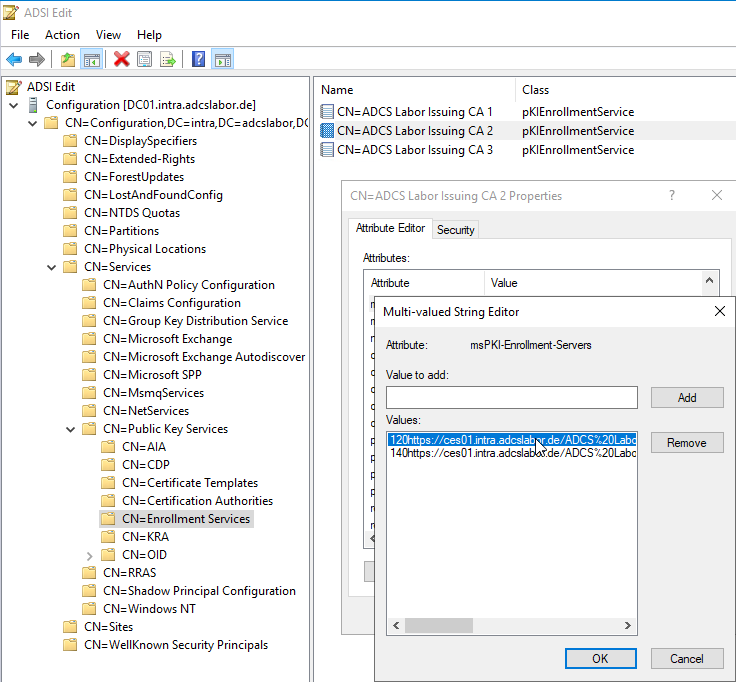
The pKIEnrollmentService objects can be used to determine the certification authorities that offer the certificate templates to be requested, as well as via which Certificate Enrollment Web Services the certification authority can be reached. For this purpose, the attributes certificateTemplates and msPKI-Enrollment-Servers are evaluated.
Step 3: Connection of the enrollee to the CES via HTTPS
In the third step, a key pair and a certificate request are generated based on the queried information and sent to the responsible CES server via HTTPS.
The enrollee authenticates to the CES again using one of the following three methods:
- Username and password
- Kerberos
- Client certificate
Step 4: Connection of the CES to the certification authority via RPC/DCOM
The CES now impersonates the logged-on user and performs the certificate request via RPC/DCOM in the user's security context.
The certification authority can identify the user based on the impersonated Kerberos authentication and applies the settings specified in the corresponding certificate template with its policy module.
After issuing the certificate, the CES returns the certificate to the enrollee.
Related links:
External sources
- Certificate Enrollment Web Services (Microsoft)
- [MS-XCEP]: X.509 Certificate Enrollment Policy Protocol | Microsoft Learn (Microsoft)
- [MS-WSTEP]: WS-Trust X.509v3 Token Enrollment Extensions | Microsoft Learn (Microsoft)
- GitHub - Sleepw4lker/TameMyCerts.WSTEP: Certificate Autoenrollment Proxy using the MS-WSTEP protocol (GitHub)