
Basics: Network Device Enrollment Service (NDES)
The Simple Certificate Enrollment Protocol (SCEP) was developed by Verisign for Cisco in the early 2000s to provide a simplified method for requesting certificates. Previously, network devices required manually generating a certificate request on each device, submitting it to a certification authority, and then manually installing the issued certificate on the corresponding device again.
An IETF standardization did not take place until two decades later with RFC 8894 .
Originally, SCEP was intended for equipping network devices such as switches and routers with certificates. Today, however, significantly more device types support certificate requests via SCEP.
These may include, for example:
- Smartphones and tablets with Apple iOS or Android
- Personal computers with Microsoft Windows since version 8.1, as well as the corresponding Windows Server versions
- Telephone systems
- Thin clients
- Routers, switches, access points
- Mobile Device Management solutions like AirWatch or Microsoft Intune
- Also for Linux there are corresponding client implementations
Microsoft Active Directory Certificate Services (AD CS) have supported the SCEP protocol through the Network Device Enrollment Service (NDES) since Windows Server 2003.
How it works
Do you know TameMyCerts? TameMyCerts is an add-on for the Microsoft certification authority (Active Directory Certificate Services). It extends the function of the certification authority and enables the application of rule sets to realize the secure automation of certificate issuance. TameMyCerts is unique in the Microsoft ecosystem, has already proven itself in countless companies around the world and is available under a free license. It can be downloaded via GitHub and used free of charge. Professional maintenance is also offered.
The basic problem compared to an Active Directory domain member, to which requesting certificates via RPC/DCOM is available, is that the devices in question do not have a centrally managed identity that could be used for their automated identification, as is the case with Kerberos in Active Directory, for example. In addition, all devices would need to speak a standardized interface that could be used to request certificates from any certification authority product.
In this case, the SCEP server acts as an intermediary between the end device that requires a certificate and the certification authority.
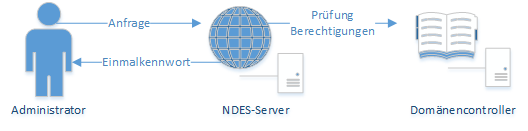
First, an administrator (in the sense of: someone who manages an end device that is to receive a certificate) logs on to the SCEP server with his or her account. In the case of NDES, this is an Active Directory account. This account has permission to request certificates for a certificate template, which in turn is configured for use on the NDES server .
The original concept at this point was that the named administrator is a natural person who performs this step manually. In practice, however, this step is usually delegated to a management software (for example, mobile device management such as VMware AirWatch or Microsoft Intune ).
If the NDES server determines that the administrator is authorized to request certificates, it hands him a one-time password (OTP).
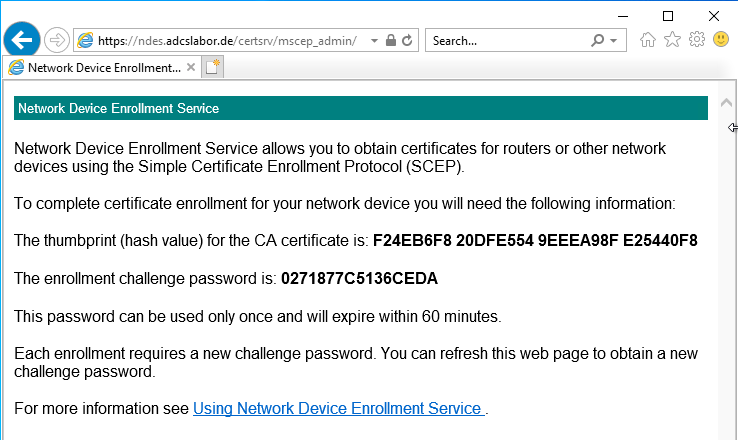
Example: a one-time password generated by NDES
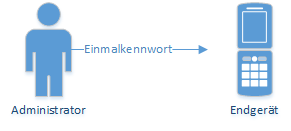
This one-time password is now stored on the end device together with the address of the NDES server. The device is now able to generate a key pair and a certificate request and send them to the NDES server. It authenticates itself with the previously configured one-time password.
Instead of a one-time password, the device can also identify itself with an existing certificate if it contains the same identity and was issued by the same certification authority (so-called renewal mode, works only if the certification authority that issued the certificates to be renewed is a member of NTAuthCertificates ). Likewise, it would be possible to configure a static, i.e. non-changing password , or to completely disable the requirement of a password , but this should not be done for security reasons.
Before the certificate request is generated, a request is sent to the NDES server (GetCACaps operation) to determine the supported functions of the server.
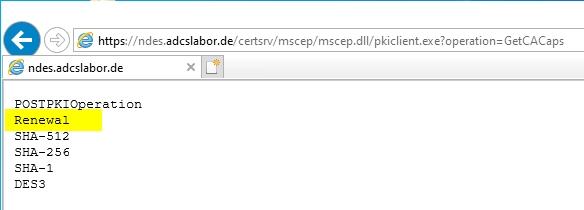
Example: The functions supported by NDES in response to the GetCACaps request
Likewise, the certification authority certificate (GetCACert operation) is requested. In the case of NDES, however, not only the certification authority certificate is returned, but also the Registration Authority (RA) certificate that the certification authority issued to the NDES server, thus appointing it as its proxy (more precisely, the "CEP Encryption" certificate).
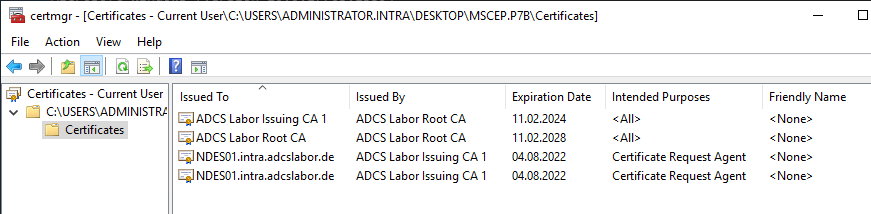
Example: A certificate chain returned by NDES on the GetCACerts request
After the end device has authenticated the certification authority using the Registration Authority certificate, a certificate request is created in the format PKCS#10. This contains the one-time password as an attribute (if used).
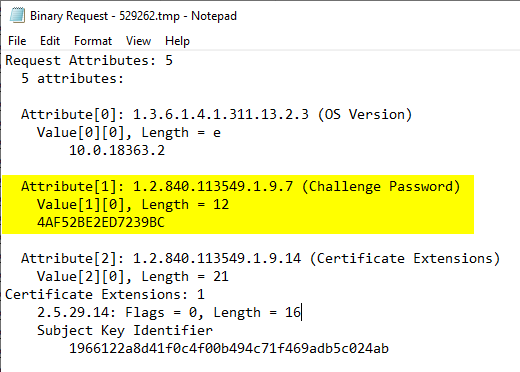
The PKCS#10 certificate request is then packaged in a Cryptographic Message Syntax (CMS, a further development of the PKCS#7 standard) SignedData data structure and, depending on the case, signed with a self-signed certificate (in the case of an initial request) or an existing certificate already issued by the same certification authority (in the case of a renewal) and then sent to the certification authority.
The confidential information such as the one-time password contained in the certificate request as the "ChallengePassword" attribute is encrypted with the public key of the previously requested RA certificate. For this reason, it is generally not possible for a third party to submit a manually generated certificate request via SCEP, since the private key for signing the CMS message (must match the public key of the certificate request) is not usually available to the third party, and the one-time password must already be entered in the certificate request when it is created.
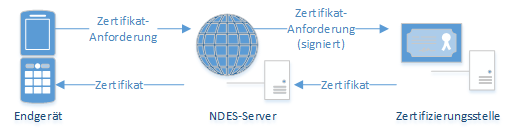
If authentication with the one-time password or certificate was successful, the NDES server now forwards the certificate request via RPC/DCOM to the certification authority, where the certificate is issued (or the certificate request is denied). The PKCS#10 certificate request is packaged into a new CMS (PKCS#7) message and signed by the NDES server using its RA certificate ("Enrollment Agent") so that the certification authority can verify the existence of a valid signature (unfortunately, this verification does not take place in the default setting, it must be enabled separately ). This prevents certificate requests that bypass the NDES service and go directly to the certification authority.
This is not an Enroll on Behalf of (EOBO) process. Accordingly, the settings for restricted enrollment agents on the certification authority do not affect the process.
Once the certificate has been issued, it is transferred to the NDES server, which in turn delivers the certificate to the requesting end device.
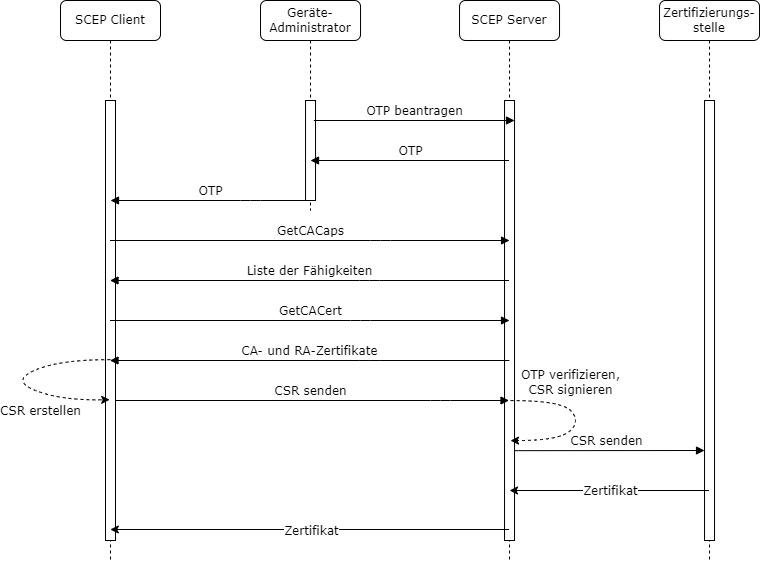
Overview: Sequence of SCEP communication
Variants
NDES can be configured for the following operating modes:
- Operation with a changing password (default setting) - each password can be used only once
- Operation with a static password - the password is the same every time, but can be changed regularly with a trick
- Operation without password - no password is required by NDES for the certificate request (not recommended)
Security concerns
When using a Network Device Enrollment Service, the following should be considered in terms of security:
- The authentication of the SCEP protocol is relatively weak. Knowledge of the identity of the device administrator account or of one of the one-time passwords entitles to arbitrary certificate requests. NDES can also be configured to use a static password or even to work without a password , which is even more insecure.
- NDES is not able to check certificate requests against a set of rules. The certificate template must be configured so that the identity contained in the certificate can be specified by the enrollee . Accordingly, authorized enrollees get any identity information signed. However, this circumstance can be greatly restricted by using an extended policy module for the certification authority like TameMyCerts .
- Even though this type of certificate request does not involve Enroll on Behalf of (EOBO) and, by default, the signatures of the certificate requests sent by NDES to the certification authority are not even verified, the Registration Authority certificates of the NDES server may be used to request certificates for other identities.
- The combination of these factors can allow an attacker to request arbitrary certificates via SCEP , which may allow a privilege escalation in the network up to the takeover of the Active Directory.
Special features
- The Microsoft implementation of the SCEP protocol called NDES can only handle a single combination of certification authority and certificate template. Accordingly, multiple NDES servers must be operated if there are multiple use cases to be served via SCEP.
- The Registration Authority certificates can only work with cryptographic service providers (CSP) , therefore only RSA keys can be used for them. For device certificates requested via NDES, however, this restriction does not apply .
- High availability for NDES cannot be implemented in a meaningful way because the one-time passwords cannot be synchronized between multiple nodes.
- The installation of an NDES server unnecessarily requires Enterprise Administrator permissions, but this can be circumvented .
Conclusion
With SCEP and the Microsoft implementation NDES, it is possible to automatically distribute certificates to devices that do not have an Active Directory account. These can be network devices such as switches or routers, as well as mobile devices such as smartphones and tablets. However, it is also possible, for example, to automatically equip servers in the cloud with certificates after they have been installed .
Related links:
- Configuring the Network Device Enrollment Service (NDES) to operate without a password.
- Authentication at the Network Device Enrollment Service (NDES) with an existing certificate (renewal mode)
- Configuring the Network Device Enrollment Service (NDES) to work with a static password.
- Using custom Registration Authority (RA) certificate templates for the Network Device Enrollment Service (NDES).
- Basics: Manual and automatic certificate enrollment via Lightweight Directory Access Protocol (LDAP) and Remote Procedure Call / Distributed Common Object Model (RPC/DCOM)
- Configure Device Template for Network Device Enrollment Service (NDES)
- Certificate Enrollment for Windows Systems via the Network Device Enrollment Service (NDES) with Windows PowerShell
- Install SSCEP for Linux (Debian Buster) and request certificates via the Network Device Enrollment Service (NDES).
External sources
- Active Directory Certificate Services (AD CS): Network Device Enrollment Service (NDES) (Microsoft)
- Simple Certificate Enrollment Protocol Overview (Cisco)
- Simple Certificate Enrollment Protocol (Wikipedia)
- Vulnerability Note VU#971035 - Simple Certificate Enrollment Protocol (SCEP) does not strongly authenticate certificate requests (Carnegie Mellon University)
- draft-nourse-scep-23 - Simple Certificate Enrollment Protocol (Internet Engineering Task Force)
- RFC 7030 - Enrollment over Secure Transport (Internet Engineering Task Force)
- RFC 8894 - Simple Certificate Enrolment Protocol (Internet Engineering Task Force)