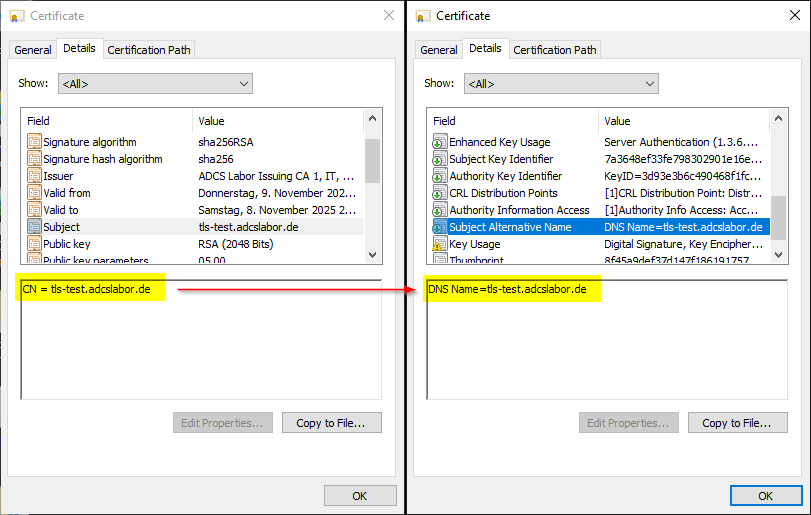
Automatically enter DNS names in the Subject Alternative Name (SAN) of issued certificates - with the TameMyCerts Policy Module for Microsoft Active Directory Certificate Services (AD CS)
With the Chromium project and products based on it such as Google Chrome and Microsoft Edge, Google has moved to enforce RFC 2818 , adopted in 2000, and to no longer trust certificates that no longer fulfill this requirement.
For us, the following sentence is of great significance:
If a subjectAltName extension of type dNSName is present, that MUST be used as the identity. Otherwise, the (most specific) Common Name field in the Subject field of the certificate MUST be used. Although the use of the Common Name is existing practice, it is deprecated and Certification Authorities are encouraged to use the dNSName instead
Please note that the statements regarding the mapping of the identity within a certificate in this article are aimed exclusively at the use case HTTP over SSL (HTTPS).
The RFC therefore requires that the identity of a website should no longer be formed from the "Common Name" field within the subject, but from one or more dNSName entries within the Subject Alternative Name (SAN) extension within the certificate. This means that a certificate without a SAN extension is not RFC-compliant and is no longer accepted by these browsers.
Unfortunately, with many applications - especially older appliances - it is often not possible to create a certificate request that contains a Subject Alternative Name.
Google Chrome will refuse the connection with the error code ERR_CERT_COMMON_NAME_INVALID. As Microsoft Edge is now also based on Google Chrome, the error message will be identical there.
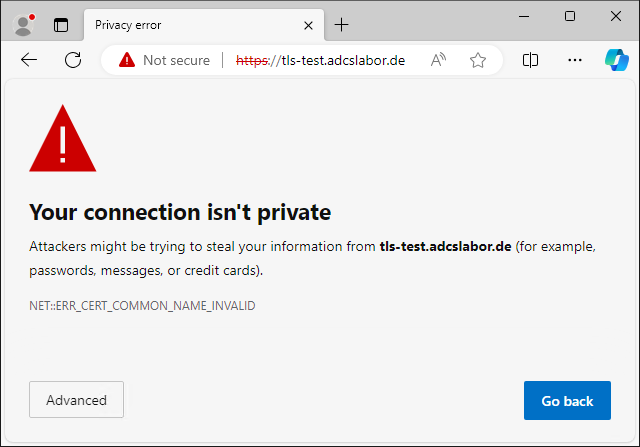
Mozilla Firefox will refuse the connection in the same way. The error code here is: SSL_ERROR_BAD_CERT_DOMAIN.
There are various ways to add a Subject Alternative Name afterwards, before the certificate is issued. Some of them are, however, extremely insecure , and what they all have in common is that they have to be carried out manually and are prone to errors.
This is now a thing of the past! The TameMyCerts Policy Module for Microsoft Active Directory Certificate Services is able to recognize DNS names in the Subject Distinguished Name and automatically transfer them to a Subject Alternative Name.
TameMyCerts has now proven itself in productive operation at numerous well-known companies and authorities. Best of all, TameMyCerts is open source and can be used free of charge.
TameMyCerts is open source and can be used free of charge. For use in the corporate sector, however, we recommend concluding a maintenance contract. This ensures that you receive qualified support and that the module can be further developed to a high quality in the long term.
The implementation
A configuration file is required to manage a certificate template using TameMyCerts. During the installation of the module on the certification authority, a directory is specified in which the configuration files are saved.
The file must be named after the certificate template. It is important to note that this refers to the name of the LDAP object and not the display name. You can find out the object name via the administration console for certificate templates by right-clicking on the certificate template and selecting the "Change Names..." option.
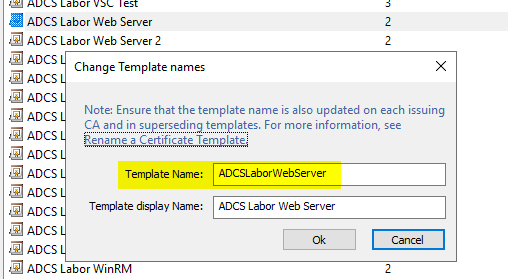
Assume that the object name of our certificate template is "ADCSLaborWebserver", we call the configuration file accordingly "ADCSLaborWebServer.xml".
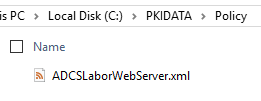
Each configuration file starts with a node called CertificateRequestPolicy, in which the configuration directives are entered.
<CertificateRequestPolicy xmlns:xsi="http://www.w3.org/2001/XMLSchema-instance" xmlns:xsd="http://www.w3.org/2001/XMLSchema">
<!-- here we will place our rules -->
</CertificateRequestPolicy>
Since our use case is an offline certificate template, we must first define a rule for the content of the certificate request. The minimum we need is a rule for the Subject Distinguished Name. This is achieved by a SubjectRule within the Subject section.
A certificate request will usually contain a "common name". TameMyCerts works according to the principle "what is not defined is forbidden". Certificate requests with undefined content will be rejected.
Therefore, a corresponding rule for the commonName field must be created. Setting the Mandatory switch ensures that certificate requests that do not contain a "common name" are also automatically rejected.
In the list of Patterns, a Pattern node is created and an Expression is defined. In this case, we use a regular expression to specify that only DNS names within the domain "adcslabor.de are accepted. If the common name deviates from this rule, the incoming certificate request is automatically rejected.
<CertificateRequestPolicy xmlns:xsi="http://www.w3.org/2001/XMLSchema-instance"
  xmlns:xsd="http://www.w3.org/2001/XMLSchema">
  <Subject>
    <SubjectRule>
      <Field>commonName</Field>
      <Mandatory>true</Mandatory>
      <Patterns>
        <Pattern>
          <Expression>^[\-_a-zA-Z0-9]*\.adcslabor\.de$</Expression>
        </Pattern>
      </Patterns>
    </SubjectRule>
  </Subject>
</CertificateRequestPolicy>
Additional rules can be defined as an option. Typically, the following things would also be included:
- Additional fields (Relative Distinguished Names, RDNs) in the Subject Distinguished Name (DN) such as organizationName, organizationalUnitName etc... For a list of possible RDNs see also article "Allowed Relative Distinguished Names (RDNs) in the Subject of Issued Certificates ".
- A rule for Subject Alternative Names (SAN) in the certificate request. After all, the certificate request could already contain one.
Finally, the SupplementDnsNames directive is set. This instructs TameMyCerts to transfer DNS names found in the "Common Name" to the Subject Alternative Name (SAN).
<SupplementDnsNames>true</SupplementDnsNames>If a certificate is now requested for the certificate template set up, TameMyCerts automatically ensures that the certificate issued contains a valid Subject Alternative Name.