
Active Directory forest compromised by EDITF_ATTRIBUTESUBJECTALTNAME2 flag
Unfortunately, far too many instructions are circulating online (the big players are not exempt from this either, not even Microsoft itself or the grand master Komar ), which fatally recommend setting the EDITF_ATTRIBUTESUBJECTALTNAME2 flag on the certification authority - supposedly so that one would be able to issue certificates with a Subject Alternative Name (SAN) extension for manually submitted certificate requests.
Unfortunately, this approach is not only unnecessary, it also has some unpleasant side effects, which in the worst case can help an attacker to take over the entire Active Directory forest.
See also article "Changes to Certificate Issuance and Certificate-Based Logon to Active Directory with the May 10, 2022 Patch for Windows Server (KB5014754) ".
Background
Do you know TameMyCerts? TameMyCerts is an add-on for the Microsoft certification authority (Active Directory Certificate Services). It extends the function of the certification authority and enables the application of rule sets to realize the secure automation of certificate issuance. TameMyCerts is unique in the Microsoft ecosystem, has already proven itself in countless companies around the world and is available under a free license. It can be downloaded via GitHub and used free of charge. Professional maintenance is also offered.
Is the setting required for issuing certificates with a SAN extension?
A clear no!
If the certificate request already contains a SAN extension, the certification authority can issue it even when the request is submitted manually. For this purpose, the object identifier for the SAN certificate extension is already registered by default in the certification authority's policy module under "EnableEnrolleeRequestExtensionList ".
The reason why most cases described on the Internet and in the relevant literature advise activating the flag is that the certificate signing request (CSR) sent to the certification authority does not have a SAN extension, but one is desired.
So the real problem the authors are trying to solve is to add the SAN extension to the certificate request after the fact. However, they cannot modify the certificate request directly without rendering its signature unusable.
In fact, after setting the flag, one is able to specify any attributes when submitting the certificate request - among others the SAN extension - but this comes at a very high price.
What does the EDITF_ATTRIBUTESUBJECTALTNAME2 flag do?
If the EDITF_ATTRIBUTESUBJECTALTNAME2 flag is set, a requester can pass additional attributes to the certification authority via a name/value combination while sending the certificate request to the certification authority.
Usually, the certification authority decides on the content of the issued certificate based on the settings in the certificate template. This decision is made by the policy module of the certification authority.
However, if the EDITF_ATTRIBUTESUBJECTALTNAME2 flag is set, the related settings in the certificate template are ignored if different information arrives with the certificate request.
In plain language, this means that anyone who has the right to request certificates from the certification authority ("Enroll" permission) can specify any Subject Alternative Names, which the certification authority then writes unchecked into the issued certificate.
Since many applications and protocols (among others HTTPS, see RFC 2818 ) preferably form the identity from the Subject Alternative Name, this allows an attacker to assume the identities of any other users - including administrators.
Depending on the certificate types offered by the certification authority, an attacker can use this to perform various unauthorized activities, for example:
- Faking the identity of a web server (SAN type "DNS Name")
- Sending signed e-mails in the name of another user (SAN type "RFC 822 Name")
- Taking over the entire Active Directory forest (SAN type "User Principal Name")
The latter case will be described in more detail in this article.
The attack
Identify interesting certificate templates
To take over the Active Directory forest, a certificate template is required that enables logon via smart card.
The following requirements must be met for this:
- The environment must allow smart card logons, which should be possible in most cases.
- The user must be able to request a certificate from the template (have Enroll permission).
- The issued certificate must contain either the Extended Key Usage for Smart Card Logon or (with a little trick) for Client Authentication.
- The user needs a smart card together with a smart card reader. The smart card middleware must be installed on a domain computer. Alternatively, the Kerberos credentials can also be generated without a smart card.
The following security measures can be bypassed:
- The setting in the certificate template to build the identity of the enrollee from Active Directory can be overridden by the enrollee, at least for the Subject Alternative Name part, due to the presence of EDITF_ATTRIBUTESUBJECTALTNAME2.
- The setting in the certificate template not to mark the private key as exportable can be overridden by the enrollee.
- The setting in the certificate template that a certificate request must first be reviewed by a certificate manager will probably still lead to a result, because the change is not visible when inspecting the certificate request , but only in the View Attributes/Extensions dialog in the Certification Authority management console (certsrv.msc). An unsuspecting certificate manager will therefore most likely approve the certificate request.
Request a certificate
The attacker could also bring along a completely finished certificate request and then only send it to the certification authority with the user's identity. For reasons of simplicity and traceability, the way via the existing built-in tools is described here.
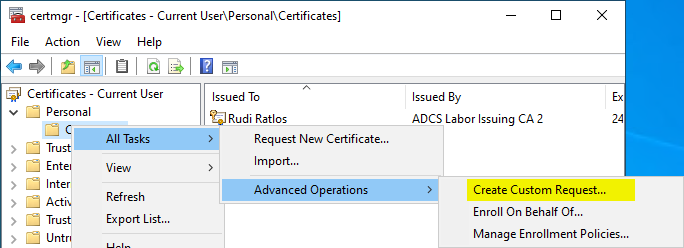
First, we need a certificate request as a text file. This can be generated via the Certificates management console (certmgr.msc). To do this, right-click on Personal - Certificates and select All Tasks - Advanced Operations - Create Custom Request....
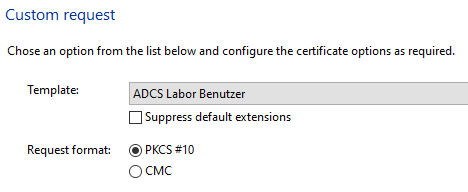
You will be prompted to specify the certificate template.
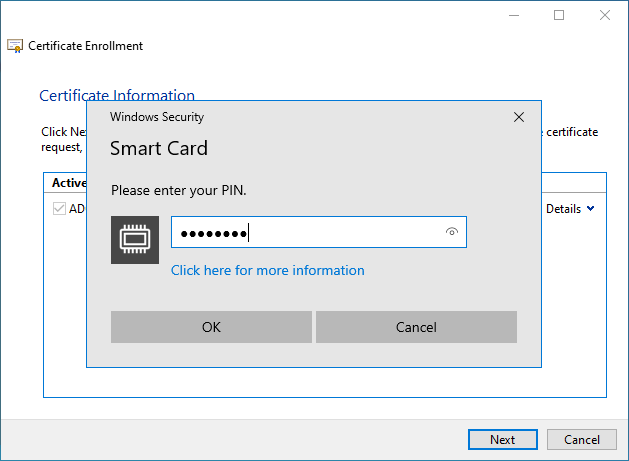
In this example, the certificate template is configured to use a smart card, so the key pair is generated directly on the smart card.
If the certificate template instead requires a software-based cryptographic service provider (CSP) or key storage provider (KSP), the private key can be set as exportable with these, and the resulting certificate can then be imported to a smart card .
The certificate request is now saved as a file.
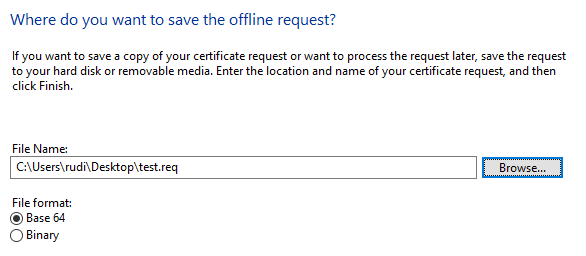
In the next step, the certificate request is sent to the certification authority, and the -attrib argument is used to specify a Subject Alternative Name in the form of the User Principal Name (UPN) of the predefined Enterprise Administrator account.
certreq ^
-submit ^
-config "CA03.intra.adcslabor.de\ADCS Labor Issuing CA 2" ^
-attrib "SAN:upn=Administrator@intra.adcslabor.de" ^
test.req ^
test.cer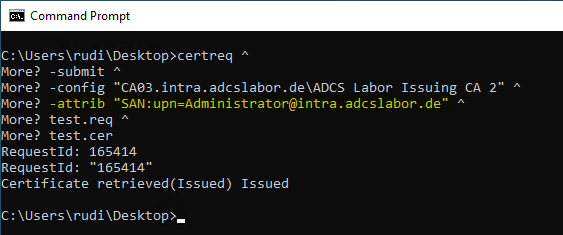
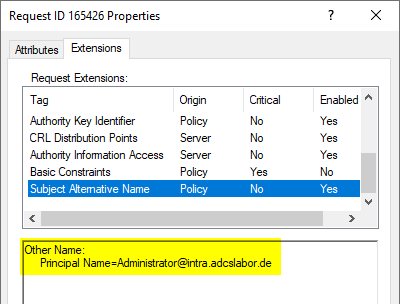
If the certificate request is configured so that a certificate manager has to review the request, this is not visible in the saved certificate request, but only in the "View Attributes/Extensions" dialog in the Certification Authority management console.
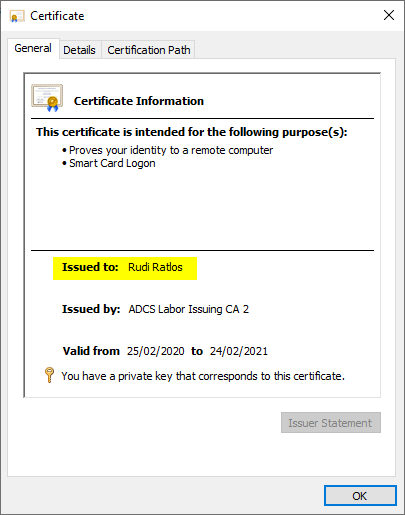
At first glance, the issued certificate does not seem to have any noticeable features, since in this case the subject of the certificate is filled with the identity of the enrollee, as expected.
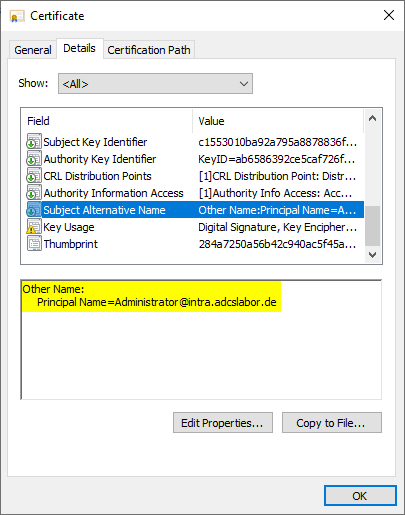
However, if you look at the Subject Alternative Name extension, you will see that the UPN of the predefined Enterprise Administrator account is entered here.
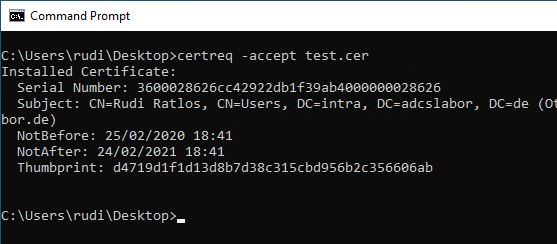
After the certificate has been retrieved from the certification authority, it can be installed using the following command.
certreq -accept test.cerAgain, there is no indication of the deviating UPN.
Perform the logon
Now the user can log on to a client with the smart card. As soon as the smart card reader and the inserted card have been recognized, a corresponding selection should be available.
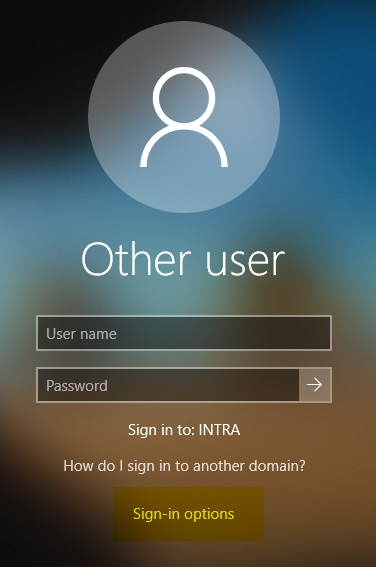
In this dialog you can see the divergent identities - the Subject at the top, the Subject Alternative Name at the bottom.
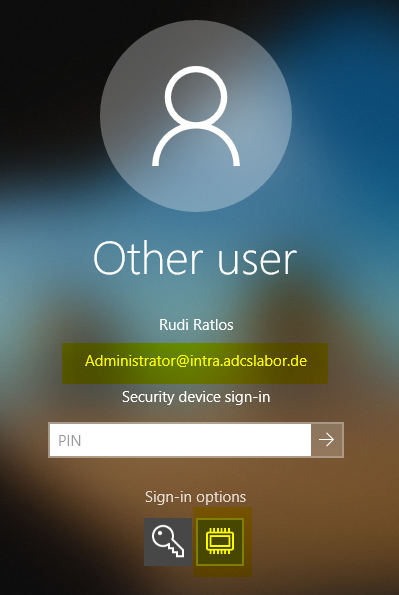
As you can see, a logon with the predefined Enterprise Administrator account should now take place.
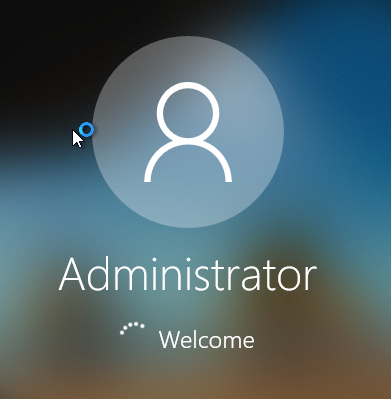
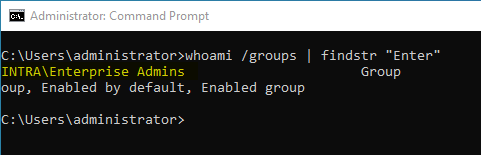
A check reveals that we now have "Enterprise Administrator" permissions.
What is the trick to use certificates with Client Authentication Extended Key Usage?
Provided that the user has administrative rights on the computer he is logging on to, he can apply a local Group Policy that disables the restriction to the Smart Card Logon EKU for the Windows logon dialog.
The setting can be found under Computer Configuration - Administrative Tools - Windows Components - Smart Card and is named "Allow Certificates with no extended key usage certificate attribute".
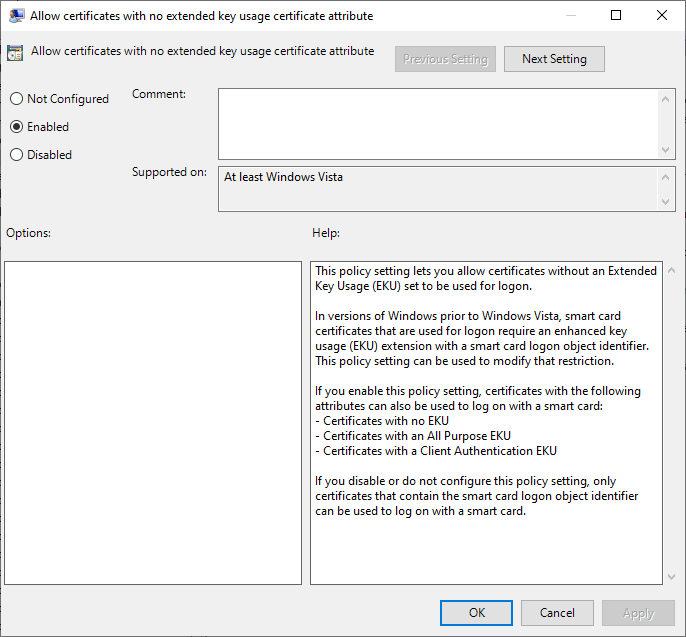
After that, certificates that do not include the Smart Card Logon Extended Key Usage can also be used. Such certificate templates are much more common, and often also without the requirement of a smart card.
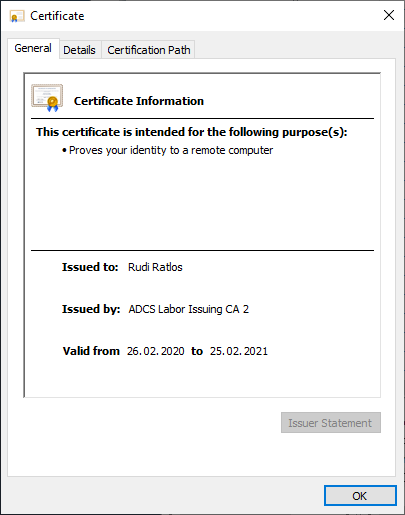
Why do domain controllers accept certificates that do not include Smart Card Logon Extended Key Usage?
The Group Policy described above merely causes certificates that do not include Smart Card Logon Extended Key Usage to be offered for selection for logon on the client where the smart card logon is performed.
Conversely, this means that the domain controllers do not check the Extended Key Usage of the certificate used for logon. This is indeed the case in the default setting, see the article "Domain controllers do not check Extended Key Usage on smart card logon ".
The solution
The EDITF_ATTRIBUTESUBJECTALTNAME2 flag should never be activated on any online certification authority, or urgently be deactivated. If possible, certificate requests should always be made in such a way that they already include the SAN extension. Although it is sometimes not possible to generate such a certificate request directly, there is a more secure alternative for such cases too.
How can I check if the flag is set?
A list of all flags on the certification authority is obtained with the following command line command. If EDITF_ATTRIBUTESUBJECTALTNAME2 is not in brackets and not indented, the flag is active.
certutil -v -getreg Policy\Editflags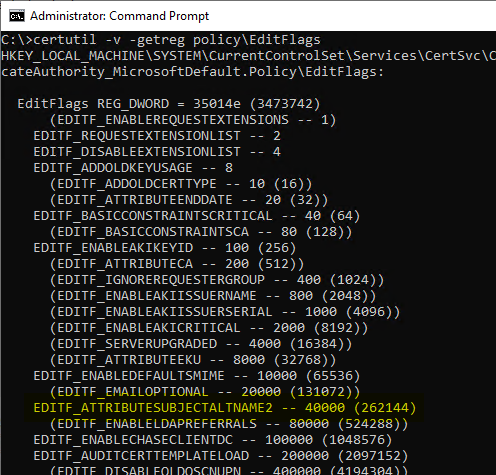
How can I disable the flag?
The flag can be removed with the following command line command:
certutil -v -setreg Policy\Editflags -EDITF_ATTRIBUTESUBJECTALTNAME2The certification authority service must then be restarted for the changes to take effect.
How can I securely add the SAN extension to a certificate request after the fact?
The ideal way, of course, would be to submit the certificate request directly including a correctly filled Subject Alternative Name. However, this is not always possible.
I have described the options for adding a Subject Alternative Name to an existing certificate request in the article "Change the Subject Alternative Name (SAN) of a certificate before it is issued - but do it securely! ".
The TameMyCerts Policy Module for Microsoft Active Directory Certificate Services supports automatically transferring any DNS names or IP addresses found in the commonName of a certificate request into the Subject Alternative Name of issued certificates if they are missing. How this works is described in the article "Automatically enter DNS names in the Subject Alternate Name (SAN) of issued certificates - with the TameMyCerts Policy Module for Microsoft Active Directory Certificate Services (ADCS) ".
TameMyCerts is a policy module to secure the Microsoft certification authority (Active Directory Certificate Services). It extends the functions of the certification authority and enables the extended application of rule sets to enable the secure automation of certificate issuance. TameMyCerts is unique in the Microsoft ecosystem and is available under a free license. It can be downloaded via GitHub and used free of charge.
Related links:
- Change the Subject Alternative Name (SAN) of a certificate before it is issued - but do it securely!
- How secure is the "Allow private key to be exported" setting in the certificate templates?
- Importing a certificate into a smart card
- What requirements must be met on the infrastructure side for smart card logons to be possible?
- Attack vector on the Active Directory directory service via the smart card logon mechanism
External sources
- How to Request a Certificate With a Custom Subject Alternative Name (Microsoft)
- Securing PKI: Technical Controls for Securing PKI (Microsoft)
- Hidden Dangers: Certificate Subject Alternative Names (SANs) (KeyFactor)
- The tale of Enhanced Key (mis)Usage (CQURE Academy)
- Certified Pre-Owned (Will Schroeder)
- Request extension processing in Active Directory Certification Authority (PKI Solutions, Inc.)
- How to add FQDN to HP iLO request (Vadims Podans)